

Personalized Outbound Strategy
Get The Right Outbound Strategy In Minutes
Enter your email to get a custom plan & stack recommendation for your business
It's being carefully crafted by AI
Please check your mailbox in 5 minutes
You’re sending 50 DMs a day, but your pipeline still looks flat. InMailer AI promises to change that with thousands of monthly DMs, AI-written replies, and meetings booked while you sleep.
Before spending $595 a month, you’ll want to know how many DMs you can actually send, what else you’ll pay for, and whether anyone has tested it.
I checked all three. I reviewed every InMailer page, studied the campaign flow and pricing, and ran the numbers myself.
Two things surprised me. The real volume works out to about 11 DMs per account daily, not the 400 advertised on the homepage. And I couldn’t find a single public InMailer review anywhere.
Here’s what you get, the full cost, who it suits, and where Salesforge fits if you want LinkedIn and email together.
InMailer sells volume above everything else. Its core pitch is simple: other tools limit you to 50–80 daily DMs, while InMailer claims 400+ per account.
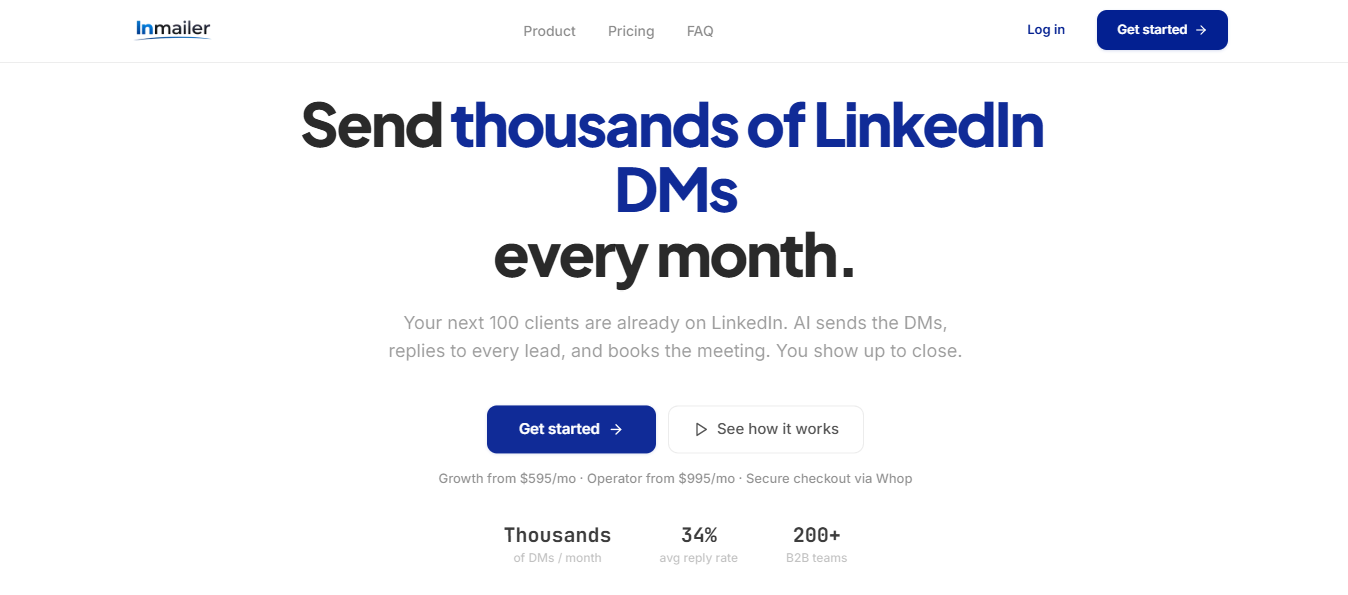
You can reach people who may never accept your connection request. InMailer sends InMails to open profiles through Sales Navigator. A Combo campaign automatically splits your list, sending InMails to open profiles and connection requests to closed ones.
The AI then handles your replies. It reads each response, classifies it as interested, pricing, or meeting request, and replies in one of six tones. You can let it run independently or approve each message first.
You also get AI voice notes that mention the lead’s name and your conversation, which you can add to a sequence after they accept.
What you don’t get is a clear answer on volume. Growth includes 5,000+ monthly DMs across up to 15 accounts. That works out to roughly 11 DMs per account daily, not 400.
Sales Navigator isn’t included either. InMail campaigns require it, and each seat adds to your $595 monthly cost.
You also can’t test it first. I found no free trial, demo call, or refund policy, meaning you pay $595 before seeing the product.
Salesforge takes a different route to the same prospects. LinkedIn steps and emails run within one sequence, so leads who ignore your InMail still receive an email.
You don’t pay per profile or mailbox. You can also warm prospects with a profile view or post like before sending a connection request.
I searched for InMailer reviews as I would for any tool I was considering. I found none.
There’s nothing on G2, Capterra, Trustpilot, or Reddit, and no customer posts on LinkedIn. The only available feedback comes directly from InMailer.
InMailer’s website features two video testimonials. One is from Ahmed Nubi, founder of 129Scaled.com, with a transcript published on the page.

Reading it carefully, he thanks someone named Andre for helping with LinkedIn outreach and describes sending 4,000–7,000 emails monthly per profile. He says his team increased bookings from roughly 10 to 25 monthly calls for each client.
Then comes the important line: “we’re soon going to implement the software as well to automate this entire process.”
So he’s praising a service he bought from someone, not the product reviewed here. When he recorded the testimonial, he hadn’t used InMailer yet.
I couldn’t test InMailer directly. There’s no trial, and access requires applying, waiting for approval, and paying through Whop before seeing the dashboard.
Instead, I reviewed every product screen, the campaign flow, and the FAQ to understand the daily workflow and what I’d check during my first week.
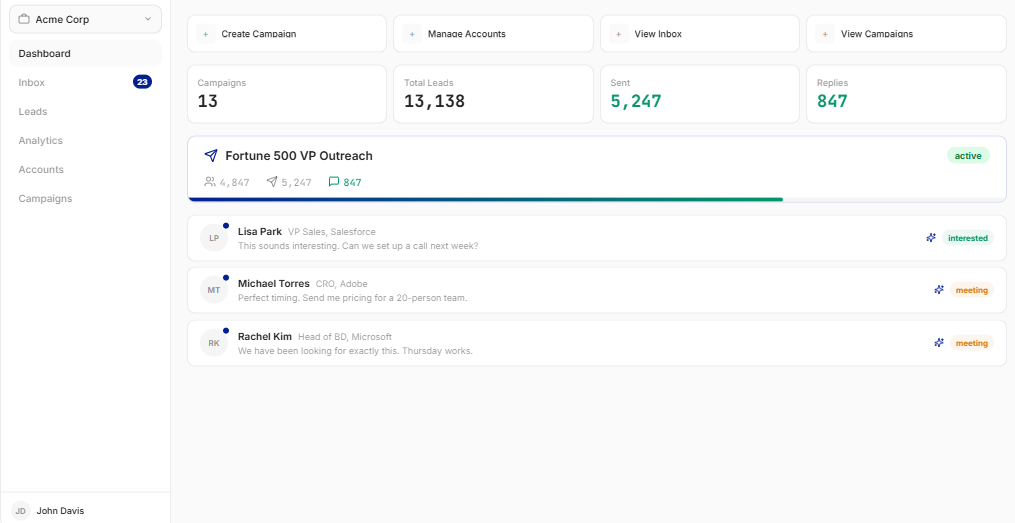
Paste a Sales Navigator URL or upload a CSV, and InMailer imports the leads before sorting them into open and closed profiles.
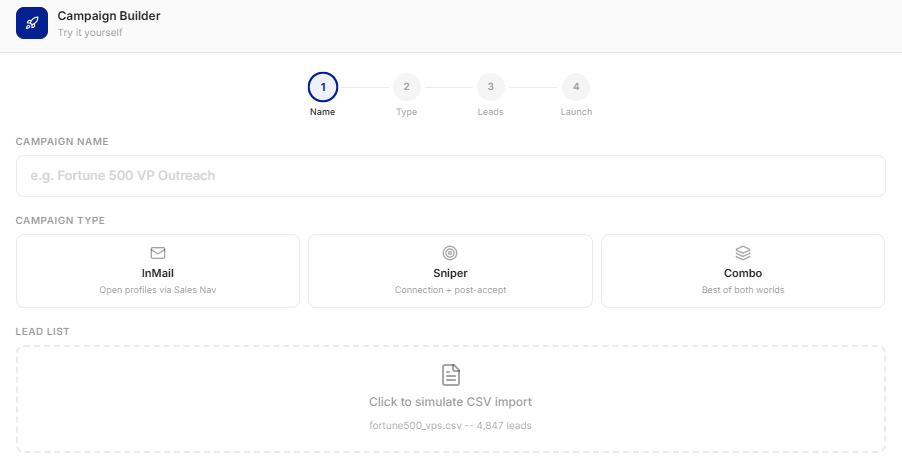
That split determines your campaign type. InMail targets open profiles, Sniper sends connection requests to closed profiles, and Combo runs both from one list.
InMailer claims its scraper bypasses Sales Navigator’s 2,500-record export limit. Your LinkedIn account carries that risk, so ask how the scraping works before using it.
In a Sniper campaign, the post-acceptance sequence sends a voice note 20 minutes later, views the profile after three hours, messages after 24 hours, and follows up 48 hours later without a reply.
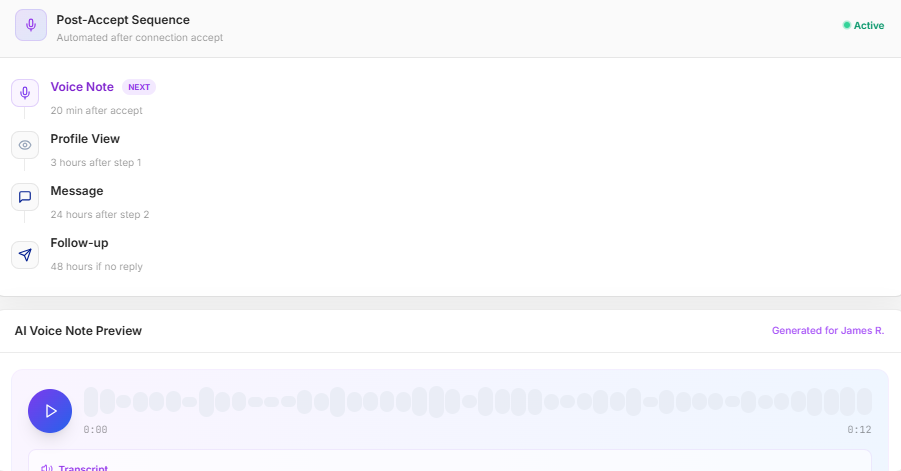
Nothing happens before acceptance. You can’t warm someone up first with a profile view or post like.
When a lead responds, the Conversation Agent identifies their intent and replies using your chosen tone, ranging from a soft pitch to a direct close.
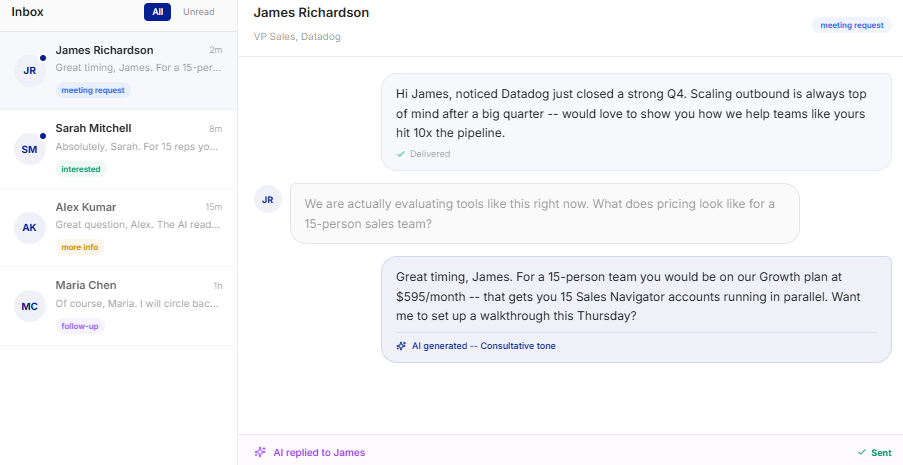
In InMailer’s demo, the AI quotes a plan and monthly price before offering a walkthrough. I’d want to approve that conversation, so I’d use review mode until I trusted it.
The dashboard tracks DMs sent, reply rate, positive responses, and booked meetings. It also divides sentiment into interested, meeting request, more information, and not interested.
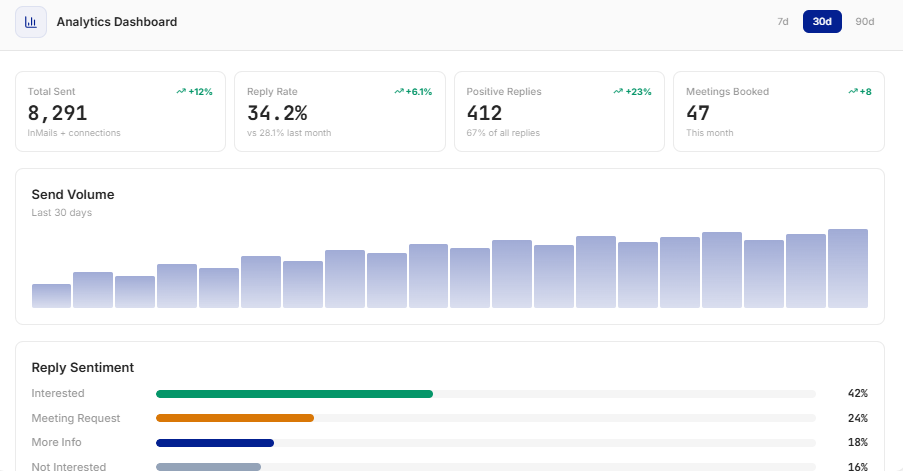
Performance is broken down by account, letting you see which Sales Navigator seat drives the campaign and which remains idle.
The homepage promises more than 400 daily DMs per account. Growth includes 5,000+ monthly DMs across up to 15 accounts.
Spread across all 15, that’s roughly 11 DMs per account daily. The FAQ explains why: InMailer adjusts sending to LinkedIn’s current account limits.
Plan your pipeline around the plan allowance, not the homepage claim.
InMailer sends events through its REST API and webhooks, allowing replies, classifications, and booked meetings to reach HubSpot, Salesforce, or Pipedrive. CSV exports cover everything else.
InMailer offers two plans, both priced by monthly DM volume rather than the number of accounts
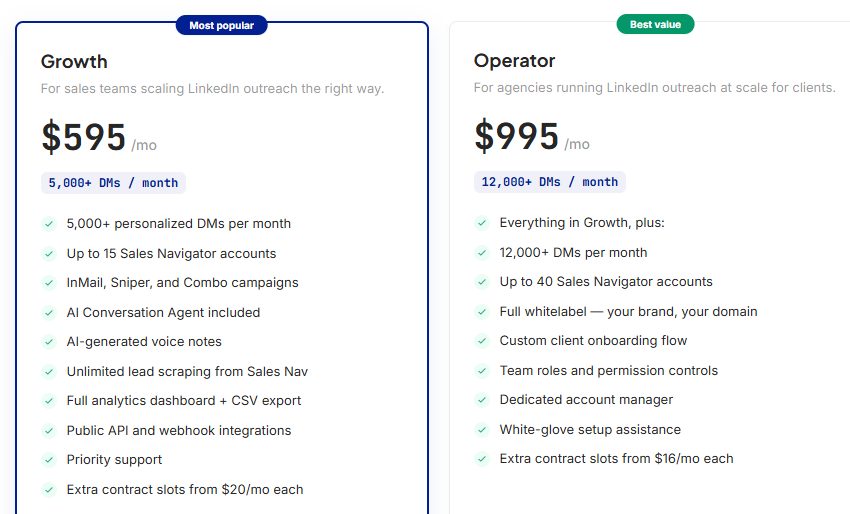
Growth works out to around 12 cents per DM, while Operator costs roughly 8 cents. Above 8,300 monthly DMs, Operator becomes cheaper per message.
InMail campaigns require Sales Navigator, but those seats aren’t included. Filling all 15 Growth accounts means paying for 15 separate LinkedIn subscriptions.
Client branding is only available with Operator. If you run an agency on Growth, clients will see InMailer.
There’s no free trial or demo call. You apply, get approved, and pay through Whop, with no refund terms that I could find.
Nothing in InMailer’s material says unused DMs roll into the next month. Choose a plan based on what your team can realistically follow up on.
InMailer suits teams that already pay for Sales Navigator and need more LinkedIn volume than one person can handle. Everything assumes the AI, rather than your team, handles most replies.
If you want to test before committing, InMailer makes that difficult. With no trial, public reviews, or refund terms, your first month becomes the test.
InMailer promises high volume and AI-managed replies. The catch is that everything happens through one channel, and LinkedIn controls how much you can send.
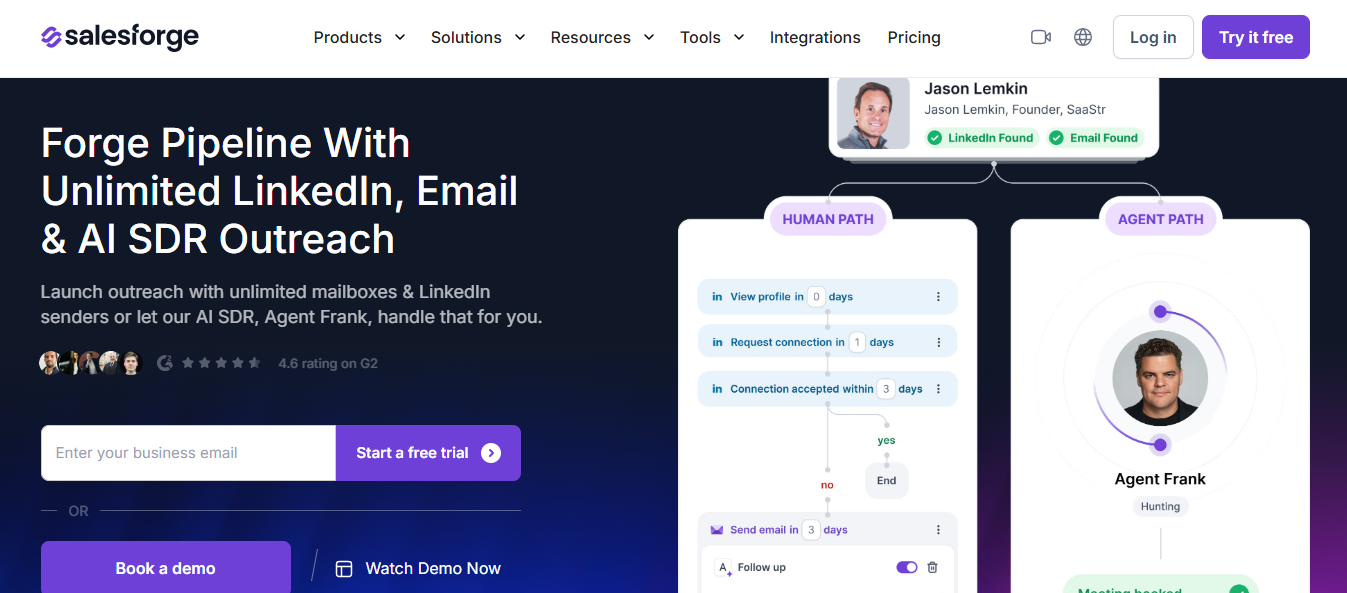
Salesforge removes that dependency by combining LinkedIn and email in one sequence, with Agent Frank handling replies.
InMailer’s DM ceiling comes from LinkedIn’s per-account limits, not your chosen plan. Growing volume means buying more Sales Navigator seats, each requiring a subscription plus $20 monthly.
With Salesforge, LinkedIn activity stays within safe limits while email volume grows through unlimited mailboxes under one subscription.
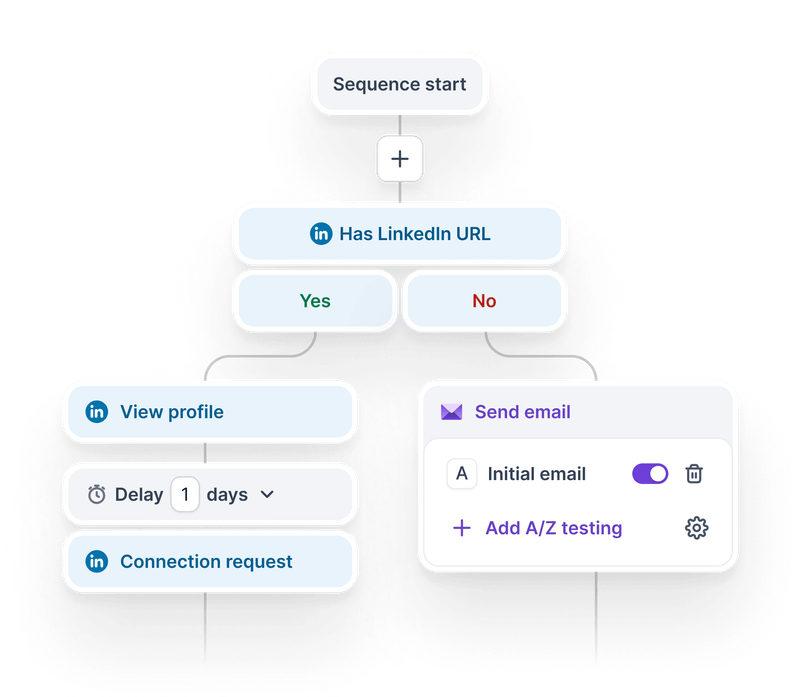
With InMailer, prospects who ignore your InMail or connection request are lost. Salesforge emails them within the same sequence, while a LinkedIn reply automatically pauses those emails.
You can also warm prospects before asking for anything through profile views, follows, or post likes, making your name familiar when the request arrives.
InMailer’s Conversation Agent begins working only after someone responds. Agent Frank finds contacts, writes opening messages across both channels, handles replies, and books meetings.
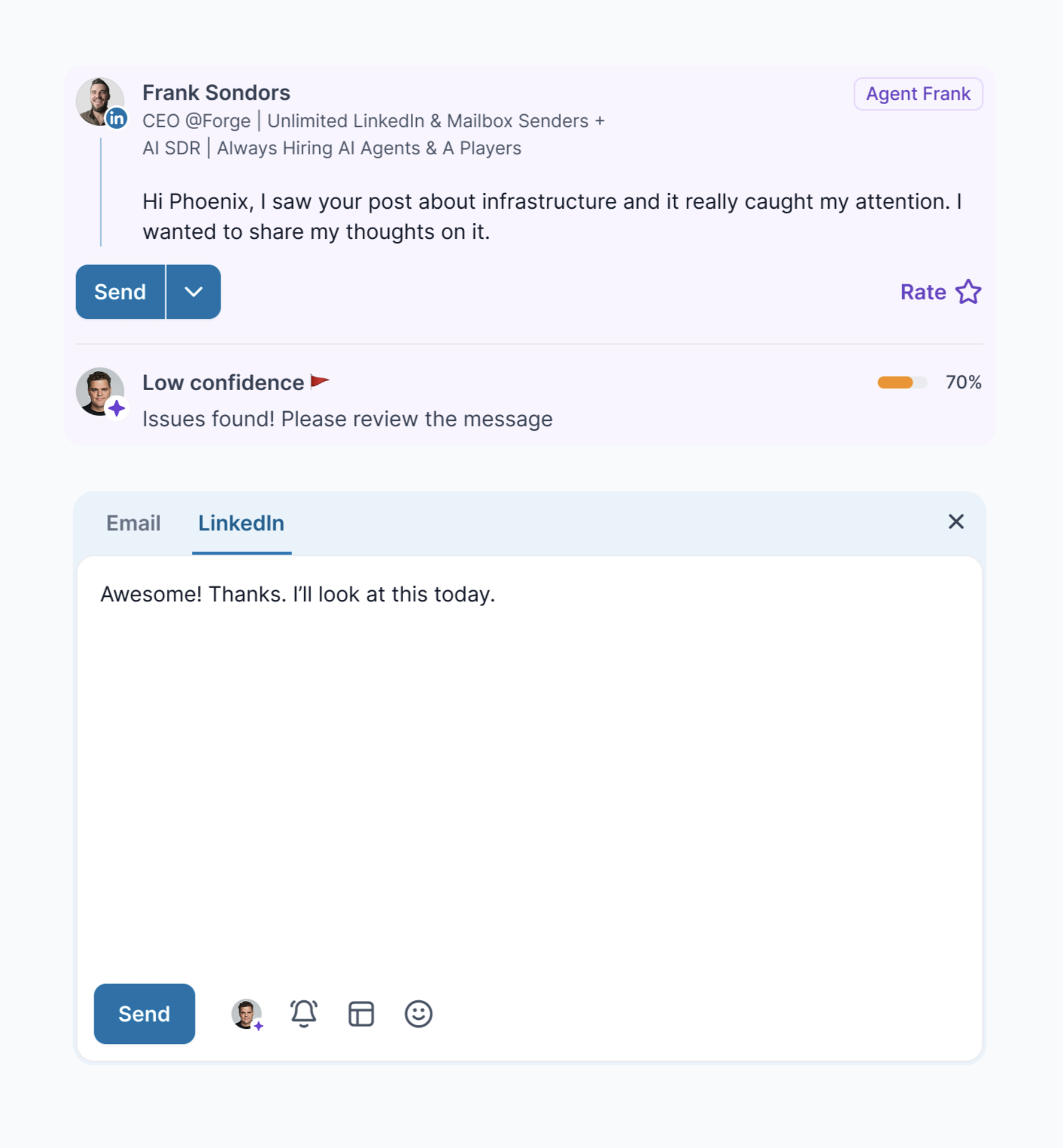
You also control its messaging more closely. Set written Do’s and Don’ts, choose a goal such as receiving a meeting link, and preview opening messages. When Frank lacks confidence, it flags the draft instead of sending it.
InMailer builds lists by using your LinkedIn account to scrape beyond Sales Navigator’s export limit.
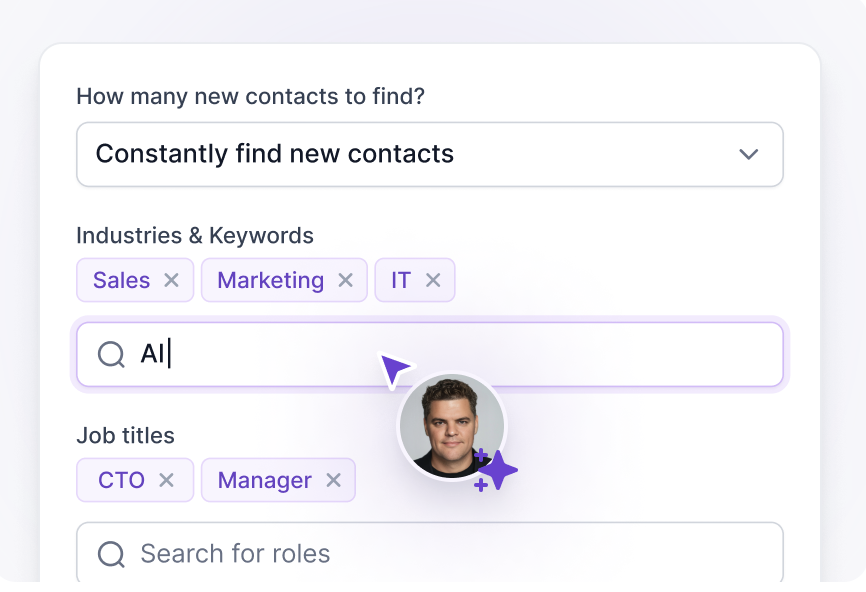
Agent Frank finds contacts by industry, keyword, and job title, while Leadsforge provides separate lead data.
InMailer's Conversation Agent adapts to what you approve or reject in the inbox. Agent Frank does that too, and keeps a record you can open.
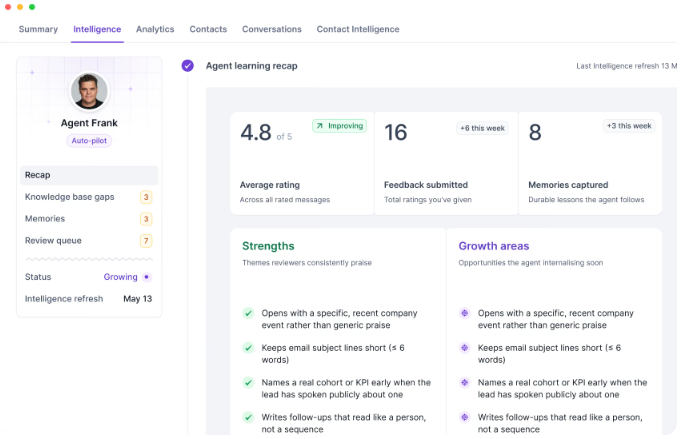
The Intelligence tab shows an average rating across every message you've scored, how much feedback you've given, and how many durable memories Frank has kept. Strengths and growth areas sit side by side, like opening with a recent company event instead of generic praise, or keeping subject lines under six words.
Frank also researches each prospect before writing: their company, buying signals, timing, and the objections likely to come up.
InMailer's AI only starts once a lead replies, so the first message is still whatever template you gave it.
InMailer requires an application, approval, and a $595 Whop payment before you see the product. Salesforge provides 14 free days without a card, so your first campaign costs nothing.
Enter your email to get a custom plan & stack recommendation for your business
Please check your mailbox in 5 minutes

InMailer is worth considering in one situation: you already pay for Sales Navigator, your buyers are active on LinkedIn, and your team receives more replies than it can handle. The Conversation Agent is the real product.
Everything else requires trusting claims you can’t verify. There are no public reviews; the website testimonial discusses a service rather than the software, and you pay before seeing the dashboard.
Check the volume math before deciding. Growth includes 5,000 monthly DMs, or about 11 daily messages per account, with Sales Navigator subscriptions added to the $595 fee.
If you want more conversations rather than more DMs, spread that budget across two channels. Salesforge combines LinkedIn messages and emails in one sequence, charges nothing per profile or mailbox, and lets Agent Frank manage replies.
Try Salesforge free for 14 days without a card and see your first replies before paying.
.jpg)

.jpg)

.jpg)