Finding someone's email address is rarely the hard part. Finding the right one, the one that is still active and still belongs to the person you want to reach, is where most people lose the hour.
I have run this process for one-off founder outreach and for lists of several thousand contacts, and the pattern holds both ways: the free methods work well for a single name, and they fall apart the moment you need volume. The trick is knowing which method to reach for before you start clicking.
This guide walks through nine methods in the order I actually use them, from the free sources that take thirty seconds to the tooling that handles hundreds of contacts in one search. Every method ends with the same step, which is verification, because an unverified address is a liability rather than a lead.
The short version if you are here for the answer and nothing else.
Check the easy sources first. LinkedIn contact info, the company website, a press page or an author byline often hold the address in plain sight.
Google search operators surface public addresses that nobody indexed on purpose. Two minutes of operator work beats an hour of scrolling.
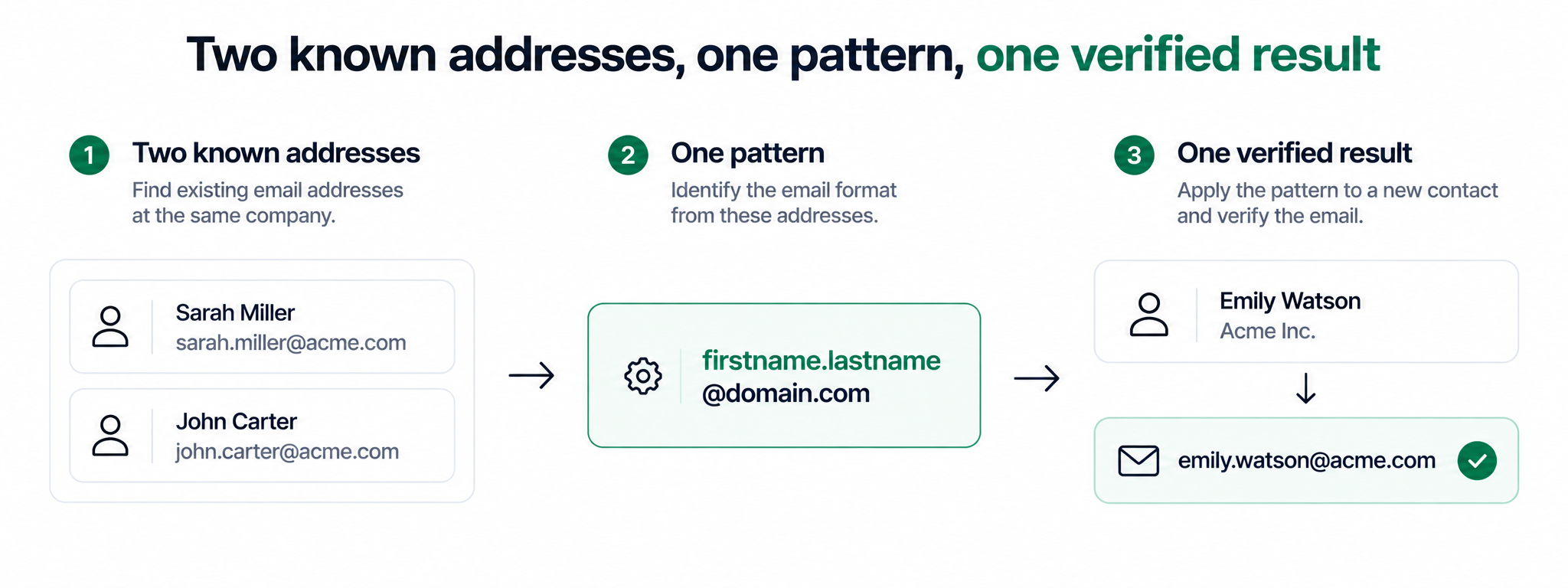
Most companies use one predictable email format. Work out the pattern from two known addresses, apply it to your target, then verify.
An email finder tool takes a name and a domain and returns the most likely address. It is the fastest route when you need one contact.
When you need hundreds of contacts, a lead search engine is the right tool. Leadsforge searches 500M+ contacts from a plain English description of your buyer.
Signals in Leadsforge finds people around real events, including job changes, funding rounds, acquisitions and active investors, so timing works in your favour.
Verify every address before you send. One bounce on a small domain is enough to drag your sender reputation down.
What finding someone's email address actually means in 2026
Before any method, it helps to be precise about what you are looking for, because the answer changes which tools work at all.
Work email addresses sit behind a company domain and follow a pattern the company chose once and rarely changed. These are findable. Public records, press releases, author bylines, support pages, code repositories and privacy policies leak them constantly, and the pattern itself is the thing you are really hunting.
Personal email addresses sit behind free providers and follow no pattern at all. There is no format to deduce and no directory to search. If someone has not published a personal address themselves, treating it as findable is how outreach turns into something nobody wants to receive.
Everything below targets work addresses for business outreach. That is the legitimate use case, it is what the tooling is built for, and it is the only one where the accuracy holds up.
One legal note worth reading before you send anything. In the US, CAN-SPAM allows cold business email as long as you identify yourself, include a physical address and honour opt-outs immediately. In the EU and UK, B2B outreach to a professional address generally sits under legitimate interest, with the same immediate opt-out obligation. Rules shift by jurisdiction and neither of those summaries is legal advice, so check your own market before a first campaign.
Check the sources that already hold the answer
Roughly a third of the addresses I need are already public somewhere, and checking takes less time than opening a tool.
LinkedIn contact info
Open the profile, click Contact info under the headline, and look at what the person chose to publish. First-degree connections see more than second-degree ones, which is why a connection request sometimes solves the problem on its own. When the contact panel is empty, the profile still carries a company name and a job title, and those two fields feed every other method in this guide. I broke that workflow down in detail in the guide to find emails from LinkedIn profiles.
The company website
Team pages, About pages and leadership pages often list addresses directly. Press and media pages almost always do, because journalists need a contact. Careers pages list a recruiting address that reveals the company format even when it is not the address you want. Privacy policies and terms pages carry a legal or data protection address for the same reason.
Published work
Authors, researchers, conference speakers and open source maintainers publish addresses as a matter of routine. An academic paper puts a corresponding author address on the first page. A commit history on a public repository carries the committer address on every entry. A podcast or webinar description frequently lists the guest's address for follow-up.
Their own posts
People hand out addresses in public constantly. A LinkedIn post that says to send a message for the template, a bio line that spells out the address to dodge scrapers, a pinned tweet with a contact detail. A search across their recent activity for the word at, or for the company domain, turns these up quickly.
Use Google search operators to surface public addresses
When the obvious pages come up empty, search operators let you look for addresses that were published without anyone intending them to be found.
Each of these runs in a normal Google search bar. Replace the placeholders with your target's details and work down the list.
site:company.com "@company.com" returns every page on the company's own domain that contains an address on that domain. This is the single highest-yield operator, and it usually reveals the format even when it does not reveal your specific person.
site:company.com "firstname" "@" narrows the same search to pages that also mention your target by name.
"firstname lastname" + "@company.com" searches the whole web rather than one domain, which catches conference listings, directories, press releases and slide decks.
"firstname lastname" + "email" + "company" is the loose version, useful when the domain is not what you expect or the person recently moved.
site:linkedin.com/in/ "job title" "@company.com" finds profiles where the address sits in the summary or headline rather than the contact panel.
filetype:pdf "company name" "@" surfaces annual reports, investor decks, whitepapers and event programmes, which leak contact details more often than web pages do.
Two habits make this faster. Put exact phrases in quotes so Google stops helpfully rewriting your query, and always run the domain-restricted search first, because knowing the format turns the next section from a guess into arithmetic.
Work out the company email format, then apply it
Almost every company picks one email format and applies it to everyone, which means one known address opens up the rest of the org chart.
Collect two or three addresses at the target company using the operators above, or from a press page or a careers listing. Look at how they are built, then apply the same construction to your target's name. Here is what those formats look like for Jane Doe at acme.com.
Three details break this more often than anything else. People with hyphenated or two-part surnames get truncated or joined in ways the pattern does not predict. Common names collide, so the second Jane Doe becomes jane.doe2@ or janed@. And companies that acquired another company frequently run two domains at once, with the acquired team still on the old one.
Never send to a guessed address without checking it. A guess that bounces tells the receiving mail server that you are sending to addresses you did not confirm, and that signal follows your domain around. Run it through the free email verifier tool first, which checks syntax, MX records, catch-all status and spam traps, and returns a score out of 100.
Stop reverse-engineering one address at a time
Describe the people you want in plain English and Leadsforge returns them with verified emails already attached.
Run the name and domain through an email finder tool
An email finder takes the two things you already have, a name and a company domain, and returns the address it believes is correct.
The good ones do three things rather than one. They check a database of addresses collected from public sources, they generate the likely permutations when the database comes up empty, and they run a live verification pass before handing anything back. That third step is what separates a finder from a permutator, which only hands you a list of guesses and leaves the checking to you.
Where finders break down is scale and filtering. A finder answers the question when you already know who you want. It cannot answer the question when you only know the kind of person you want, because there are no job title or seniority filters behind it. That limitation is the reason most teams end up comparing Hunter.io alternatives within a few months of starting outbound, and it is why the next section exists.
One shortcut worth having installed either way. The Salesforge Chrome Extension pulls business emails and phone numbers from LinkedIn profiles and company websites while you browse, which removes the copy-and-paste step entirely. It is free to install, it comes with 100 free credits on signup, and further lookups draw on Leadsforge credits.
Find emails at scale with a lead search engine
Everything above answers the question for one person. A lead search engine answers it for a list, which is a different job and needs a different tool.
Leadsforge is a search engine for leads. Instead of stacking ICP filters, industry filters, seniority filters and geography filters and hoping the intersection produces useful people, you describe the buyer the way you would explain them to a colleague, and the search runs against a database of 500M+ B2B contacts.
Chat-based ICP search
Type something like "marketing directors at SaaS companies in the US with 50 to 200 employees" and the AI Lead Finder sets the filters for you. No boolean syntax, no filter stacking and no technical skills required. You refine the list with follow-up prompts in the same conversation, so narrowing from 10,000 profiles to the 300 worth contacting happens in plain sentences rather than dropdowns.
Waterfall enrichment
Single-source contact data plateaus. One provider holds part of the market and misses the rest, which is why hit rates on executive contacts often sit below half. Leadsforge runs waterfall enrichment instead, pulling from one source, then the next, then the next, until the email, LinkedIn profile or phone number is found. You choose which of the three you need per list, and accuracy stops depending on whichever single vendor you happened to pick. It is the same principle behind most serious data enrichment tools, built in rather than bolted on.
Company Lookalikes
Take the ten accounts that closed fastest last quarter, and Company Lookalikes finds the companies that resemble them, then surfaces the right people inside those companies. This is the fastest way I know to turn a short list of happy customers into a long list of qualified prospects.
Competitor Followers Search
People who follow a competitor's company page have already told you they are in market for the category. Competitor Followers Search builds a list from exactly that audience, which is a warmer starting point than any cold industry filter produces.
Mobile numbers and LinkedIn profiles
Email is one channel. The same search returns LinkedIn profiles and direct phone numbers when you need them, which matters when you are reaching senior contacts who screen their inbox. Anyone working a list of executives should read the breakdown of CEO email finder tools alongside this, because C-suite data behaves differently from everyone else's.
API, MCP and CLI
If your team wants lead search inside its own systems rather than in a browser tab, Leadsforge exposes an API, an MCP server and a CLI. Enrichment can run inside your own workflows, and your own agents can operate the search directly.
Straight into outreach
A list is worth nothing sitting in a spreadsheet. Lists move from Leadsforge into Salesforge in one click, with no CSV export and no format juggling, and campaigns run from there. Across the Forge Stack, the same account covers lead finding, email infrastructure, warmup, multichannel outreach and reply management, which is the under one roof story that separates this from buying five tools and stitching them together.
There are also three ways to run it. Your own team operates it, Agent Frank operates it as an autonomous AI SDR that prospects, writes, sends and books meetings on his own, or a Forge Expert agency runs it for you.
Finding the address is half the work. Finding it at the moment the person is receptive is what turns a list into replies.
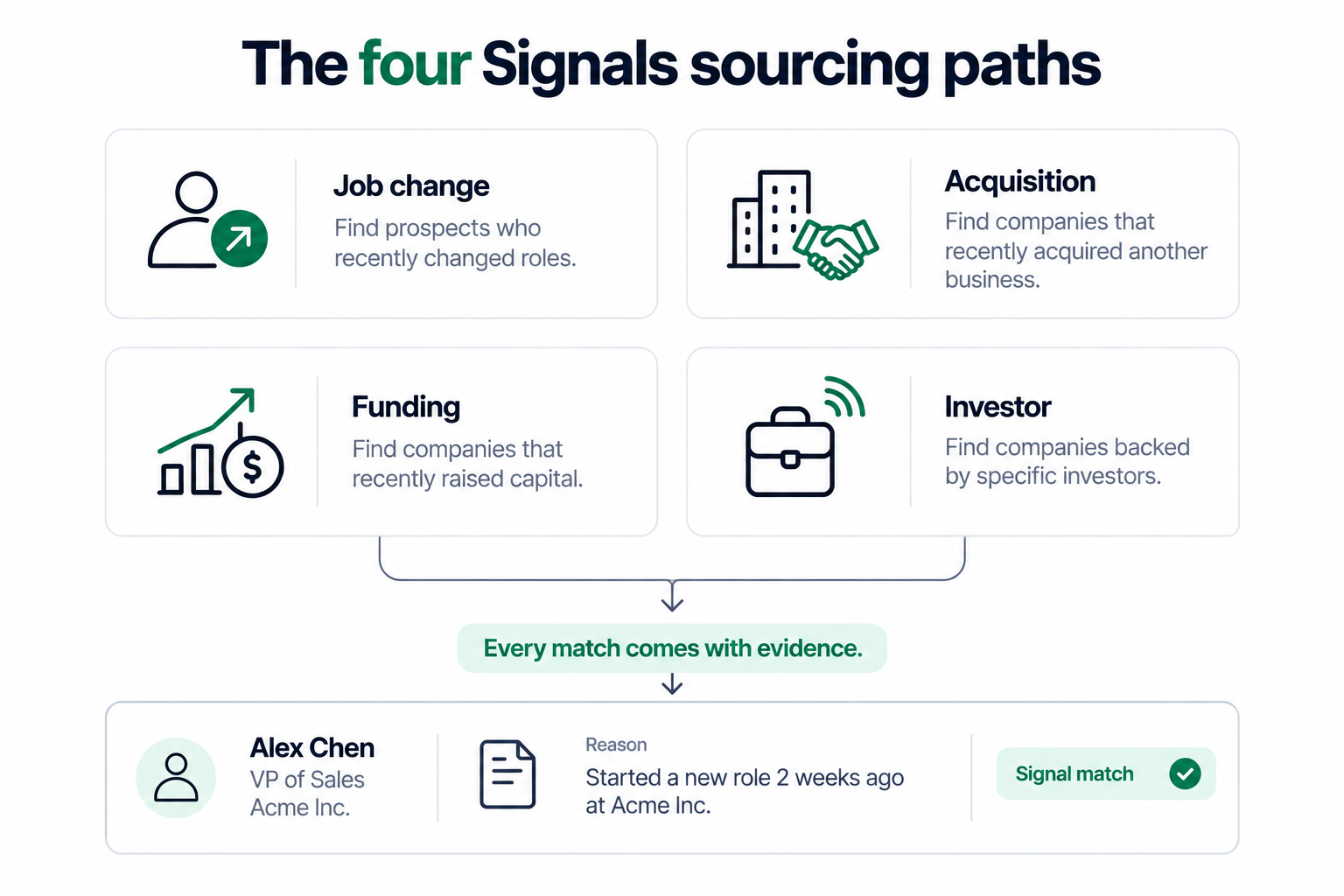
Signals is the newest sourcing path in Leadsforge, and it changes the starting question from who matches my ICP to who just did something that makes them worth contacting this week. You pick Signals as the sourcing path, choose a signal type, set the provider filters, see the estimated number of matching companies or contacts, then extract.
Job Change Signals find people who recently changed roles, filtered by signal period, contact location, position, seniority and department. Someone eight weeks into a new job has a budget to spend and a mandate to change things.
Funding Signals find companies that recently raised, filtered by signal period, location, categories, subcategories, industries, funding round, funding amount, employee count and founded year. Fresh capital usually means new tooling.
Acquisition Signals find companies that were recently acquired, filtered by signal period, location, categories, subcategories, employee count and founded year. New ownership tends to trigger a vendor review.
Investor Signals find companies and people actively making investments, filtered by signal period, location, headquarters, type and ticket size. Useful when the decision-maker you want sits on the investor side rather than the operating side.
For company-based signals, Leadsforge identifies the matching companies first, matches them against the contact database, then surfaces the relevant employees, so you get people rather than a list of company names to work through yourself.
The part I find most useful is the evidence. Open the Details view on any extracted company or person and you see why they matched the signal you picked. That turns a personalised opening line from a research task into a copy-and-paste, and it means you can sanity-check a list before spending credits on the rest of it.
Verify every address before you send a single email
This is the step people skip, and it is the one that decides whether the previous eight sections were worth anything.
A bounce is not a neutral outcome. Mailbox providers read a high bounce rate as evidence that you are sending to a list you did not maintain, and they apply that judgement to every message from your domain afterwards, including the ones to addresses that were correct. On a small company domain, a handful of bounces is enough to move you from the inbox to the spam folder. The full process is covered in the guide to verify email addresses before outreach, and the short version is below.
Syntax. The address is formatted correctly. Cheap to check and it catches typos from manual entry.
MX records. The domain has a mail server that accepts mail at all. Dead domains fail here.
Deliverability. The specific mailbox exists and can receive. This is the check that matters most.
Catch-all. The domain accepts everything sent to it, so the address cannot be confirmed either way. Treat these as medium risk and send carefully.
Disposable. A temporary or throwaway provider. Not worth a credit.
Spam traps. Addresses that exist only to catch senders who did not verify. One of these can blacklist a domain.
Full inbox. Usually an abandoned account. The person left and nobody closed it.
A score in the 90s means send. Below that, read the breakdown before you decide, and when an address is flagged as a spam trap or undeliverable, leave it out and find an alternative contact at the same company instead.
Verification is not a one-time task either. Contact data decays at roughly two to three percent a month as people change jobs, so a list you built in March is meaningfully stale by September. I re-verify active lists monthly and anything older than a quarter before it goes anywhere near a sequence.
Skip the verify step and you pay for it twice
Leadsforge verifies as part of enrichment, so contacts land on your list already checked rather than waiting for a separate clean-up pass.
A verified list still fails if it is sent from a mailbox that providers do not trust yet, so the sending side needs the same attention as the finding side.
Never run cold outreach from your primary company domain. Use a secondary domain that looks and reads like the main one, so a deliverability problem stays contained instead of taking your internal email down with it.
Warm every new mailbox before it sends anything real. Warmforge builds sending reputation over roughly a fortnight, checks SPF, DKIM and DMARC, and reports a Heat Score so you know when a mailbox is actually ready rather than guessing at it. It comes included with Salesforge rather than as a paid add-on.
For the mailboxes themselves, the stack gives three options under one login. Primeforge provides real Google Workspace and Microsoft 365 mailboxes, ready in about thirty minutes with US IP addresses and automated DNS, with no EDU tricks and no loopholes that break the next time a policy updates. Mailforge provides shared IP infrastructure for volume at lower cost. Infraforge provides private dedicated IP infrastructure when you want full control over your own sender reputation.
Once sending starts, Salesforge handles the outreach itself, with AI personalization across 21+ languages, ESP matching, sender rotation, Bounce Shield and text-only content, and Primebox™ pulls every email and LinkedIn reply into one inbox with Auto-Pilot and Co-Pilot modes. If you are still choosing between sources of contact data at this stage, the comparison of B2B data providers is the right place to start, and the walkthrough on how to build a lead list covers the sequencing side once your contacts are verified.
The nine methods compared
Here is how the methods stack up against each other on the three things that actually decide which one you should use.
Method
What you need to start
Best for
Holds up at scale
Accuracy
LinkedIn contact info
A profile and ideally a connection
One specific person
No
High when present
Company website pages
The company domain
Press, support and leadership contacts
No
High
Published work and repos
The person's name
Academics, developers, authors
No
High
Their own public posts
The person's name
Founders and creators
No
High
Google search operators
Name and domain
Finding the company format
No
Medium to high
Email pattern matching
Two known addresses
Filling in a known org chart
Partly
Medium until verified
Email finder tool
Name and domain
A handful of named targets
Partly
Medium to high
Lead search engine
A description of your buyer
Lists of hundreds or thousands
Yes
High with waterfall enrichment
Signals sourcing
A signal type and filters
Timing outreach to real events
Yes
High, with evidence attached
Read that table as a sequence rather than a menu. The free methods are the right answer for one name, pattern matching is the right answer for a department, and a lead search engine is the right answer the moment your target list has more rows than your afternoon has hours.
Mistakes that cost people the reply
Five patterns come up again and again in lists I have been asked to clean up.
Sending to a guess. A pattern is a hypothesis. Verification turns it into an address. Skipping that step is the single most expensive habit in outbound.
Ignoring the job change. The address was right eighteen months ago. Contact data decays every month, and old lists bounce hardest.
Using info@ as a fallback. Shared inboxes are monitored by people who are not your buyer and who did not ask to hear from you. A generic address is not a substitute for the right one.
Chasing personal addresses. If the work address is hard to find, a personal one is not the workaround. It reads as intrusive and it damages the first impression you were trying to make.
Finding the address and stopping there. An address without a reason to write is still a cold email. The evidence behind a signal, a funding round, a role change or an acquisition is what makes the first line worth reading.
Final Verdict
If you need one email address today, start with LinkedIn contact info and the company website, then run the domain-restricted Google operator to learn the format, apply the pattern, and verify before you send. That whole path takes under ten minutes and costs nothing.
If you need a list, stop doing that by hand. Manual methods do not scale past about twenty contacts before the time cost outweighs anything you save, and the error rate climbs as you get faster. Leadsforge searches 500M+ contacts from a plain English description, runs waterfall enrichment so you are not stuck with one provider's hit rate, verifies as it goes, and pushes straight into Salesforge for outreach.
The piece I would not skip either way is Signals. Finding the right person is table stakes now. Finding them in the eight weeks after a job change, a funding round or an acquisition, with the evidence for why they matched sitting next to the contact, is what separates a list that gets replies from a list that gets ignored.
Find the people, not just the addresses
Describe your ideal customer in one sentence, get back a verified list with emails, LinkedIn profiles and phone numbers, and send from the same account.
Start with LinkedIn contact info, the company's team, press and careers pages, and any work the person has published. If those come up empty, run site:company.com "@company.com" in Google to learn the company's email format, then apply that format to your target's name. Several finder tools also offer a free tier, and Leadsforge gives new accounts 100 free credits. Whichever route you take, verify the address before sending, because a free guess that bounces costs more than the lookup would have.
Is it legal to find and email someone's business email address?
In most B2B contexts, yes. Under CAN-SPAM in the US you must identify yourself, include a valid physical address and honour opt-outs promptly. Under GDPR in the EU and UK, B2B outreach to a professional address is generally permitted under legitimate interest, again with an immediate opt-out. Rules differ by country and this is not legal advice, so confirm the position in your target market before a first campaign, and use a compliant data provider rather than a scraped list.
How accurate are email finder tools?
It depends on how the tool builds its answer. A permutator that only generates name combinations gives you guesses and nothing else. A finder that checks a database, generates permutations and then runs live verification typically lands in the eighty to ninety percent range on mainstream B2B contacts. Accuracy drops for senior executives, for very small companies and for regions where data coverage is thinner. Waterfall enrichment, which pulls from several sources in sequence, is what lifts hit rates where a single provider comes up short.
Can I find someone's personal email address?
Usually not, and it is rarely the right goal. Personal addresses sit behind free providers and follow no company pattern, so there is nothing to deduce and no directory to search. The methods in this guide are built for work addresses tied to a company domain, which is where business outreach belongs. If someone has published a personal address themselves, that is their choice, but treating a personal inbox as a sales channel tends to cost you the conversation.
What is the fastest way to find hundreds of email addresses at once?
Use a lead search engine rather than a finder. A finder answers one name at a time. In Leadsforge you describe the buyer in plain English, see the matching contacts from a 500M+ database, and extract the list with emails already enriched and verified. Company Lookalikes expands from your best customers, Competitor Followers Search builds from a competitor's audience, and Signals sources around job changes, funding rounds, acquisitions and investor activity.
How do I check if an email address is valid before I send?
Run it through a verifier that checks more than syntax. A proper check confirms formatting, looks up MX records to confirm the domain accepts mail, tests whether the specific mailbox can receive, and flags catch-all domains, disposable providers, spam traps and full inboxes. Send to addresses that score in the 90s, look at the breakdown for anything lower, and leave out anything flagged as undeliverable or as a spam trap.
How often should I re-verify a list I already built?
Verify new leads before every campaign, re-verify active lists about once a month, and re-check anything older than a quarter before it goes into a sequence. Contact data decays as people change roles, so a list is at its most accurate on the day you build it and gets worse from there. If open rates start sliding or bounces start climbing, run a verification pass before you change anything else about the campaign.
What should I do if I cannot find someone's email address at all?
Move sideways rather than digging further. Find a colleague in the same department whose address you can confirm, since the format is shared and a warm internal forward often beats a cold direct hit. Reach out on LinkedIn instead, which is a legitimate channel in its own right and can run in the same sequence as email. Or use the company's contact form with a specific, short message naming the person you want. Some addresses are genuinely not findable, and the fastest move is to accept that and target the next account.
Book more meetings on autopilot
Set up in minutes. No per-seat pricing. No commitment.
The 7 internal resources sales teams need to sell AI solutions with confidence, from expert councils and playbooks to battlecards, proof libraries, and demo environments.
Learn how signal-based LinkedIn outreach works, which buying signals to track, how to find the right prospects, and write messages that start conversations.


.jpg)



.jpg)
