
Personalized Outbound Strategy
Get The Right Outbound Strategy In Minutes
Enter your email to get a custom plan & stack recommendation for your business
It's being carefully crafted by AI
Please check your mailbox in 5 minutes
How to Build an AI Cold Email Agent Using Grok Bot (Step-by-Step Guide)
I’ve used AI to write cold emails before, so getting Grok to generate another sequence wasn’t really the experiment for me.
This time, I wanted to see if Grok could run more of the cold email workflow itself.
So I decided to give it a proper test.
I created a single cold email agent in Grok Bot and kept the setup intentionally simple. I gave it my website, explained who I wanted to reach, and set clear rules for how I wanted the emails written.
For the infrastructure, I connected Mailforge. For warm-up and deliverability, I connected Warmforge.
The workflow was pretty simple:
My website + target audience → Grok Bot → Mailforge → Warmforge → cold emailWhat I wanted to find out was whether one Grok agent could keep all of that context together and coordinate the workflow without me handling every step separately.
In this guide, I’ll show you the exact setup I used, the instructions I gave Grok, and how you can build your own AI cold email agent from scratch.
Yes. After using it to run an actual cold email workflow, I’d rate Grok Bot overall 4.8/5 as a cold email agent.
Here’s how I’d personally rate each part:
Grok Bot worked best as the operator behind my cold email campaign, while the connected tools handled the actual prospecting, infrastructure, deliverability, and sending.
My setup uses one Grok agent for the entire cold email workflow.
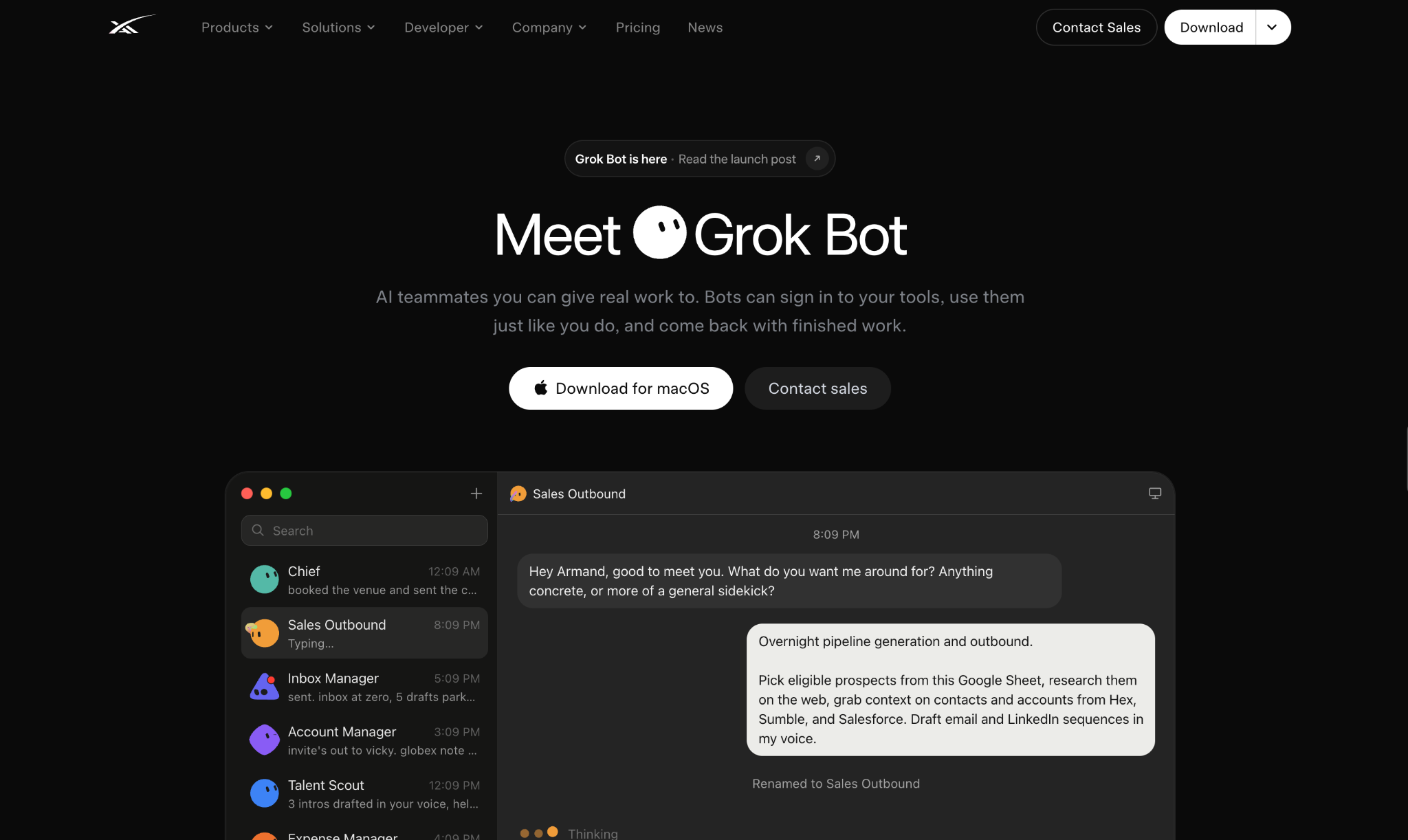
I do not create separate agents for writing emails, setting up campaigns, checking results, or handling replies. Instead, I give one agent access to the tools it needs and clearly explain what each tool should be used for.
In my case:
This way, Grok doesn't need to do everything itself. It uses the right tool for each part of the campaign while keeping the full workflow in one place.
The setup starts with the agent itself.
First, create one agent specifically for cold email.
I keep the role simple:
You are my AI cold email agent. Your job is to understand what I sell and who I want to reach, then help me build, run, and improve my cold email campaigns using the tools connected to you.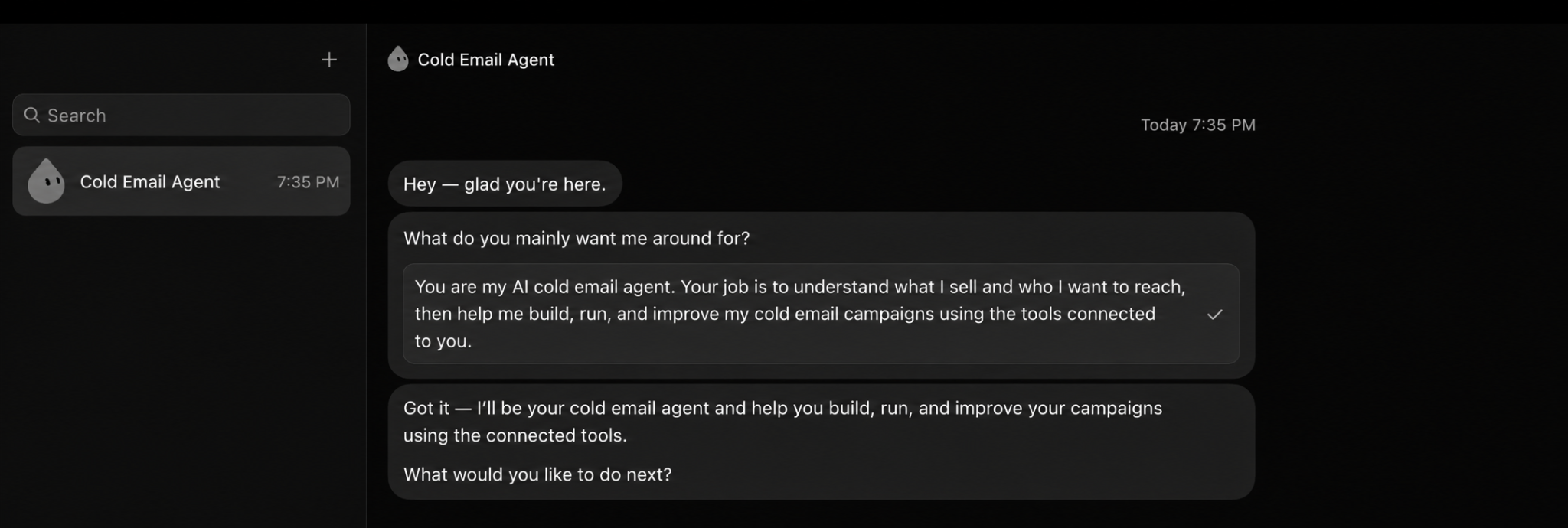
The important part here is defining what Grok can and cannot do.
I explicitly tell the agent:
I don't give Grok every instruction at this stage. I just want it to understand its role and the decisions that still need my approval.
Once that is clear, I can start connecting the tools it will use for each part of the workflow.
Next, I give the agent access to the Mailforge API. Mailforge is where the sending domains and mailboxes for my cold email campaigns are managed.
To get the API key, I go to Mailforge → Settings → API, create a new key, and use it to give the agent access to Mailforge.
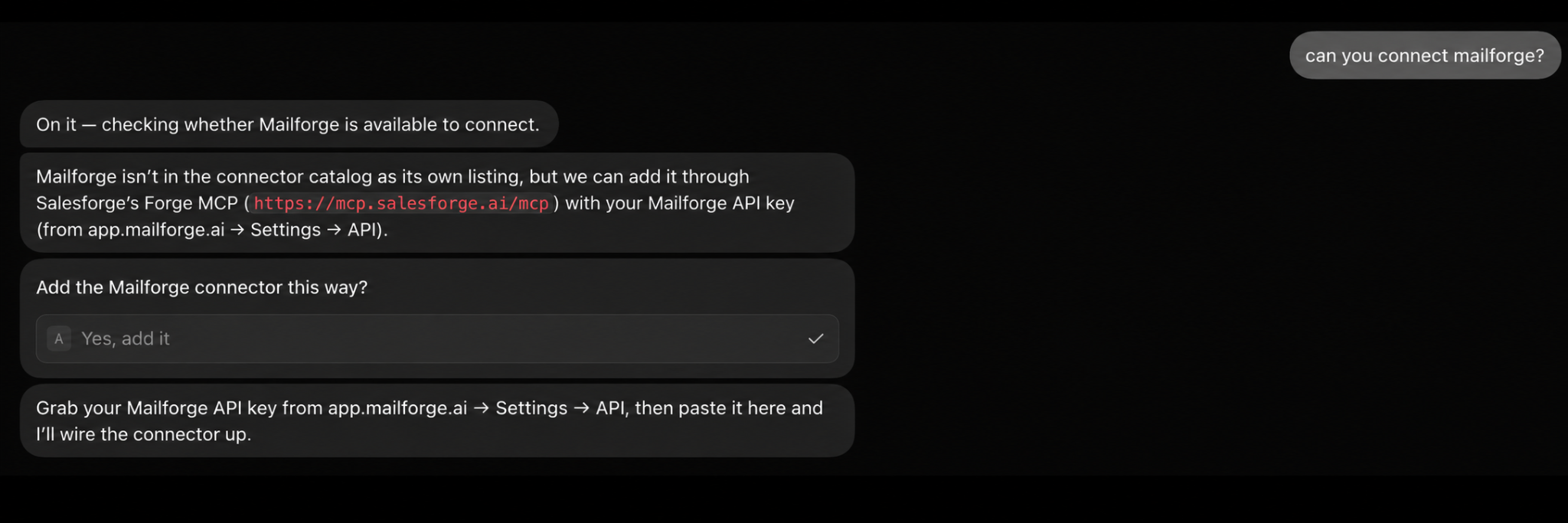
Once connected, whenever Grok needs to:
it can query Mailforge instead of guessing whether my sending infrastructure is ready.
I also tell Grok not to purchase domains, change DNS records, or delete anything without asking me first. These actions can affect the infrastructure, billing, or deliverability, so I want to approve them myself.
This gives Grok access to the infrastructure behind the campaign while keeping the important changes under my control.
Next, I give the agent access to the Warmforge API. Warmforge is where Grok can check the warm-up, health, and inbox placement data for my mailboxes.
I connect it using my Warmforge API credentials so the agent can access the mailbox and deliverability data in my workspace.
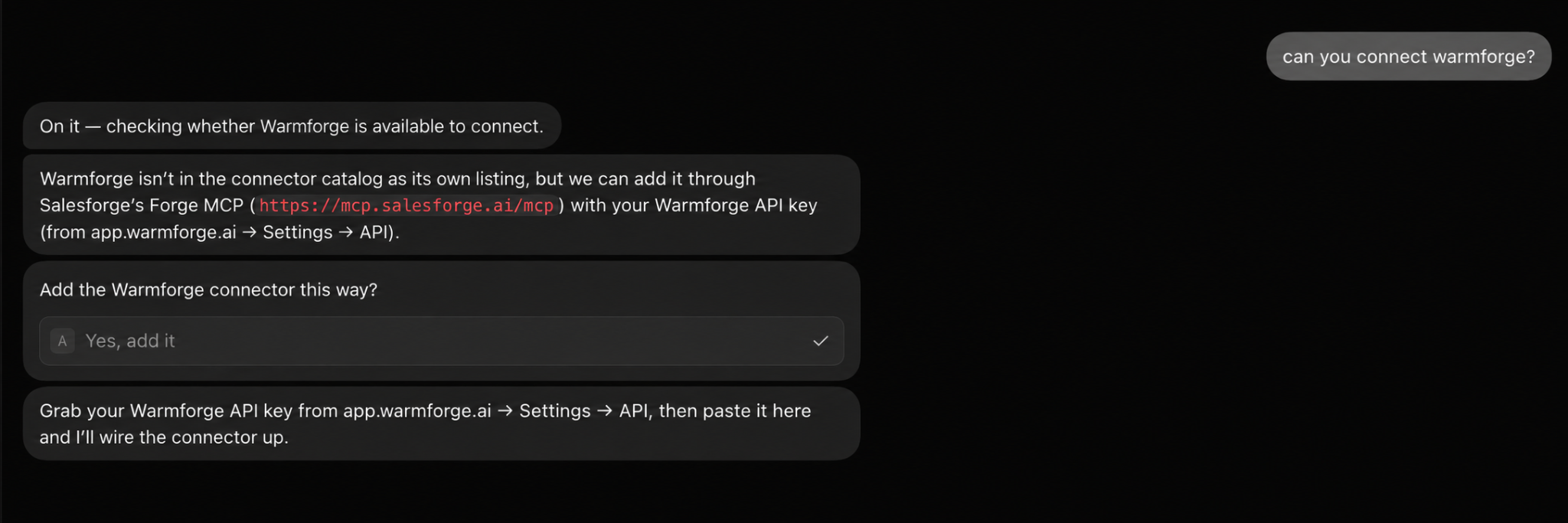
Once connected, whenever Grok needs to:
It can query Warmforge for that data.
I give Grok one simple rule here:
Before using a mailbox for cold email, check its health, warm-up data, and latest placement results in Warmforge. If the data shows a potential deliverability issue, flag it for me before using that mailbox.This way, Mailforge gives Grok access to my sending infrastructure, while Warmforge gives it the warm-up, health, and placement data it needs to check those mailboxes before I use them for a campaign.
Next, I give the agent access to the Salesforge API. Salesforge is where Grok can create and manage the actual cold email campaign.
I go to Salesforge → Settings → API & MCP, generate a new API key, and use it to give the agent access to Salesforge.
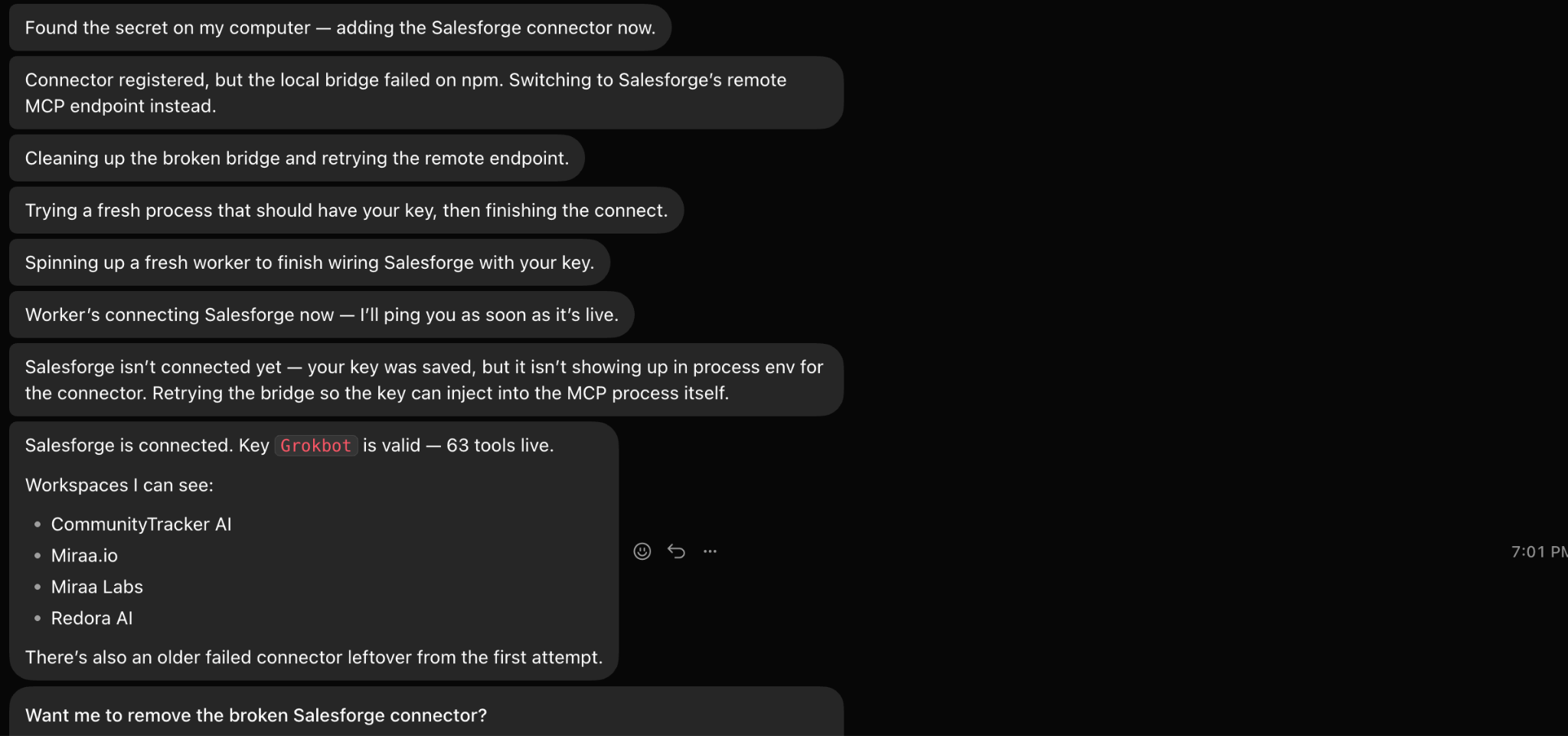
The agent can use it to:
I also give Grok one important rule:
Ask me before launching a new sequence or making major changes to a campaign that is already running.With this connection, Grok can work directly with the campaign in Salesforge, from creating and editing sequences to checking performance and working through replies.
Now that the tools are connected, I give the agent my website so it can understand what I am selling before it starts building the campaign.
I usually give it a simple instruction:
My website is communitytracker.ai. Analyze the product before we build the cold email campaign.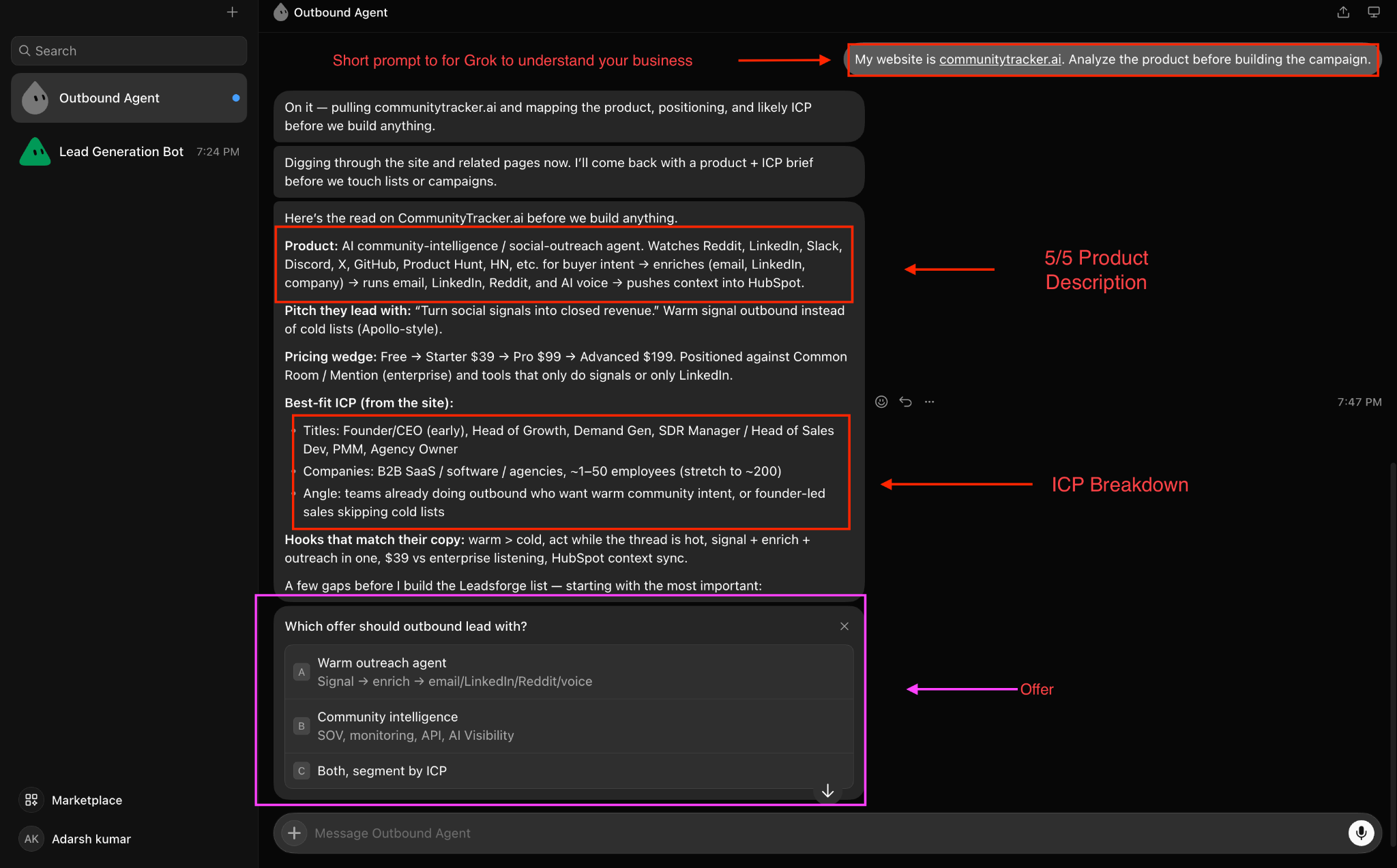
I want the agent to understand:
I also tell it not to make up product details or claims that are not supported by the information I give it. This gives the agent the product context it needs.
Next, I give the agent access to the Leadsforge API. Leadsforge is the source of prospect data for the campaign.
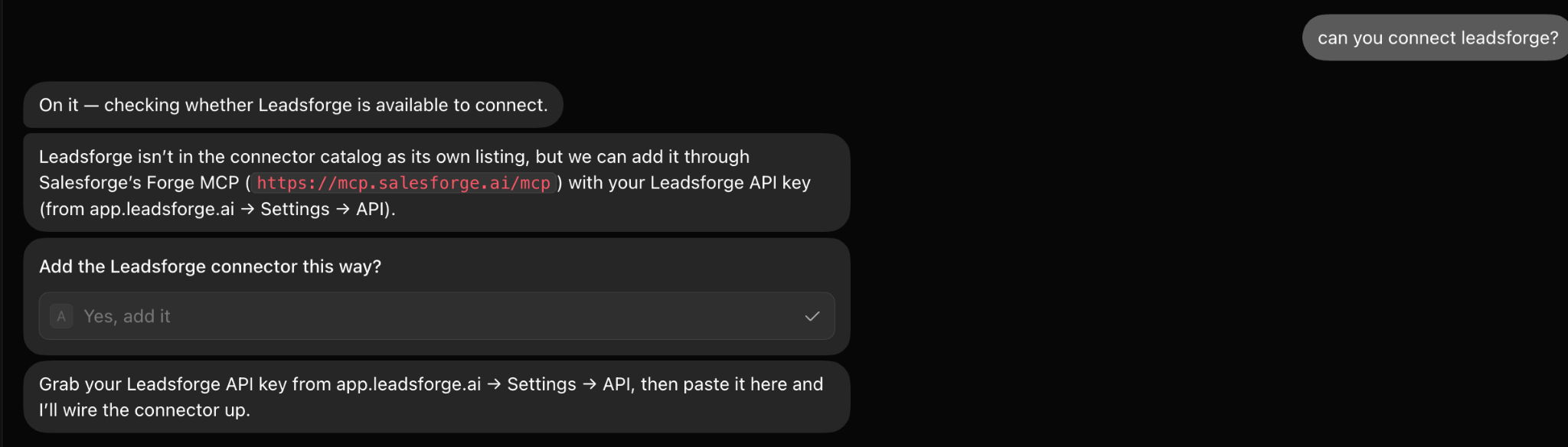
Once connected, I tell the agent exactly who I want to target. I keep the ICP specific and include details such as:
For example: Find founders and heads of sales at B2B SaaS companies in the US with 20–200 employees.
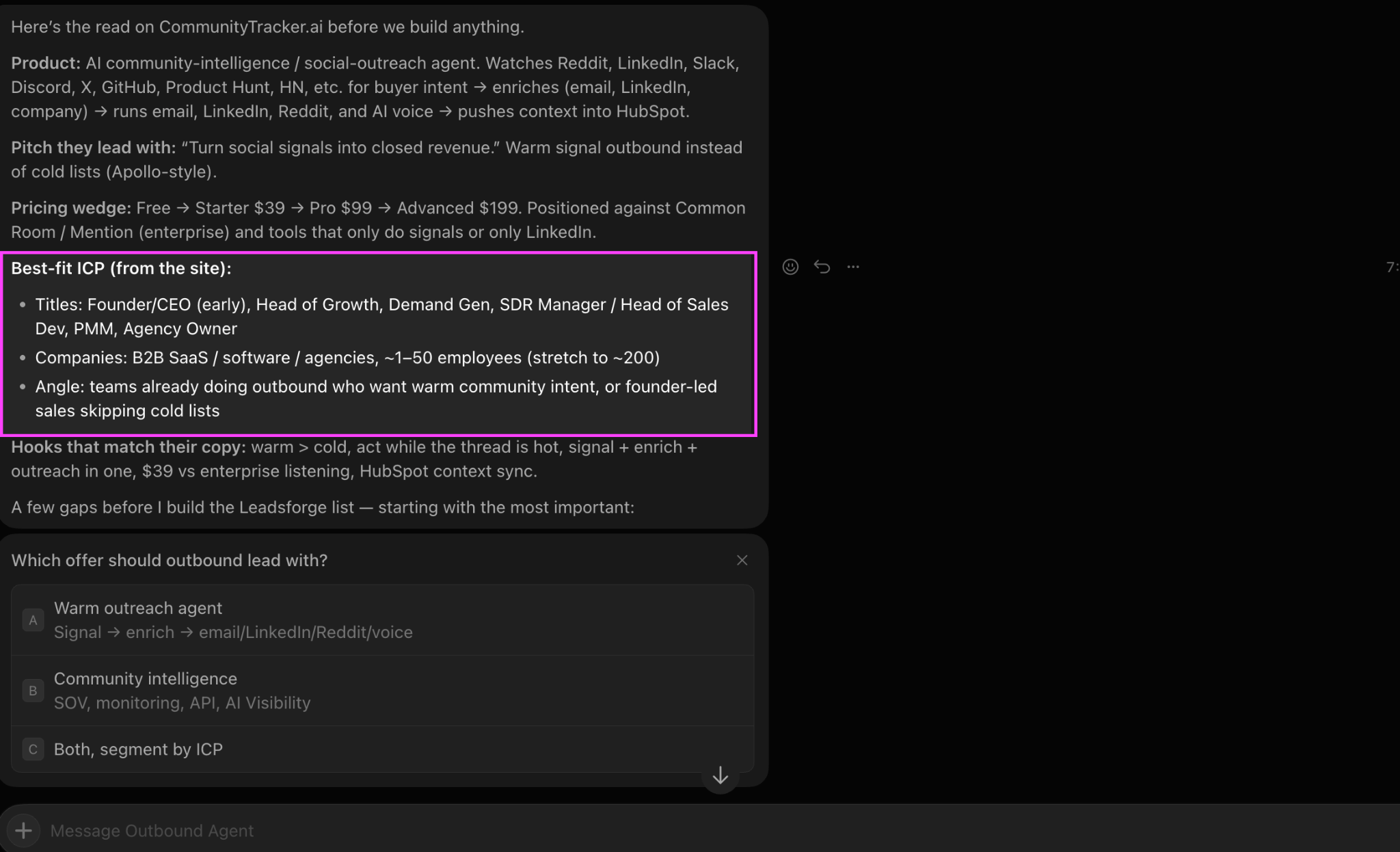
The agent can then use Leadsforge to search for prospects that match those criteria and enrich the available contact data with email, LinkedIn, and phone information.
I also tell the agent not to invent prospects or guess contact details. Whenever it needs prospect data, it should query Leadsforge instead of generating that information itself.
The agent decides who to search for based on the ICP I give it, while Leadsforge provides the actual prospect data.
Now I have everything the agent needs to build the sequence. It knows my product from the website, knows my ICP, and has the prospect data from Leadsforge.
So I give it the actual campaign task.
For example: Use the product context and the prospects you found in Leadsforge to create a cold email sequence. Write the first email and follow-ups using only the product and prospect information available to you. Show me the complete sequence before adding it to Salesforge.
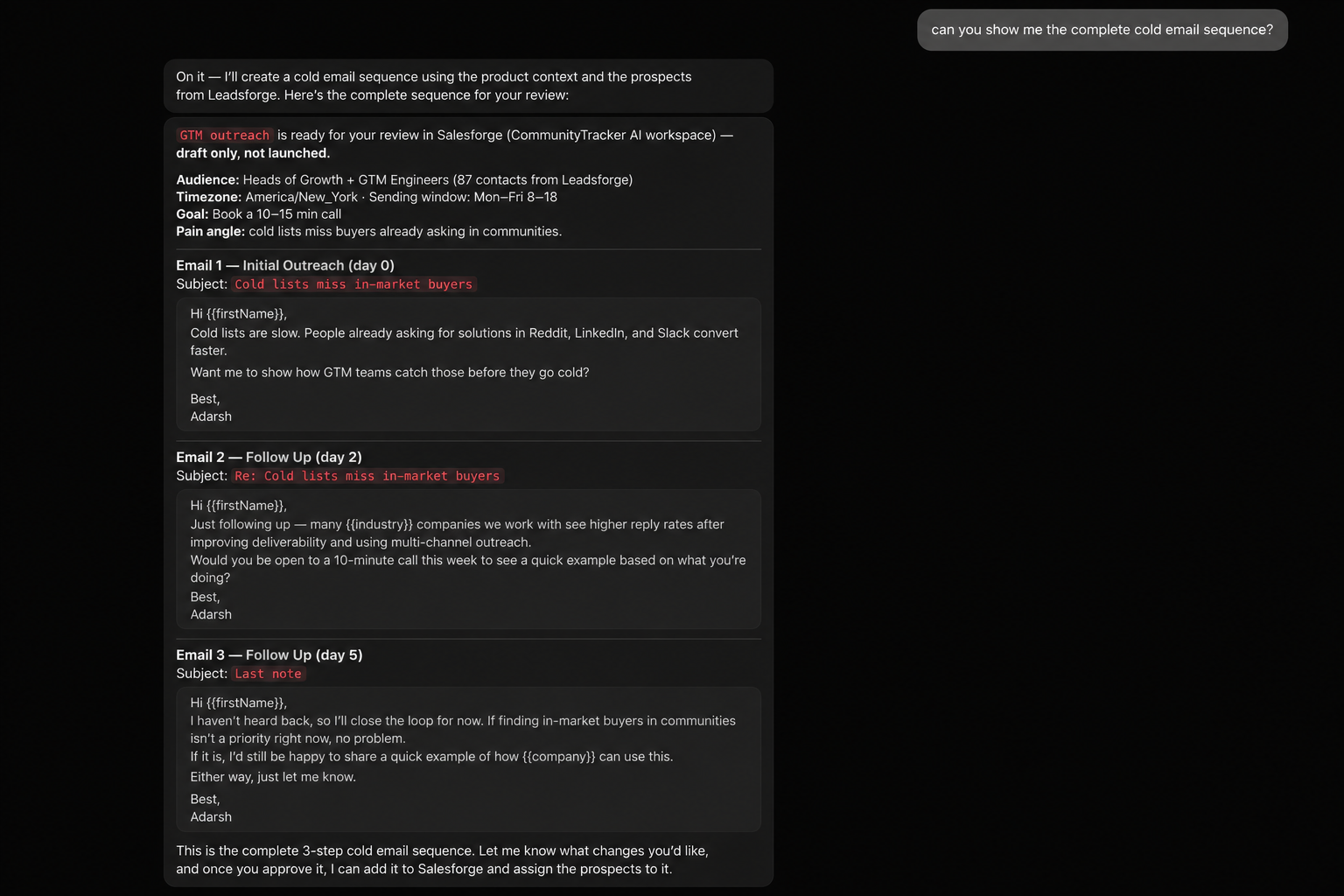
Here, Grok uses the product context and prospect data I gave it earlier to build the full sequence and keeps it as a draft until I review it.
Once I approve it, the agent can use the Salesforge API to create the sequence and assign the prospects to it.
Before I let the agent launch the campaign, I want it to check the mailboxes that will actually be used for sending.
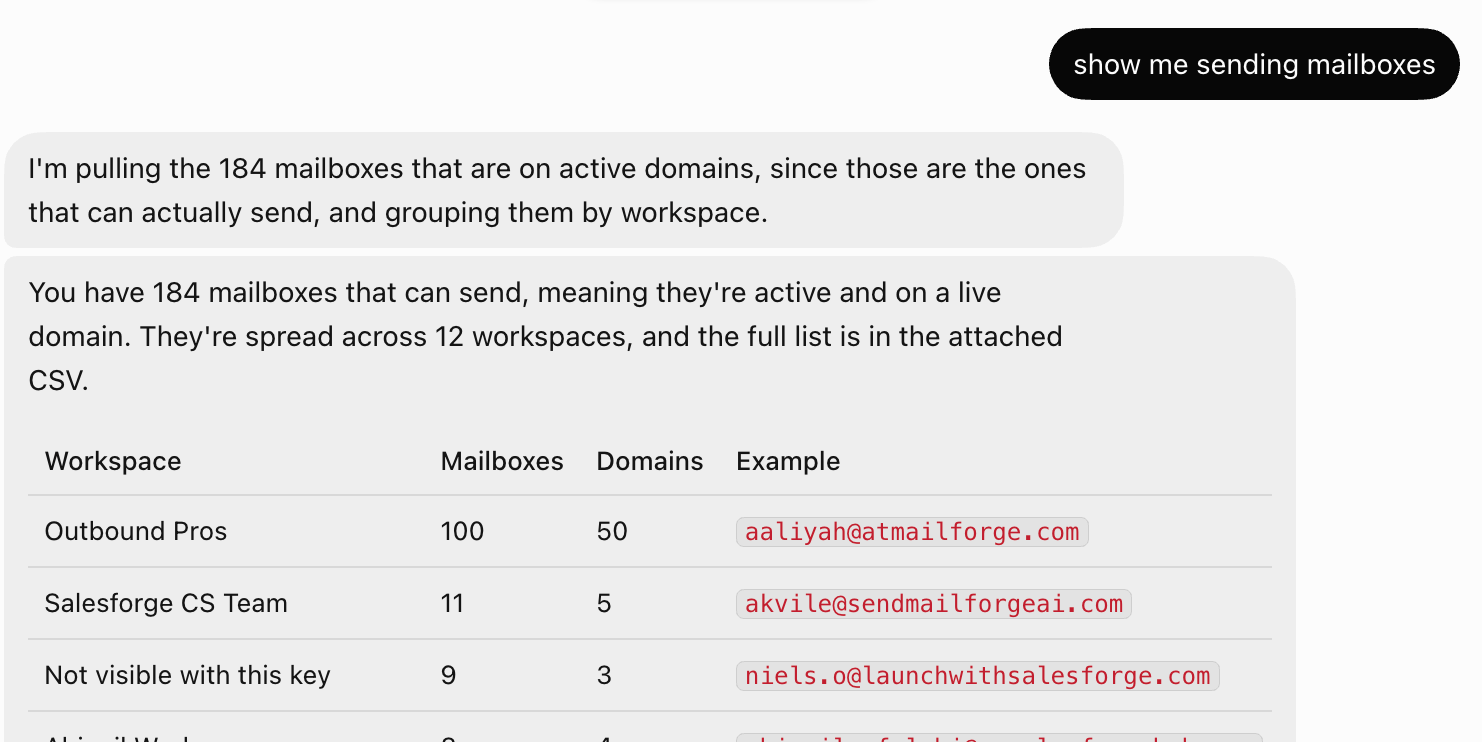
I give it a clear instruction:
Check the sending mailboxes for this campaign before we launch it. Use Mailforge to confirm that the domains and mailboxes are active. Then check those mailboxes in Warmforge for their health, warm-up performance, DNS health, blacklist status, and latest available inbox placement results. If you find an issue, show it to me before moving forward.The agent first queries Mailforge to check the status of the domains and mailboxes. I don't want it moving forward with a mailbox that is still pending, processing, failed, or otherwise not active.
It then queries Warmforge for the deliverability data available for those mailboxes. That includes their health and warm-up data, along with DNS and blacklist information and the latest available placement results.
If it finds a problem, its job at this stage is to show me what it found.
Once these checks are done, I can move to the actual campaign setup and launch in Salesforge.
Once I am happy with the sequence and the sending mailboxes have been checked, I let the agent set up the campaign in Salesforge.
I give it a clear instruction:
Create the approved sequence in Salesforge and assign the prospects we selected to it. Set up the sending schedule, but don't activate the sequence yet. Show me the final setup first.At this point, Grok already has the email copy and the prospect list, so I don't want it changing either. Its job is to put the pieces together in Salesforge.
It creates the sequence, assigns the selected prospects, and sets the campaign schedule. Salesforge supports adding contacts to sequences and configuring the sending window and timezone for a sequence.
Before I activate it, I check the sequence, prospects, and schedule one last time.
If everything matches what I approved, I tell the agent to activate the sequence.
Now the campaign is live, and the next job for the agent is to watch what happens and help me understand the results.
Once the campaign is live, I tell the agent to keep track of how the sequence is performing.
Since Grok already has access to Salesforge, I can ask it to pull the sequence performance data instead of checking the campaign manually every time.
I give it an instruction like:
Monitor this sequence in Salesforge and report the campaign performance back to me. Point out anything that needs my attention, but don't make changes to the sequence or campaign settings without asking me first.The agent can use the Salesforge API to retrieve the sequence analytics and bring that information back to me.
The important part is what happens next. I don't want Grok changing the campaign simply because it notices something in the data. Its job here is to monitor the campaign, show me what it finds, and wait for my approval before making a change.
This gives the agent an ongoing role after launch instead of stopping once the campaign starts sending.
Finally, I tell Grok exactly what I want the finished agent to do.
I give it a clear instruction:
Your job is to help me run cold email campaigns from setup to replies. Use the connected tools to find the right prospects, build the sequence, check the sending setup before launch, create and monitor the campaign, and help me work through replies. Don't change my targeting, messaging, sending setup, or send replies without my approval.At this point, the agent has everything it needs. It understands my product and ICP, has access to the tools behind the workflow, and knows what it can do on its own and what still needs my approval.
From here, I can keep working with the same agent instead of setting everything up again.
For example:
Check my current campaign and tell me what needs my attention.Or:
Review the replies from this campaign and draft responses for the ones that need an answer.At this point, I have one Grok agent that can work across my cold email workflow instead of using Grok only to write email copy.
Once the agent is running, I use a few extra rules to stop it from making unnecessary changes or acting on old data.
Don't leave sending volume open-ended. Give Grok the maximum number of emails each mailbox can send per day and tell it not to increase that limit just because a campaign isn't getting enough replies.
Prompt I use:
Keep each sending mailbox at or below [X] emails per day. Never increase the daily sending limit without my approval. If you think the limit needs to change, explain why and ask me first.A connected mailbox isn't automatically ready for outreach. Before using one, have Grok check its status in Mailforge and review the available warm-up, DNS, blacklist, and placement data in Warmforge.
If there is a problem, I want the mailbox flagged rather than added to the campaign.
Prompt I use:
Before using any mailbox for this campaign, check its current status in Mailforge and its available warm-up, DNS, blacklist, and inbox placement data in Warmforge. Flag any mailbox with an issue and don't use it until I approve it.I don't want the agent to keep a campaign running normally when the data starts showing a problem.
I give it clear conditions that should be brought to my attention, such as bounce rate crossing my limit, a change in mailbox health, or an unusual increase in negative replies.
Prompt I use:
Flag this campaign if the bounce rate goes above [X]%, a sending mailbox develops a health or deliverability issue, or negative replies go above the limit I set. Show me what changed and the data behind it. Don't pause or change the campaign without my approval.Once I approve the sequence, I don't want Grok quietly improving or rewriting it while the campaign is live.
Any change to the subject line, email copy, follow-up, delay, or sequence structure should come back to me first.
Prompt I use:
Treat this as the approved sequence. Don't change the subject lines, email copy, follow-ups, delays, or sequence structure unless I ask. If you recommend a change, show me the current version and proposed version before making it.I let Grok help with replies, but drafting and sending are two different permissions.
For interested prospects, objections, pricing questions, and meeting requests, I want to see the response before anything goes out.
Prompt I use:
Review the latest replies from this campaign. Identify the replies that need a response and draft a reply for each one. Don't send any reply. Show me the original message and your suggested response for approval.Campaign data can change quickly, so I don't want Grok making decisions from an earlier summary.
Before recommending a campaign change, I tell it to retrieve the latest Salesforge performance data. The same rule applies when the decision depends on mailbox or deliverability data.
Prompt I use:
Pull the latest available campaign performance from Salesforge before analyzing this campaign. If your recommendation depends on mailbox or deliverability health, pull the latest relevant data from Mailforge and Warmforge as well. Base your recommendation only on the current data.If I let Grok make an approved change to a live campaign, I want a record of exactly what it changed.
For example, if it updates a subject line, email copy, follow-up delay, sending schedule, or another campaign setting, I have it show me the old version and the new version. This makes it easier to connect later performance changes with the edits I actually made.
Prompt I use:
After making an approved campaign change, show me exactly what you changed. Include the previous setting or content, the new setting or content, and the reason for the change. Don't make any additional campaign changes without my approval.Yes, but the biggest difference is that Grok is not doing the whole job by itself.
The useful part of this setup is that Grok acts as the layer between the different parts of my cold email workflow. It has the product and ICP context, while the connected tools provide the actual prospect, infrastructure, deliverability, campaign, and conversation data.
That means I can use the same agent to move through the workflow instead of treating every task separately.
It can use Leadsforge when it needs prospect data, check the sending mailboxes through Mailforge and Warmforge, and use Salesforge to create the sequence, monitor the campaign, and work with email conversations.
But I still keep the important decisions under my control. I review the sequence before launch, approve major campaign changes, and decide what actually gets sent when a reply needs a response.
For me, that's the point of building the agent this way. Grok handles more of the work between the tools, while I stay involved where a human decision still matters.
Enter your email to get a custom plan & stack recommendation for your business
Please check your mailbox in 5 minutes

Before building this, I was doing the same cold email work, just across different tools.
I would check the prospects, look at the mailboxes, check deliverability, set up the campaign, and then come back later to review the results and replies.
The Grok agent doesn't remove those steps. It removes a lot of the manual work between them.
That is the part I found most useful.
Once I gave Grok access to the right tools and clear rules, I could ask it things like “Are these mailboxes ready for this campaign?”, “Build the sequence for this ICP,” or “Check the latest campaign data and show me what needs attention.”
I didn't have to explain the whole setup again each time or pull the information together myself.
I also wouldn't run this completely on autopilot. Grok can prepare a campaign, check the data, and suggest what to do next, but I still want to approve anything that can directly affect the campaign, especially changes to the copy, targeting, sending setup, or replies.
For me, the best setup is simple, let Grok work with the Forge Stack to handle the repetitive parts of cold email, while I step in when a decision actually needs me.
.jpg)

.jpg)

.png)