
Personalized Outbound Strategy
Get The Right Outbound Strategy In Minutes
Enter your email to get a custom plan & stack recommendation for your business
It's being carefully crafted by AI
Please check your mailbox in 5 minutes
If you’re thinking about GoAccounts, the real question isn’t whether renting LinkedIn accounts can help you scale outreach. It’s whether the accounts you’re paying $149–$249 a month for are reliable enough to be worth the cost and risk.
GoAccounts offers two very different options. The Lite plan gives you pre-warmed fabricated profiles with 500+ connections, while the Plus plan includes real, ID-verified profiles with 2,500+ connections and an existing activity history. Both plans come with browser and proxy infrastructure, and GoAccounts will recover or replace an account if it gets restricted.
That can be appealing for agencies and outbound teams that want to run multiple LinkedIn senders without risking their own profiles. But there are some cons as well. Restrictions usually lead to replacements rather than refunds, independent customer reviews are limited, and GoAccounts itself says using rented profiles may conflict with LinkedIn’s rules.
In this GoAccounts review, I’ll break down pricing, account quality, the replacement policy, reported restriction rates, and how it compares with other rented LinkedIn account providers so you can decide whether it fits your outreach setup.
This is where GoAccounts is difficult to evaluate.
I could not find meaningful user feedback for GoAccounts on major independent review platforms such as G2, Capterra, or Trustpilot. The available search results are mostly GoAccounts’ own claims, partner content, or reviews written by other companies rather than verified customer feedback.
That means there is very little independent evidence around the things that matter most:
So I would treat GoAccounts’ restriction rates, customer outcomes, and account-quality claims as vendor-reported until there is more independent feedback available.
My take: the lack of negative reviews is not automatically a positive signal. There simply is not enough third-party feedback yet to judge GoAccounts confidently from customer experience alone.
GoAccounts is mainly built around renting LinkedIn accounts for outbound. I looked at the account types, setup, automation support, and what is included with each account.
These features cover most of what a team needs to get multiple LinkedIn accounts running without setting up the account, proxy, and browser infrastructure separately.
GoAccounts provides the LinkedIn accounts. You still need an outreach platform to find prospects, build sequences, send messages, and manage replies.
Here’s how you can use GoAccounts with Salesforge:
Choose between:

Once purchased, GoAccounts gives you access to the LinkedIn profile along with its dedicated proxy and browser environment.
Next, add the GoAccounts profile as a LinkedIn sender in Salesforge.

This moves you from simply having a rented account to actually using it for outbound campaigns. Salesforge supports multiple LinkedIn senders, with unlimited LinkedIn senders available on its higher-tier plan.
You don’t have to rely only on LinkedIn.
Salesforge lets you connect email mailboxes alongside your LinkedIn senders, so the same prospect can be reached across both channels.

Now create your outreach flow inside Salesforge.
For example: View LinkedIn profile → Send connection request → Send LinkedIn message → Wait → Send email → Follow up

You can also add conditions based on what the prospect does, so the sequence can change when someone accepts, replies, or moves to another channel.
If you rent several GoAccounts profiles, you can use them as separate LinkedIn senders instead of pushing all your outreach through one account.
This is where the setup becomes more useful for agencies or teams trying to scale LinkedIn outreach across multiple profiles.
Replies from both LinkedIn and email can be managed through Salesforge's Primebox instead of checking every rented LinkedIn profile separately.
So the setup is fairly simple: GoAccounts provides the LinkedIn profiles and account infrastructure → Salesforge handles the multichannel outreach, follow-ups, and replies.

If a rented profile gets restricted, GoAccounts handles the account recovery or replacement side while you manage the actual campaigns through your outreach platform.
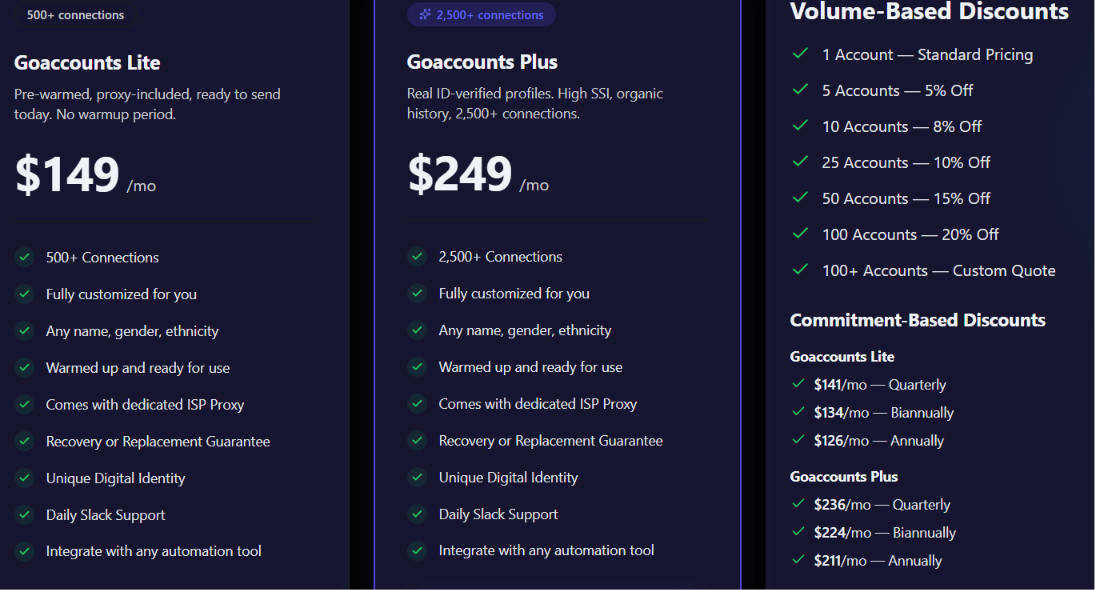
GoAccounts has two main LinkedIn account plans. The price is charged per account, so your total monthly cost depends on how many profiles you need.
Both plans also work with external LinkedIn automation tools. GoAccounts offers lower prices if you rent more accounts. The discount starts at 5% for 5 accounts and reaches 20% for 100 accounts. Orders above 100 accounts require a custom quote. You can also pay for a longer period to lower the monthly price.
Lite drops to $126 per month when paid annually, while Plus drops to $211 per month.
If you also need GoAccounts' LinkedIn automation, it is listed at $39 per month as an add-on. This is separate from the account rental price. There are no setup fees or long-term contracts. Billing is monthly by default, and GoAccounts says you can cancel anytime without a cancellation fee.
So, the main thing to calculate before signing up is how many accounts you actually need. One Lite account costs $149 per month, but the cost can rise quickly if you need several accounts for a larger outbound campaign.
LinkedIn restrictions are still possible even when you use a rented and pre-warmed account. GoAccounts handles this through a replacement guarantee rather than a traditional refund policy.
Here’s how it works:
If your rented profile gets restricted, GoAccounts first attempts to recover it. Its pricing page says the average recovery time is around four days.

If GoAccounts cannot recover the profile, it provides a comparable replacement at no additional cost. Its refund policy says replacements are available for both real and warmed accounts, with unlimited replacements during the rental period.
A restriction or LinkedIn ban usually doesn’t qualify for a refund. GoAccounts treats that as part of the risk of running LinkedIn automation and covers it through replacement instead.
Refunds are mostly limited to cases where GoAccounts fails to deliver an account, can’t provide a replacement within seven days, makes a billing error, or supplies an account that’s unusable because of its own error.
Keep in mind that the replacement guarantee reduces the financial impact of losing an account, but it doesn’t remove the operational impact. If a profile gets restricted in the middle of a campaign, you may still lose momentum, active conversations, and time while the account is recovered or replaced.
GoAccounts says its accounts have a restriction rate under 5%, but I’d still treat that as their own reported number, not a guaranteed result for your campaigns.
A lot will still depend on how you use the accounts, including:
In theory, GoAccounts Plus should give you a better starting point because those profiles are real, ID-verified accounts with organic activity history. Lite accounts are fabricated and pre-warmed, so I’d be more careful using them for high-value prospects who are likely to check the sender’s profile before replying.
The bigger concern is independent validation. I found very little third-party customer feedback to confirm GoAccounts’ claims about restriction rates, account longevity, or replacement quality.
Honestly, GoAccounts seems to have built solid infrastructure around account stability, but I’d still start with a small batch of profiles before rolling out a larger fleet.
GoAccounts makes sense if you need extra LinkedIn profiles for high-volume outreach and don’t want to put your own or client accounts at risk.
The $149 Lite plan is cheaper, but it uses fabricated profiles. The $249 Plus plan is the safer-looking option because it uses real, ID-verified accounts with more history and connections.
I’d consider GoAccounts mainly for agencies or outbound teams that already have their outreach stack in place. The biggest concerns are per-profile cost, limited independent reviews, and the fact that restrictions are handled mainly through replacement rather than refunds.
They shares a few customer examples to show how people use rented LinkedIn accounts to scale outbound. These examples include agencies, recruiters, consultancies, and SaaS teams.
A few of the results they highlight are:
These examples are helpful for understanding where GoAccounts might fit in a larger outbound setup, but they shouldn’t be taken as the results you should expect.
GoAccounts presents them as representative outcomes based on customer usage, and I wasn’t able to verify them independently.
Enter your email to get a custom plan & stack recommendation for your business
Please check your mailbox in 5 minutes

It makes the most sense for teams that already know how to run LinkedIn outbound and simply need more sender capacity.
It is a good fit if you:
I would lean toward GoAccounts Plus if you are targeting higher-value prospects who are likely to inspect the sender profile before replying.
GoAccounts is less attractive if you only need one LinkedIn account, want a complete lead generation platform, or expect rented accounts to remove the risk of LinkedIn restrictions.
It is probably not the right fit if you:
It is also a weaker fit for teams that have not yet figured out their targeting, messaging, and outbound process. Renting more accounts will increase sending capacity, but it will not fix a weak campaign.
GoAccounts is worth considering if you already have a working LinkedIn outbound process and your main bottleneck is sender capacity.
The biggest advantage is convenience. You can rent pre-warmed or ID-verified profiles, get the proxy and browser setup included, and rely on GoAccounts for recovery or replacement if an account gets restricted.
But it is not a low-risk or low-cost solution. Pricing starts at $149 per profile, independent customer feedback is limited, and rented accounts can still face LinkedIn restrictions.
If I were testing GoAccounts, I would start with one or two profiles, measure reply rates, account stability, and cost per qualified conversation, and only scale once the economics make sense.
For teams that also need prospecting, email outreach, multichannel sequences, and centralized reply management, pairing GoAccounts with a platform like Salesforge makes more sense than treating GoAccounts as a complete outbound solution.
.jpg)

.jpg)

.jpg)
