One bad email address can do more damage than you think.
I’ve seen cold email teams build a solid outbound setup, warm their domains properly, write good copy, and still watch deliverability fall apart. The culprit is often sitting quietly inside their lead list: a spam trap.
The problem is that spam traps don’t look dangerous. They look like normal email addresses until you send to one.
At Salesforge, we’ve seen this play out across thousands of outbound accounts. And most of the advice out there doesn’t help much because it was written for permission-based email, not cold outreach.
So in this guide, I’ll break down how spam traps work, why cold senders are more exposed, and what you can do to catch bad addresses before they hurt your sending reputation.
Let’s get into it.
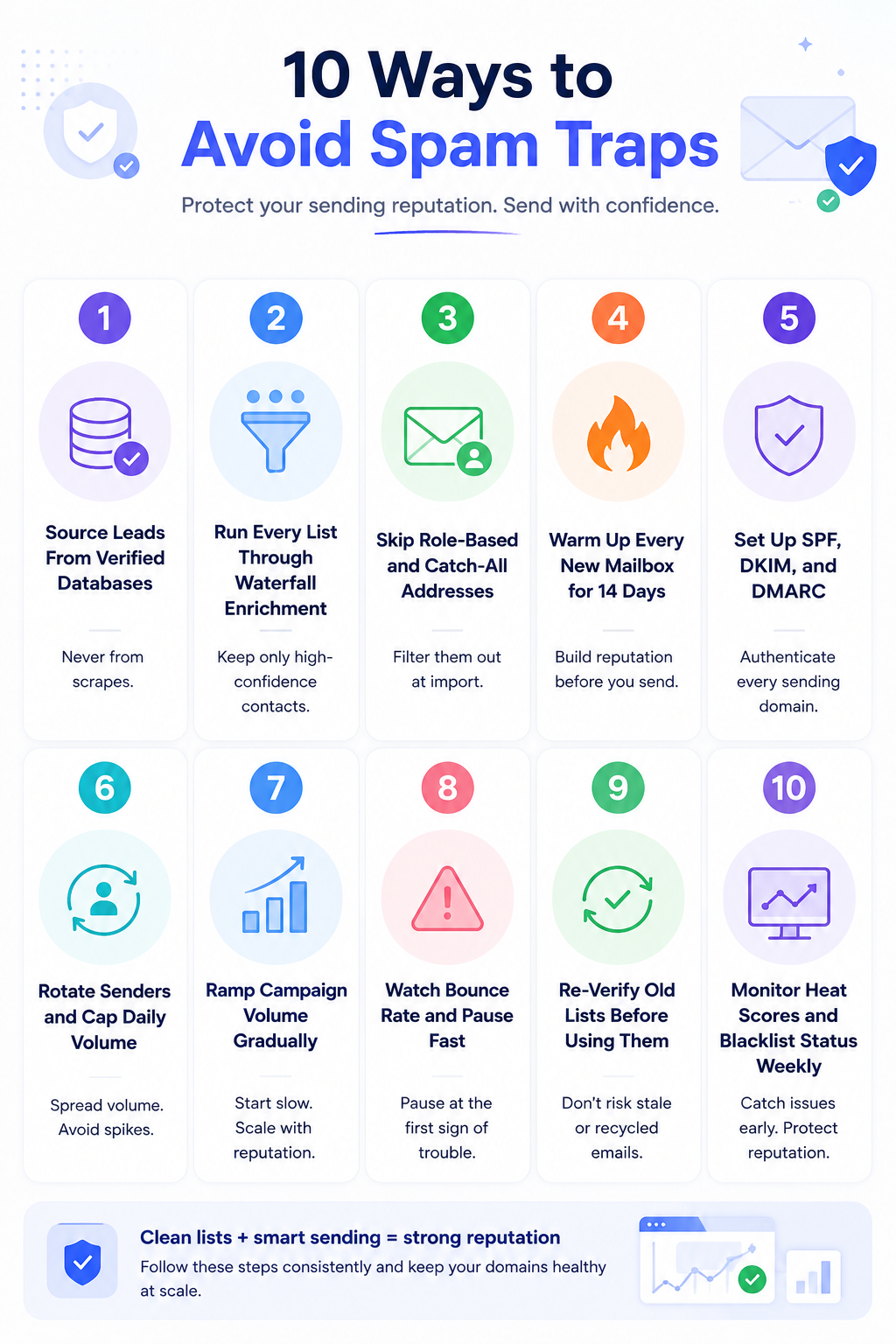
Here is the short version if you need answers fast.
That is the shortlist.
The rest of this guide explains why each step matters and exactly how I run it in my own campaigns.
A spam trap is an email address that exists for one purpose, catching senders who do not follow proper list practices. When you send to one, you get flagged by ISPs, blocklist operators, and reputation monitors.
Here is the tricky part. Spam traps are designed to be invisible. You will not know one is on your list until you have already sent to it. And by then, the damage to your sender reputation has already started.
Cold senders get caught more often than opt-in marketers for a simple reason. You cannot use double opt-in when you run outbound. Your lists come from prospecting databases, enrichment tools, and scrapers. Every one of those sources carries some risk of spam traps hiding inside.
Understanding the different types helps you spot them earlier. I have a deeper breakdown in how spam traps harm sender reputation, but here is the quick tour.

These are email addresses created from scratch by anti-spam organizations. They have never belonged to a real person. They exist only to catch senders using purchased lists, scraped data, or non-consented outreach.
Hitting one usually means an immediate blocklist entry. This is the most damaging trap type by a wide margin.
These are old email addresses that were once real accounts. The user abandoned them years ago, and the provider let them go inactive for 6 to 12 months. Then the mailbox got repurposed as a trap.
If your list has recycled traps, it usually means your data is stale. You are pulling from a source that has not refreshed its records in a long time.
These addresses catch senders who do not validate spelling at import. Common examples include gmial.com, yahooo.com, and hotmial.com.
Traps sit on those misspelled domains and wait for careless senders. Skip verification at the import stage and typo traps are the easiest to hit.
Role-based addresses like info@, sales@, and admin@ are not spam traps by strict definition. But they behave like them in cold outreach.
Nobody reads them, they never reply, and they often forward messages straight to spam. Catch-all addresses have a similar issue. Any email you send to a catch-all domain lands somewhere, even if the address never actually existed.
Both categories can drag your sender reputation down like a real spam trap. Skip them at the source.
That is the anatomy. Now let me show you how to tell if one has already slipped into your list.
You will not get a warning email from a blocklist. But there are five signals that show up almost every time.
If two or more of these hit at the same time, treat it as confirmed. Pause your campaigns and start the recovery process I cover further down.
Here is the core playbook. Every one of these is a step I actually run.
Skip any of them and you leave a hole for a spam trap to sneak through.
Scraped lists are the fastest way to hit pristine traps. Anti-spam organizations plant traps on public directories, LinkedIn scraper output, and old company websites. They do this precisely because they know how prospectors work.
The safer path is to pull leads from a verified B2B database that refreshes contact data regularly. I use Leadsforge for this. The database holds 500 million contacts, and every record runs through waterfall enrichment before it lands in my list.
That does not mean zero risk. But it cuts the risk of pristine traps by a wide margin compared to scraping.
Even if your source is clean, individual records can still be stale. Waterfall enrichment pulls the same contact through multiple data providers, then keeps the version with the highest confidence score.
If a record fails across every provider, that is a strong signal the email is either dead or a recycled trap. Drop it before you import.
I do this on every new list I build, and I re-verify anything older than 30 days. Here is my full breakdown of how real-time email validation works if you want the deeper mechanics.
Most email verification tools flag role-based and catch-all addresses automatically. Set your filter to exclude them at the import step.
You lose a small number of technically valid contacts. But you save your reputation from traffic that would never reply anyway.
I have never regretted dropping a role-based address from a cold list.
A new mailbox has no sending history. When you push cold volume from it on day one, providers treat it as suspicious traffic and route more of your mail to spam.
Warmup builds a positive history before you ever send a real cold email. The mailbox exchanges natural-looking messages with a pool of real inboxes, gets replies, and slowly climbs a reputation ladder.
I target a heat score of 85 or higher in Warmforge before I launch any campaign. Warmforge is included free on every Salesforge plan, so this step costs nothing extra. If you want the full picture, I wrote a complete guide to email warmup in 2026.
Authentication records prove to inbox providers that the email is really from you. Without them, even a clean list will land in spam.
Here is what each one does. SPF says which servers are allowed to send from your domain. DKIM signs each message with a cryptographic key. DMARC tells the receiving server what to do if either check fails.
If you run infrastructure through Mailforge or Infraforge, these records get configured automatically on every domain. If you set up mailboxes yourself, do this before you start warmup. My step-by-step is in how to set up SPF, DKIM, and DMARC correctly.
Even a healthy mailbox has a natural sending ceiling. Push past it, and providers throttle you or start flagging your traffic.
I cap every mailbox at 30 to 50 emails per day. Then I split my full send volume across multiple mailboxes on rotation, so no single sender ever spikes.
This is built into Salesforge natively. Sender rotation runs in the background across every mailbox connected to a sequence. If you want the deeper math on daily volume caps, I broke it down in how many cold emails to send per day.
The first two weeks after warmup are the highest risk window. Providers are still calibrating your reputation.
I ramp campaign volume slowly. Week 1 sits at about 25 percent of full volume. Week 2 climbs to 50 percent. By week 3, I am at full pace.
If bounce rates stay low and reply rates hold, I keep climbing. If anything spikes, I pull back to the previous week's volume and hold for another cycle.
Bounce rate is the earliest signal that something is wrong. A healthy campaign sits below 3 percent hard bounces.
If any mailbox spikes above that, pause it the same day. Do not wait to see if it recovers on its own.
I set up Bounce Shield in Salesforge to handle this automatically. Any mailbox that crosses my threshold gets paused, and I get a notification to review the list.
If a list has been sitting for 60 or 90 days, treat it like a new list. Contacts change jobs, addresses go stale, and recycled traps get planted in the meantime.
I run every dormant list back through waterfall enrichment before I reactivate it. The extra step takes minutes and saves entire domains.
Skipping this is one of the most common ways experienced senders still get burned.
Your sender reputation shifts every day based on how mailboxes respond to your traffic. If you check it once a month, you catch problems weeks after they start.
I run a weekly review across three metrics. Heat score for every active mailbox. Blacklist status for every sending domain. Inbox placement test for at least one mailbox per sequence.
The whole review takes 15 minutes and catches issues before they compound. My deeper piece on improving sender reputation covers the monitoring stack I run.
Let's say the warning signs earlier pointed to a trap hit. Do not panic and do not keep sending. The next 24 hours matter most.
Here is the recovery flow I follow, in order.
The first move is to stop the bleeding. Pause every sequence attached to the affected mailbox before you send another email.
If the trap is a pristine trap, more sends make the blocklist entry worse. If it is recycled, you may still avoid the worst of the damage by acting fast.
Run a placement test through your warmup dashboard. This shows exactly where your mail is landing across Gmail, Outlook, and other providers.
If you are landing in spam across more than one provider, the mailbox needs a full reputation rebuild. If it is only one provider, the recovery is faster.
Run a blacklist check on both your sending domain and its IP. If you show up on Spamhaus, SORBS, or another major list, follow their delisting process directly.
Most major blocklists have a self-service delisting form. Provide the fix you have made and request removal. I wrote a full walkthrough in IP blacklist removal steps to recover.
If the reputation damage is significant, treat the mailbox as new. Pull it out of active sequences, connect it to warmup, and start a fresh 14-day cycle.
Do not shortcut this. A mailbox that ships cold volume mid-recovery ends up back in spam within days.
Every trap hit points to a data quality problem somewhere in your list source. Re-verify the full list through waterfall enrichment and drop any address that fails.
If the whole list came from a single source and multiple traps surface, retire that source entirely.
I run all of my cold outbound through the Forge stack because every one of these steps is baked into the platform. If you are stitching this together from separate tools, expect gaps.
Here is how the pieces fit together.
The stack talks to itself, so I do not need three separate deliverability tools that fight with a lead database. Everything runs from one login.
If you want to try the sequencing and warmup side, Salesforge runs a free 14-day trial with no card required. Warmforge is included on every plan, and Bounce Shield is on by default.
1. What is a spam trap in cold email?
A spam trap is an email address that exists to catch senders who use poor list practices. Sending to one damages your sender reputation and can land your domain on a blocklist.
2. How do I know if I have hit a spam trap?
Watch for sudden bounce rate spikes, sharp drops in open rate, blocklist alerts, or heat score drops below 85. If two of these hit at once, treat it as a confirmed trap hit and pause your campaigns.
3. Can spam traps be removed from my list?
You cannot identify individual spam traps because their owners keep them secret by design. The fix is to re-verify the entire list through waterfall enrichment and drop any address that fails.
4. How long does it take to recover from hitting a spam trap?
Recovery depends on the trap type and how quickly you pause. A recycled trap caught early may recover in 2 to 3 weeks. A pristine trap with continued sending can take 60 to 90 days, and some domains never fully recover.
5. Do email verification tools catch spam traps?
Advanced verifiers with toxicity scoring and AI risk detection catch a meaningful share of traps. No tool catches all of them, so combine verification with sourcing hygiene and volume controls.
6. Does warming up a mailbox help avoid spam traps?
Warmup does not remove spam traps from your list. But it builds a strong sender reputation that helps your mailbox survive a small hit if one does slip through.
7. Are role-based emails technically spam traps?
Role-based addresses like info@ and admin@ are not spam traps by definition. But they behave like them in cold outreach because nobody engages with them, so filter them out at import.
.jpg)

.jpg)
.jpg)


