
Personalized Outbound Strategy
Get The Right Outbound Strategy In Minutes
Enter your email to get a custom plan & stack recommendation for your business
It's being carefully crafted by AI
Please check your mailbox in 5 minutes
Planning to use TexAu for B2B lead generation? There's a good chance the reviews you're reading are about a version of TexAu that no longer exists.
TexAu was once known for LinkedIn scraping and social media automation. Now, it's moving in a different direction, with B2B lead search, waterfall enrichment, AI lead scoring, and CRM workflows.
And not everyone was happy about the change.
In August 2025, one G2 reviewer complained about LinkedIn features being removed, while another reported concerns about the older product shutting down.
Yet TexAu still holds a 4.3/5 rating on G2 and 4.5/5 on Trustpilot. The problem? Much of that feedback comes from its older product, so those ratings don't necessarily tell you what to expect in 2026.
Is the new TexAu actually worth paying for, or are you better off looking elsewhere?
In this TexAu review, I'll break down its current features, pricing, customer feedback, and limitations to help you decide.
TexAu’s current version focuses on B2B lead generation and managing what happens to those leads after they're found.
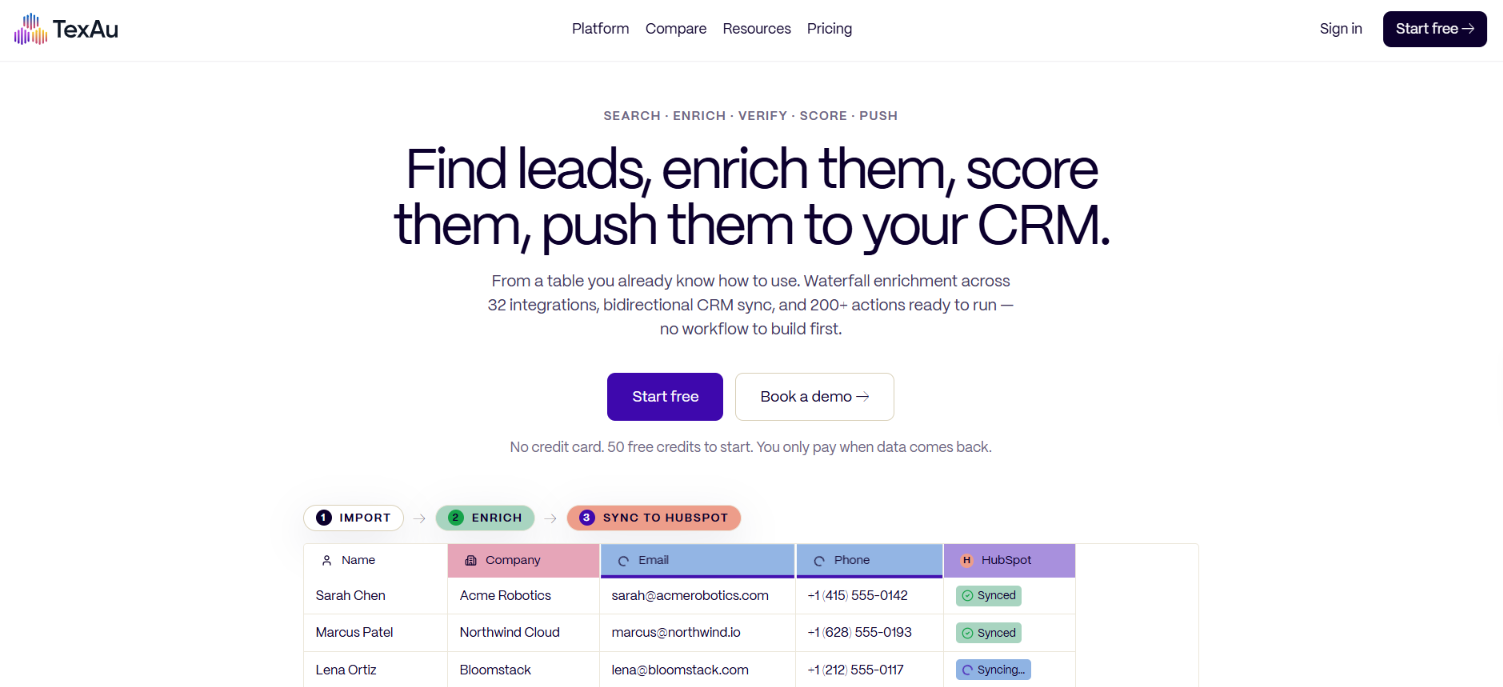
With TexAu, you get B2B lead search, waterfall enrichment, email verification, AI lead scoring, and scheduled workflows. You can also sync contacts with your CRM and send enriched leads to tools like Smartlead and Instantly.
What you don't get is a built-in email sequencer or bidirectional CRM syncing on the Solo and Starter plans. Here's how TexAu compares with Leadsforge, which also offers B2B lead search and contact enrichment.
Both tools help you find and enrich B2B prospects, but they focus on different parts of the process. TexAu lets you schedule enrichment, score leads, and sync records with your CRM. However, bidirectional hourly syncing requires its $649/month Teams plan.
Leadsforge offers several ways to find prospects, including ICP searches, company lookalikes, and business signals. It starts at $49/month and focuses on finding and enriching B2B leads rather than managing CRM workflows.
TexAu has a 4.3/5 rating on G2 from 60 reviews and 4.5/5 on Trustpilot from 15 reviews. However, most reviews cover its older social media automation product rather than its newer B2B lead generation platform.
Positive reviews mainly mention TexAu's ready-made workflows, lead extraction, and social media automation.
In a March 2025 G2 review, Mrinali S. praised its quick setup and cloud-based workflows.

A July 2024 Trustpilot reviewer also liked its LinkedIn, Twitter, and Instagram scraping features. These comments reflect users' experiences with TexAu's older automation tools.
More recent complaints focus on TexAu's product changes. In August 2025, Mark D. complained on G2 about LinkedIn features being removed during the product relaunch.

Another reviewer, Vidit G., claimed TexAu was shutting down and said they had started looking for alternatives. Earlier reviews also mention bugs, a learning curve, and customer support issues.
The ratings reflect customer feedback, but they don't give a clear picture of TexAu's current product. Trustpilot's latest review is from May 2025, and its page shows no reviews in the last 12 months.
The supplied G2 reviews also offer little feedback on the newer lead search, waterfall enrichment, AI scoring, and CRM syncing features.
So, I'd treat the ratings as feedback on TexAu's history rather than proof of how well its 2026 platform performs.
TexAu uses a spreadsheet-style table where you can search for leads, enrich contact details, and run actions on the results. Here are the eight main features.
TexAu has a built-in people search for finding B2B prospects. You can also bring contacts into the platform through a CSV file, copy and paste, or a saved LinkedIn Sales Navigator search.
Once imported, the leads appear in a table where you can select columns and run actions on them.
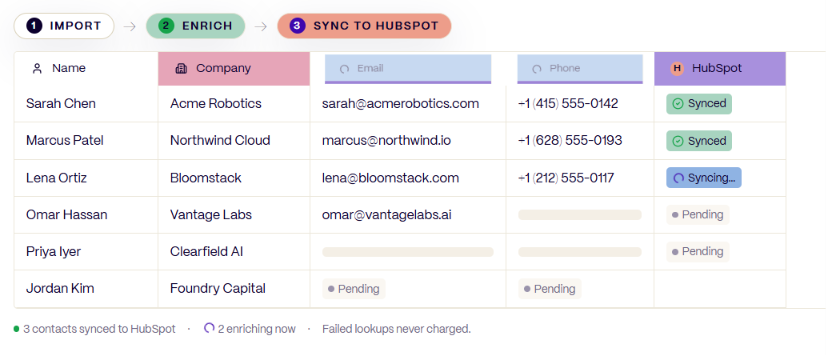
For example, you can import a list containing names and company details, then add work emails and phone numbers through enrichment.
TexAu uses the same credit balance for lead searches and enrichment. Failed lookups aren't charged. TexAu does not publish the size of its B2B contact database.
TexAu searches multiple data providers when you need missing contact or company details. Its listed providers include Hunter, Apollo, Snov, RocketReach, ContactOut, and Dropcontact.
Suppose you have a prospect's name and company but no work email. TexAu can check one provider and move to another if the first doesn't return a match.
You can use enrichment to find:
TexAu advertises 32 enrichment integrations. However, the Solo and Starter plans include 12 waterfall sources, with additional premium sources on Teams.
Failed lookups cost zero credits. TexAu charges for successful matches rather than each provider attempt.
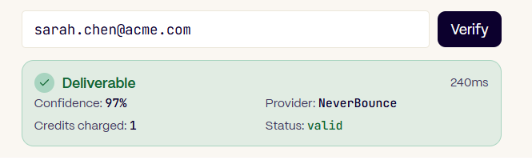
TexAu lets you verify email addresses before sending them to an outreach campaign. Verification runs from the table, so you can check an enriched list without exporting it to another verification service.
TexAu claims 97% email verification accuracy, based on its reported results from 1.2 million verified sends. That figure comes from TexAu's own website, not an independent test. Verification is included in all paid plans. A successful verification costs one credit.

TexAu lets you write your own AI prompts and apply them to contacts in a table. For example, you could ask it to score SaaS prospects based on company size, industry, funding, and how closely they match your ICP.
You can also use AI Columns to classify companies or generate personalized text using information already present in each row.
TexAu supports GPT, Claude, and Gemini, with an option to connect your own API key. One limitation is that the AI can only work with the information available to it. Missing company details or poorly written scoring instructions can affect the results.
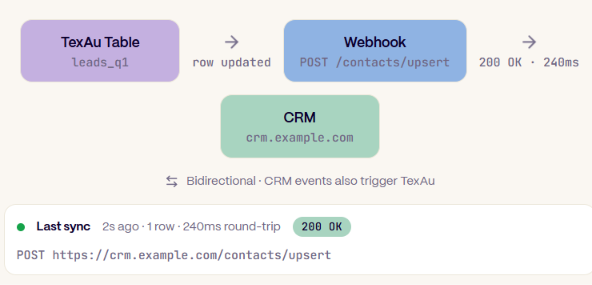
TexAu supports CRM syncing with HubSpot, Pipedrive, Zoho CRM, and GoHighLevel. You can map contact information to CRM fields and update records with enriched data. The syncing frequency changes by plan:
For example, if you enrich a list of HubSpot contacts, TexAu can send the updated information back to HubSpot. Salesforce appears in TexAu's marketing material, but its integrations page currently marks it as coming soon.
TexAu connects with Smartlead, Instantly, Lemlist, Apollo Sequences, and Reply.io. After enriching and verifying a prospect list, you can send those contacts to a connected outreach tool.
For Smartlead, TexAu lists support for adding contacts to campaigns and passing custom variables for personalization. TexAu lets you push verified contacts into Instantly campaigns and assign them to sequences.
TexAu doesn't provide its own email sequencer. You still need the connected tool to send emails and manage follow-ups.
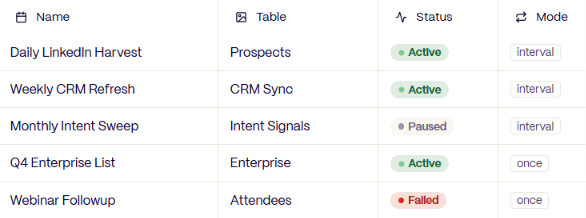
TexAu advertises more than 200 ready-to-run actions. These cover tasks such as searching for contacts, enriching records, verifying emails, scoring prospects, and sending data to connected tools.
You can run actions from a table or schedule them to run at a set time. TexAu lists scheduled searches, enrichment, AI scoring, and outbound handoffs among its supported workflow actions.
TexAu also provides reusable workflow templates for repeating the same process across different lists.
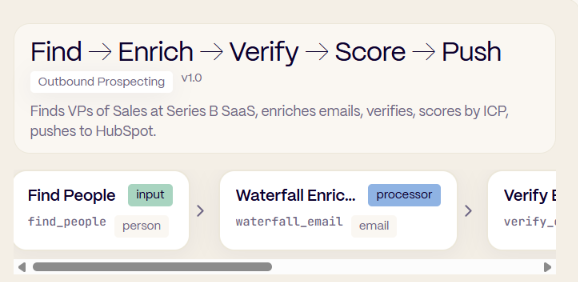
TexAu's GTM Co-Pilot lets you describe a task in plain English. For example, you could ask it to find CTOs at Series B SaaS companies, enrich their work emails, score the contacts, and add selected prospects to a Smartlead campaign.
TexAu says Co-Pilot can turn those instructions into a workflow using its existing search, enrichment, and outbound actions. Co-Pilot is included in the Solo, Starter, and Teams plans. The actions it runs still use TexAu's credit system.
TexAu covers lead search, but much of its current product is built around what happens after you've found the contacts. You can import a list, fill in missing emails and phone numbers, check email addresses, and score prospects before sending them to an outreach campaign.
The part I'd pay closest attention to is its lead search. TexAu doesn't clearly publish the size of its contact database. So, although it offers built-in people search, there's not enough published information to judge how many relevant prospects it can find across different industries and locations. Its credit system also needs some attention.
The $99/month Solo plan includes 2,500 credits, but TexAu estimates that this covers roughly 450-500 enriched leads, depending on the actions you run. Searching, enriching, verifying, and scoring the same contacts can use credits at different stages.
And if you want contact updates to move both ways between TexAu and your CRM every hour, you'll need the $649/month Teams plan.
TexAu has documented features for enriching, scoring, and moving prospects into outreach campaigns. But without published database coverage figures, it's difficult to judge how well its built-in search performs for finding new leads.
If your main work is finding new prospects every day, that distinction matters.
TexAu pricing starts at $99/month for 2,500 credits. There are three paid plans and an Enterprise option with custom pricing.
The important part is how those credits are used. TexAu charges for lead searches, enrichment, email verification, AI scoring, and other actions. So, 2,500 credits won't necessarily give you 2,500 fully enriched contacts.
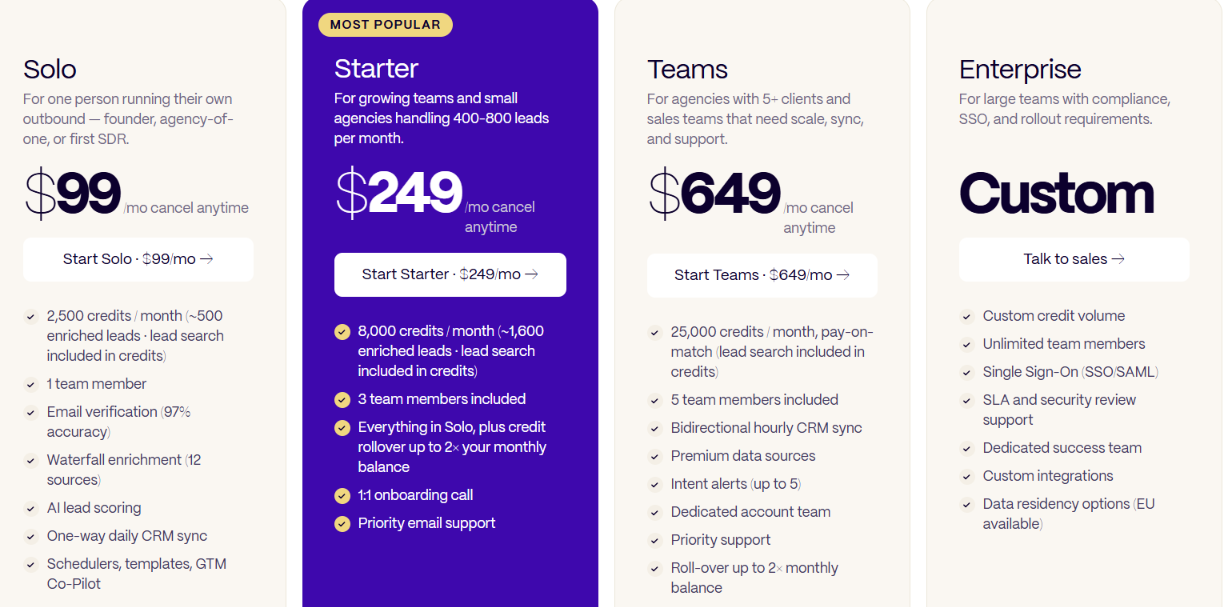
Here's what each plan includes when billed monthly.
All three paid plans include lead search, email verification, AI lead scoring, schedulers, templates, and GTM Co-Pilot.
The differences go beyond credit limits.
Additional members cost $99 per person per month on Starter and Teams. TexAu also offers annual billing with approximately 17% savings.
TexAu uses a pay-on-match model for data lookups. For example, suppose you search for 100 work email addresses. If TexAu finds 72 and fails to find the remaining 28, you're charged 72 credits for the successful email lookups. According to TexAu's pricing page:
TexAu says its dashboard shows the credit cost of each action in real time. Starter and higher plans support credit rollover, up to twice the monthly allowance. Solo doesn't include rollover. If you run out, you can purchase extra credits or upgrade. Purchased top-up credits don't roll over.
TexAu estimates that 2,500 credits on Solo can produce around 450–500 enriched leads, depending on the enrichment and verification actions used. Using that estimate, here's the approximate cost.
These figures are based on TexAu's published estimates. The cost can change depending on how many searches, enrichment actions, verification checks, and AI actions you run.
For example, finding a work email and verifying it are separate credit-consuming actions. Adding AI scoring may increase usage further.
That's why the cost per enriched lead is more useful than comparing plans by credit count alone.
TexAu helps you find leads, get contact details, score prospects, and update your CRM. But it may not be the right choice for everyone.
Who Should Use TexAu:
Who Should Avoid TexAu:
TexAu is useful if you already have lead lists and need to enrich them, score prospects, and update your CRM. If your main goal is finding new B2B prospects and getting their contact details, a dedicated lead search tool may be a better fit.
TexAu gives you several tools around lead data, but Leadsforge is a better fit if you want to spend less time setting up workflows and more time finding prospects.

Leadsforge starts with the search itself. You can describe the type of company or person you want, then build a list from that.
That difference shows up in how you find and prepare leads for outreach.
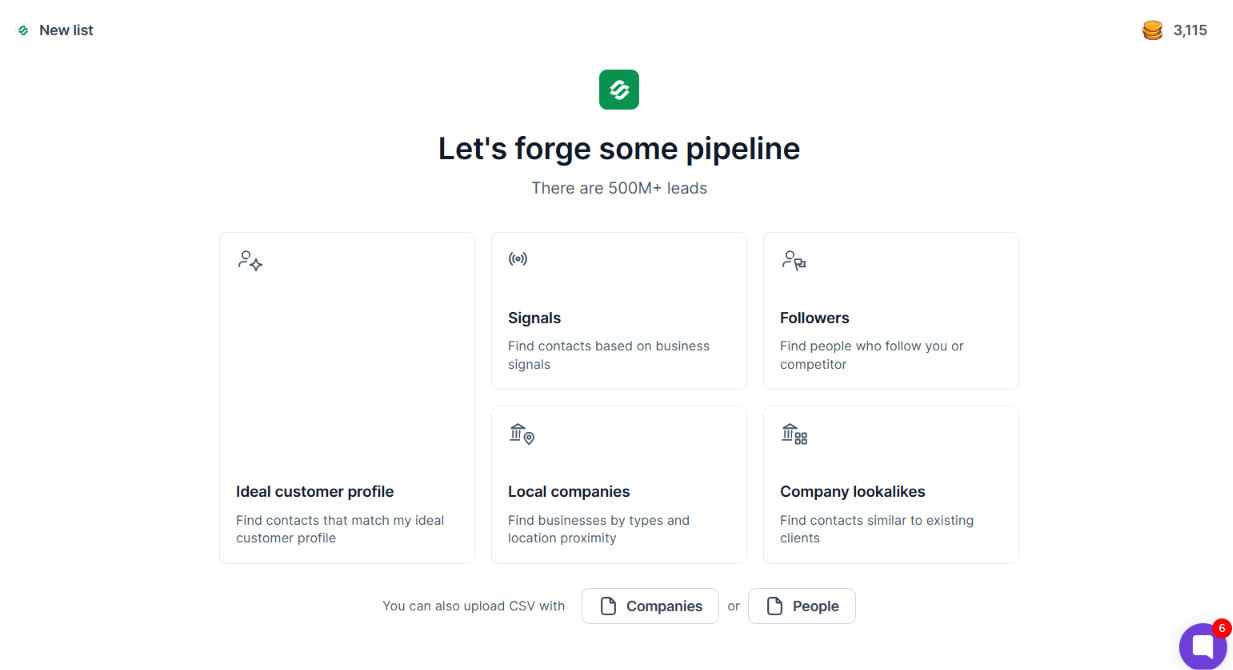

TexAu is the better fit when scoring, scheduled tasks, and CRM syncing are a bigger part of what you need. Leadsforge is the stronger alternative when the main job is finding new B2B prospects and getting their contact details.
Enter your email to get a custom plan & stack recommendation for your business
Please check your mailbox in 5 minutes

Yes, TexAu is worth it if you need lead enrichment, scoring, scheduled tasks, CRM syncing, and outbound integrations in one place. Its pay-on-match pricing also means failed lookups do not cost credits.
But I would not choose TexAu just for B2B lead generation.
TexAu starts at $99 per month, does not clearly publish the size of its B2B contact database, and limits the lower plans to one-way daily CRM syncing. There is also little recent user feedback on the new version of the platform.
If finding new prospects is your main goal, Leadsforge is the better choice. You get access to 500M+ B2B contacts, several ways to find prospects, and waterfall enrichment for contact data.
Leadsforge also starts at $49 per month with 2,000 credits, and you get 100 free credits to try it before paying.
So, choose TexAu for enrichment and workflow automation around your lead data. Choose Leadsforge if you mainly want to find new B2B prospects and get their contact details.
.jpg)



.jpg)
