MCP is quickly becoming the standard for connecting AI assistants with business software, and Salesforce has now joined that shift with the Salesforce MCP Server. It promises to let AI clients like Claude, ChatGPT, and Cursor securely interact with your Salesforce org instead of relying on custom integrations.
It offers different MCP servers, different setup methods, and different use cases depending on what you're trying to do. In this Salesforce MCP Server review, I'll explain how it works, how easy it is to set up, what features stand out, where it still falls short, and whether it's worth using. I'll also compare it with the Forge MCP Server to help you decide which one better fits your workflow.
After reviewing Salesforce MCP Server, I think it's a valuable addition for organizations that already use Salesforce and want AI assistants to securely interact with their CRM. Instead of building custom integrations for every AI client, Salesforce lets you configure an MCP server once and connect compatible clients using standard OAuth authentication.
The platform also keeps your existing permissions and security controls in place, which is one of its biggest strengths. However, understanding the different Salesforce MCP server options and setting them up requires some technical knowledge.
Best For:
Not Ideal For:
Pros of Salesforce MCP Server:
Cons of Salesforce MCP Server:
Salesforce MCP Server is a solid choice for organizations that want AI assistants to securely work with Salesforce through the Model Context Protocol. Its biggest strengths are Salesforce-managed hosting, user-level security, and support for standard MCP-compatible AI clients.
While the setup and different server options introduce a learning curve, it's worth evaluating if your team already relies on Salesforce and wants to bring AI into its existing workflows.
Salesforce MCP Server lets AI assistants work with your Salesforce org in a secure way. Instead of building a separate API integration for every AI tool, you set up an MCP server once in Salesforce, and compatible AI clients like Claude, ChatGPT, Cursor, and Postman can connect using standard OAuth authentication.
Once connected, AI assistants can access Salesforce data and perform approved tasks based on the permissions of the signed-in user.
Salesforce manages the Hosted MCP Servers, so you don't have to set up or maintain your own server. These servers can read, create, update, and delete Salesforce records, work with Flows, Apex actions, and Named Queries, and connect with products like Data 360 and Tableau Next. Salesforce also provides different standard servers for different levels of access, such as read-only, create and update, delete-only, or full access. This lets administrators decide exactly what an AI assistant is allowed to do.
Salesforce or Hubspot: Which CRM is Right for Your Sales Team?
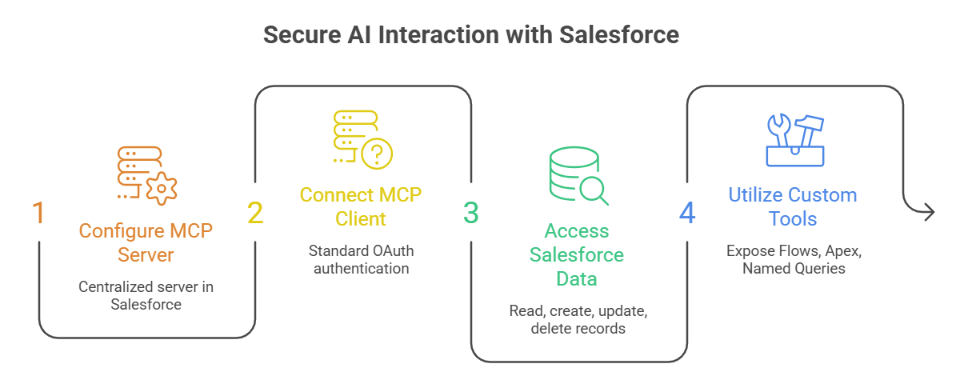
Salesforce Hosted MCP Servers give AI assistants a secure, governed way to interact with Salesforce data and automation using the Model Context Protocol (MCP). Instead of building separate integrations for each AI tool, you configure a server once in Salesforce, and any compatible MCP client can connect using standard OAuth authentication. Here are the main capabilities it offers:
Salesforce provides different MCP servers for different use cases. While they all use the Model Context Protocol (MCP), they're designed for different users and workflows. The two main Salesforce MCP servers are:
Salesforce Hosted MCP Servers are fully managed by Salesforce and let MCP-compatible AI clients securely interact with Salesforce data and automation. They support tasks such as working with Salesforce records, Flows, Apex actions, Named Queries, Prompt Templates, and supported Salesforce product capabilities while following your organization's existing security and user permissions.
The Salesforce DX MCP Server is built for Salesforce development. It runs in your local development environment and helps AI assistants work with Salesforce metadata, org management, data operations, testing, deployments, and other development tasks.
Here's a quick comparison of the two:
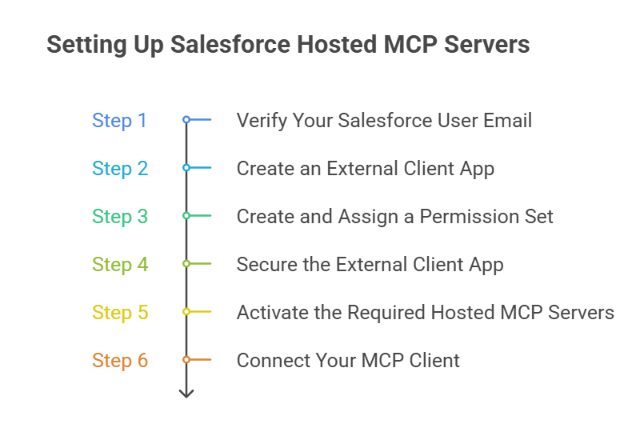
Setting up Salesforce Hosted MCP Servers takes a few configuration steps, but once everything is in place, you can securely connect AI clients like Claude, ChatGPT, or Postman to your Salesforce org. Here's how the setup works.
Before you begin, make sure your Salesforce user email is verified. Salesforce recommends completing this first because it's required for the remaining setup process.
Next, create an External Client App (ECA) in Salesforce. Enable OAuth, configure the required OAuth scopes, and enable PKCE authentication. This allows MCP-compatible AI clients to securely authenticate with your Salesforce org.
Create a permission set for users who need access to Salesforce Hosted MCP Servers. Then assign the permission set to the appropriate users.
Configure the External Client App so that only approved users can access it. Once the configuration is complete, save the OAuth credentials you'll need when connecting your MCP client.
Go to Setup → API Catalog → MCP Servers and activate the Hosted MCP Servers you want to use. Salesforce provides several standard servers, including:
Finally, connect your preferred MCP-compatible client, such as Claude, ChatGPT, Cursor, or Postman. After authentication, test the connection to confirm that your Hosted MCP Servers are working correctly before using them in production.
Yes, Salesforce Hosted MCP Servers are built around Salesforce’s existing security and permission model. AI clients do not receive unrestricted access to your Salesforce org. Every transaction runs under the authenticated user’s identity and follows the permissions already assigned to that user. Here are the main security controls:
Salesforce also separates record access through different standard servers. For example, SObject Reads only allows reading, querying, and searching records. SObject Mutations allows creating and updating records but does not allow deletion. SObject Deletes only exposes delete operations.
For a safer rollout, I would start with SObject Reads in a sandbox, give users only the permissions they need, and add write or delete access only after the workflow has been tested.
Salesforce does not publish separate pricing for Salesforce Hosted MCP Servers or the Salesforce DX MCP Server. Instead, Salesforce includes MCP Server capabilities as part of its broader Salesforce platform. The overall cost depends on the Salesforce products and editions your organization uses.
If you're evaluating Salesforce MCP Server for your business, you'll need to review the pricing for the relevant Salesforce products, such as Sales Cloud, Service Cloud, Data 360, or other supported offerings. Salesforce also notes that pricing varies by product and edition, and recommends contacting its sales team for detailed pricing information. Salesforce has not published a standalone pricing plan specifically for Salesforce Hosted MCP Servers or the Salesforce DX MCP Server.
Salesforce Hosted MCP Server is built for teams that want AI assistants to work with Salesforce data, automation, and development capabilities. It helps AI clients securely interact with Salesforce records, Flows, Apex actions, metadata, and other supported Salesforce features.
If your focus is outbound sales instead of Salesforce administration or development, Forge MCP Server is a better fit. Forge MCP Server connects MCP-compatible AI assistants such as Claude, Cursor, Windsurf, Gemini, and Codex to the entire Forge stack.
Instead of switching between different tools, you can use natural-language prompts to manage your outbound workflow from one place. With Forge MCP Server, you can:
Forge MCP Server supports all Forge products through a single MCP endpoint.
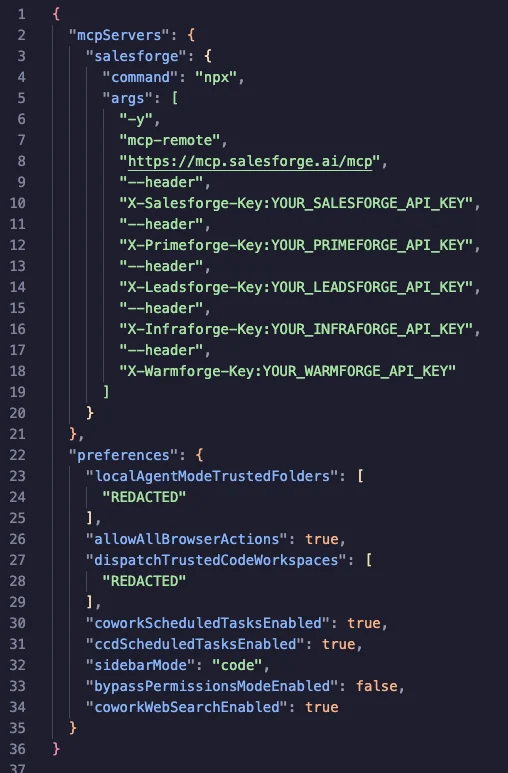
Each product uses its own API key, so you only connect the products you use. Tools for products without configured API keys do not appear in your AI assistant.
Forge MCP Server is not a replacement for Salesforce Hosted MCP Server because the two products solve different problems. Salesforce Hosted MCP Server is designed for AI-powered Salesforce workflows, while Forge MCP Server is designed for AI-powered prospecting, outreach, email infrastructure, and deliverability workflows.
I think Salesforce Hosted MCP Servers are worth it if your team already uses Salesforce and wants AI assistants to securely work with CRM data and automation. Instead of building separate integrations for every AI tool, you can configure Salesforce once and connect MCP-compatible clients like ChatGPT, Claude, or Cursor using standard authentication.
It is especially useful for teams that want AI to read or update Salesforce records, run Flows, use Apex actions, work with Named Queries, or access supported Salesforce capabilities while following existing user permissions and security policies.
However, Salesforce Hosted MCP Servers are designed specifically for the Salesforce ecosystem. If your goal is to manage outbound sales workflows, email infrastructure, lead generation, or deliverability, you'll need additional tools outside Salesforce.
Salesforce Hosted MCP Servers are worth it if you want to:
It may not be the right choice if you want to:
Overall, Salesforce Hosted MCP Servers are a good choice for teams that want to securely connect AI assistants to Salesforce. If your work already depends on Salesforce, they can simplify AI integration while keeping your existing permissions and governance in place.
Salesforce Hosted MCP Servers make it easier to connect AI assistants with Salesforce without building separate integrations for every tool. They let AI securely access Salesforce data and automation while following your existing user permissions and security controls.
If you also want AI to help with outbound sales, lead generation, email infrastructure, and deliverability, take a look at the Forge MCP Server. It connects MCP-compatible assistants like Claude, Cursor, Windsurf, Gemini, and Codex with the Forge platform, so you can manage more of your outbound workflow from one place.
.jpg)


.jpg)

