Even if your deliverability rate looks healthy, about 1 in 6 of your emails may still miss the inbox. A delivered email only means the recipient's server accepted it. The message can still land in spam and go unread, while your sequencer counts it as a success.
So, if your reply rate starts to drop, don't assume your targeting or offer is the problem. First, check whether your emails are reaching the inbox.
Email deliverability tools can help you spot issues through mailbox warmup, inbox placement tests, and blacklist monitoring.
In this guide, I compare six email deliverability tools for cold email. I'll cover their features, limitations, and pricing to help you find the right fit for your outreach needs.
TL;DR: 6 Best Email Deliverability Tools at a Glance
Warmforge: Warmforge warms mailboxes and runs inbox placement tests from one dashboard, and it offers MCP, CLI, and API for quick email deliverability checks.
GlockApps: GlockApps gives detailed placement reports by provider and spam filter, with DMARC and blacklist monitoring.
MxToolbox: MxToolbox offers free DNS and blacklist lookups, with paid plans for placement analysis and DMARC management.
MailReach: MailReach pairs mailbox warmup with on-demand spam tests for cold email senders and agencies.
Warmy: Warmy combines warmup on a 1M+ mailbox network with seed testing and a named deliverability expert.
Folderly: Folderly diagnoses why emails land in spam and gives fixes, with placement testing sold as a separate product.
How I Evaluated Email Deliverability Tools
I evaluated these tools based on five key factors to understand how well they help cold email teams improve inbox placement, manage email health, and run campaigns.
Inbox Placement Testing: Can the tool test inbox placement across Gmail, Outlook, and other email providers?
Automation and Technical Access: Does it support automated monitoring, API integrations, MCP, or CLI access?
Email Infrastructure and Monitoring: Can it check SPF, DKIM, and DMARC records, monitor blacklists, and track domain and IP health?
Pricing and Scalability: Are the plans affordable, and can teams manage multiple mailboxes and domains as they grow?
User Reviews and Reputation: What do users say on G2, Trustpilot, Reddit, and other communities about the tool's performance, reliability, and support?
A Quick Comparison of 6 Best Email Deliverability Tools
The table below shows how the six tools compare on the jobs that matter for cold email. Use it to shortlist two or three tools, then read the full reviews.
$9 per mailbox slot per month with annual billing. Free with Salesforge
$59 per month with annual billing
$129 per month
$20 per mailbox per month with annual billing
$49 per month
$96 per mailbox per month with yearly billing
Free option
1 warmup slot and 1 placement test per month
Free plan with 2 spam tests
Free plan with weekly blacklist checks for 1 domain
Free spam test on its website
7-day free trial
Inbox Insights Free plan with 2 tests per month
Warmup
Yes
No
No
Yes
Yes
Yes
Inbox placement tests
Yes
Yes
Yes, on paid plans
Yes
Yes
Yes, through Inbox Insights
Monitoring
DNS, MX, and blacklist checks
DMARC, IP reputation, and blacklists
DMARC, blacklists, and complaints
Blacklist and DNS checks
Domain reputation and DMARC
Placement alerts through Pulse
MCP / CLI
MCP server and CLI
MCP server
No official MCP server or CLI
No MCP server or CLI
MCP connection
MCP server for Folderly AI (pilot)
API
Yes
Yes
Yes
Yes, for warmup and spam tests
Yes
Developer API for Folderly AI
G2 rating
4.6
4.1
4.1
4.7
4.8
4.8
What Email Deliverability Tools Do for Cold Email
A sequencer can tell you that a server accepted the email. An email deliverability tool goes one step further. It shows whether the email reached the inbox, the promotions tab, or spam.
For cold email, that work comes down to three jobs:
Warmup: Warmup sends and replies to emails between your mailbox and a network of other mailboxes. It builds a sending history, so providers trust a new mailbox.
Inbox placement testing: A placement test sends your email to seed addresses, which are test inboxes at different providers. The report shows where each copy landed.
Monitoring: Monitoring checks your authentication records (SPF, DKIM, and DMARC) and blacklist status over time. It alerts you when something breaks.
These jobs depend on each other. A warm mailbox with a broken DKIM record still lands in spam, and a clean DNS setup cannot help a mailbox that has not been warmed. Before you pay for any tool, the free Salesforge inbox placement test shows where one email lands today.
6 Best Email Deliverability Tools Reviewed
1. Warmforge
Best for: GTM teams and agencies that want to warm every cold email mailbox and test where their emails land from one dashboard.
G2: 4.6 out of 5
Warmforge is an email warmup and deliverability tool for cold email. It warms Google Workspace and Microsoft 365 mailboxes, tests where your emails land, and checks DNS records and blacklists from one dashboard.
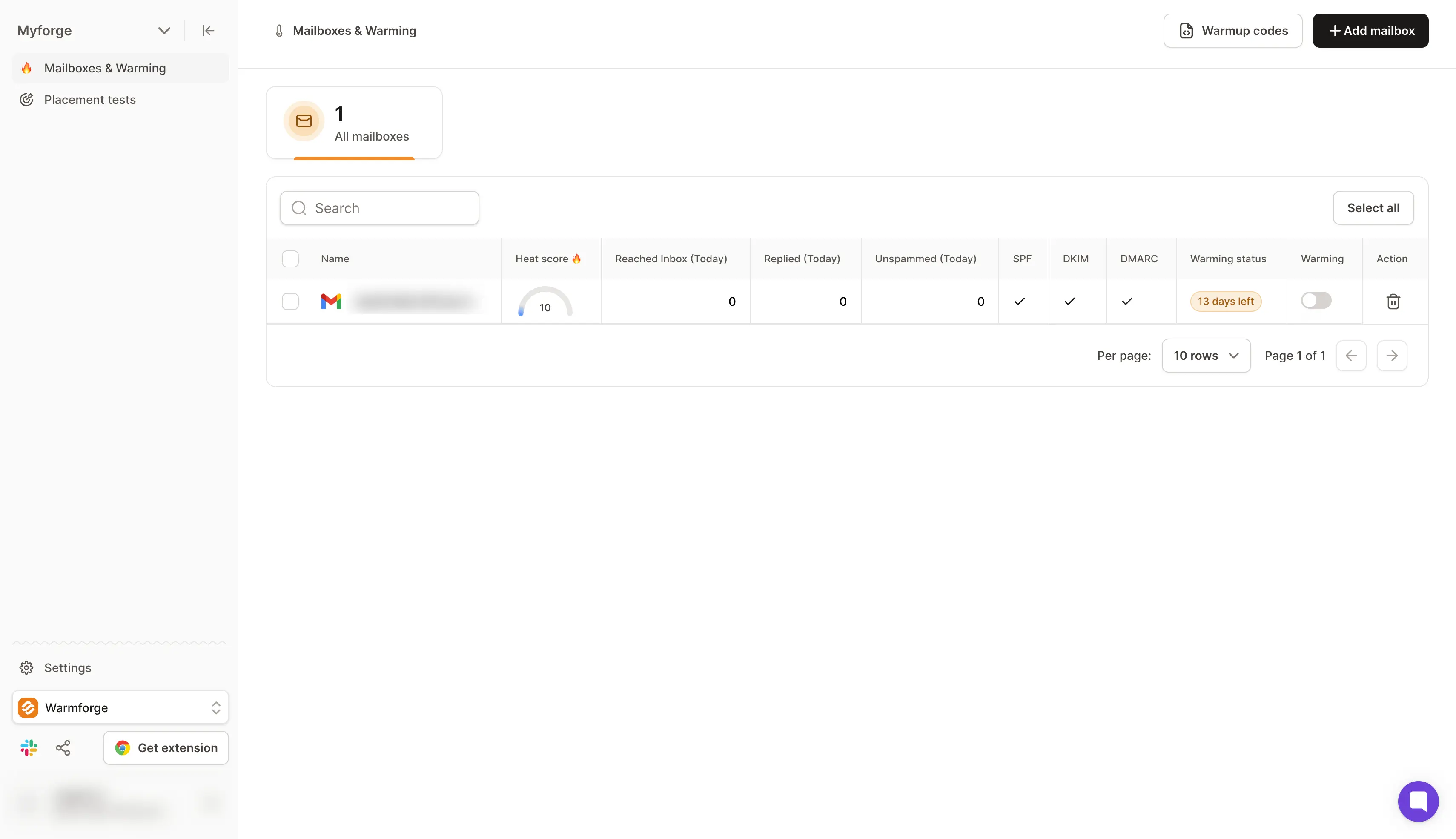
The part I find most useful is Heat Score™. Warmup without a ready signal leaves you guessing when to start sending.
Heat Score™ gives each mailbox a live health score, and once that score reaches 85, the mailbox is ready. Warmforge recommends 14 days of warmup before the first campaign.
For warmup, Warmforge sends emails to one premium pool of aged mailboxes with no recycled inboxes. AI writes each warmup email in multiple languages, so the conversations look natural to inbox providers.
If you already use Salesforge, Warmforge is free with unlimited warmup slots. The Warmforge pricing page explains the standalone prices.
That makes Warmforge the right choice for SDR teams and agencies that send from many mailboxes.
Key Features of Warmforge
AI email warmup: Warmforge sends and replies to warmup emails written by AI, so each new mailbox builds a sending history before your first campaign.
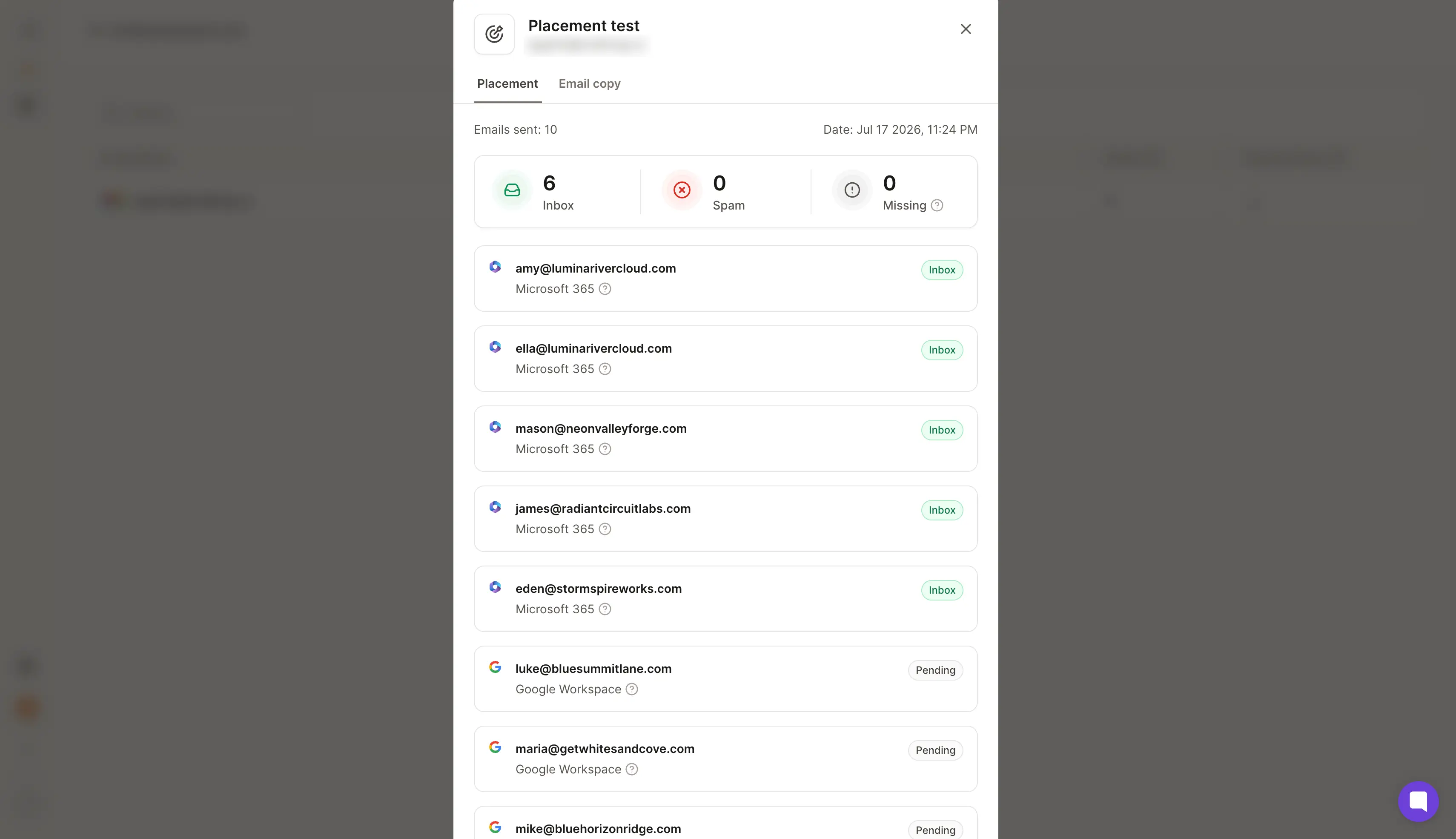
Inbox placement tests: A placement test sends emails from your mailbox to addresses at several providers. The report shows the inbox rate at each provider, such as Google and Outlook.
Heat Score™: Each mailbox gets one health number, so SDRs know when it is safe to raise sending volume.
Health Checks: Health Checks scan your DNS records, MX records, and blacklist status. They alert you before a problem spreads across a domain.
API and MCP access: Developers and AI agents can run warmup and placement tests through the Forge API, MCP server, or CLI.
What I Like About Warmforge
Free inside every Salesforge subscription with unlimited warmup slots
Heat Score™ with a clear 85+ ready-to-send threshold
One premium warmup pool of aged accounts with no recycled inboxes
Health Checks for DNS, MX, and blacklist status
API, MCP server, and CLI access for agent workflows
What Are the Cons of Warmforge
One free warmup slot outside Salesforge, then $9 per slot per month
One free placement test a month, with more tests from $32.50 per month
Warmforge Pricing
Free plan: The Free plan includes 1 warmup slot and 1 placement test per month at no cost.
Email Warmup plan: Warmup costs $9 per mailbox slot per month with annual billing. The same slot costs $10 with quarterly billing or $12 with monthly billing.
Placement Tests Pro plan: The Pro plan costs $32.50 per month with annual billing, or $39 with monthly billing. It includes 100 tests per month with up to 50 mailboxes per test.
Placement Tests Growth plan: The Growth plan costs $140.80 per month with annual billing, or $169 with monthly billing. It includes unlimited tests with up to 250 mailboxes per test.
With Salesforge: Every Salesforge subscription includes unlimited Warmforge warmup slots.
Free trial: Warmforge does not offer a free trial. The free warmup slot and the monthly placement test let you try the product instead.
Check Where Your Emails Land for Free
See whether your emails land in the inbox or in spam. Run the free Salesforge inbox placement test before your next campaign.
Best for: Email marketers and deliverability consultants who want detailed placement reports by provider, plus DMARC and blacklist monitoring in one account.
G2: 4.1 out of 5
GlockApps is an email deliverability testing and monitoring tool. It runs inbox placement tests, reads your DMARC reports, and watches your IPs for blacklist listings.
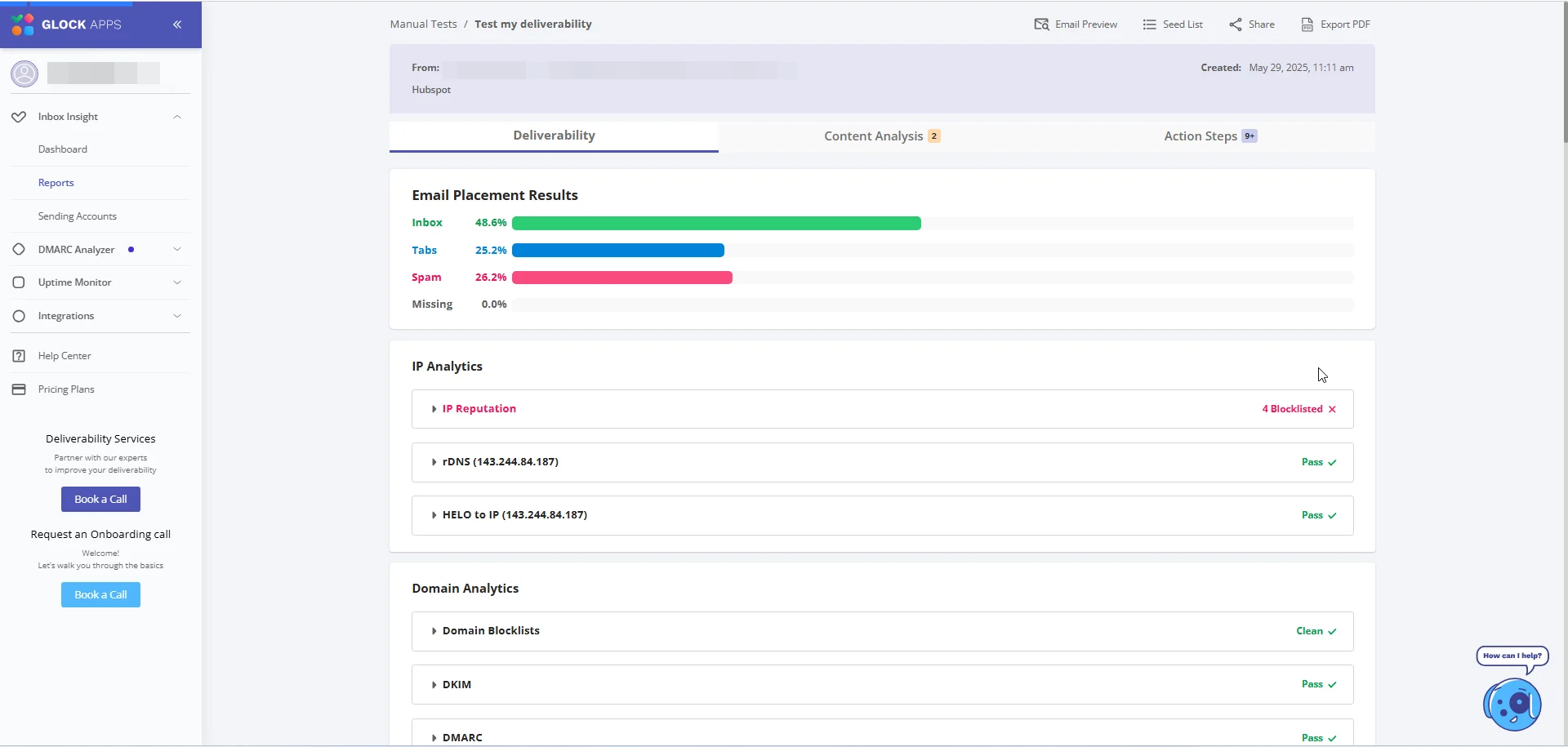
Its biggest strength is the provider breakdown. An average placement rate can hide a Gmail problem behind a clean Outlook result.
GlockApps breaks every test down by provider and spam filter, so you see exactly where each email landed. Each test runs through Inbox Insight and uses one spam test credit.
Between tests, DMARC Analytics and Uptime Monitor keep watch on your authentication and blacklist status. GlockApps does not warm mailboxes, so it works best next to a warmup tool.
The Free plan includes 2 spam test credits for quick checks. This GlockApps review explains these features in more detail.
That makes GlockApps the right choice for email marketers who test before every large send.
Key Features of GlockApps
Inbox Insight placement tests: A test shows whether your email reached the inbox, the spam folder, or the promotions tab at each provider.
Content and authentication analysis: Each test report reviews your SPF, DKIM, and DMARC results along with the links in your email.
DMARC Analytics: GlockApps reads your DMARC reports and shows which sending sources pass or fail.
Uptime Monitor: The monitor tracks IP reputation and blacklist status and sends alerts when something changes.
Google Postmaster integration: Gmail's Postmaster data appears inside the GlockApps dashboard next to your test results.
What I Like About GlockApps
Placement results by provider and spam filter in every test
DMARC Analytics with unlimited domains on the Free plan and above
Uptime Monitor for IP reputation and blacklist alerts
Google Postmaster data inside the GlockApps dashboard
Free plan with 2 spam test credits for quick checks
What Are the Cons of GlockApps
No warmup feature for new cold email mailboxes
No email rendering tests, per a G2 reviewer
GlockApps Pricing
Free plan: The Free plan costs $0 and includes 2 spam test credits for one user.
Essential plan: The Essential plan costs $59 per month with annual billing, which is $708 per year. It includes 360 spam test credits for one user.
Growth plan: The Growth plan costs $99 per month with annual billing, which is $1,188 per year. It includes 1,080 spam test credits for up to 5 users.
Enterprise plan: The Enterprise plan costs $129 per month with annual billing, which is $1,548 per year. It includes 1,800 spam test credits for up to 10 users.
Spam test credit packs: Packs cost $16.99 for 3 tests, $47.99 for 10 tests, or $75.99 for 20 tests.
Free trial: GlockApps does not offer a free trial. The Free plan is available for as long as you need it instead.
3. MxToolbox
Best for: IT admins and deliverability consultants who need free DNS and blacklist lookups, with paid monitoring for DMARC and inbox placement.
G2: 4.1 out of 5
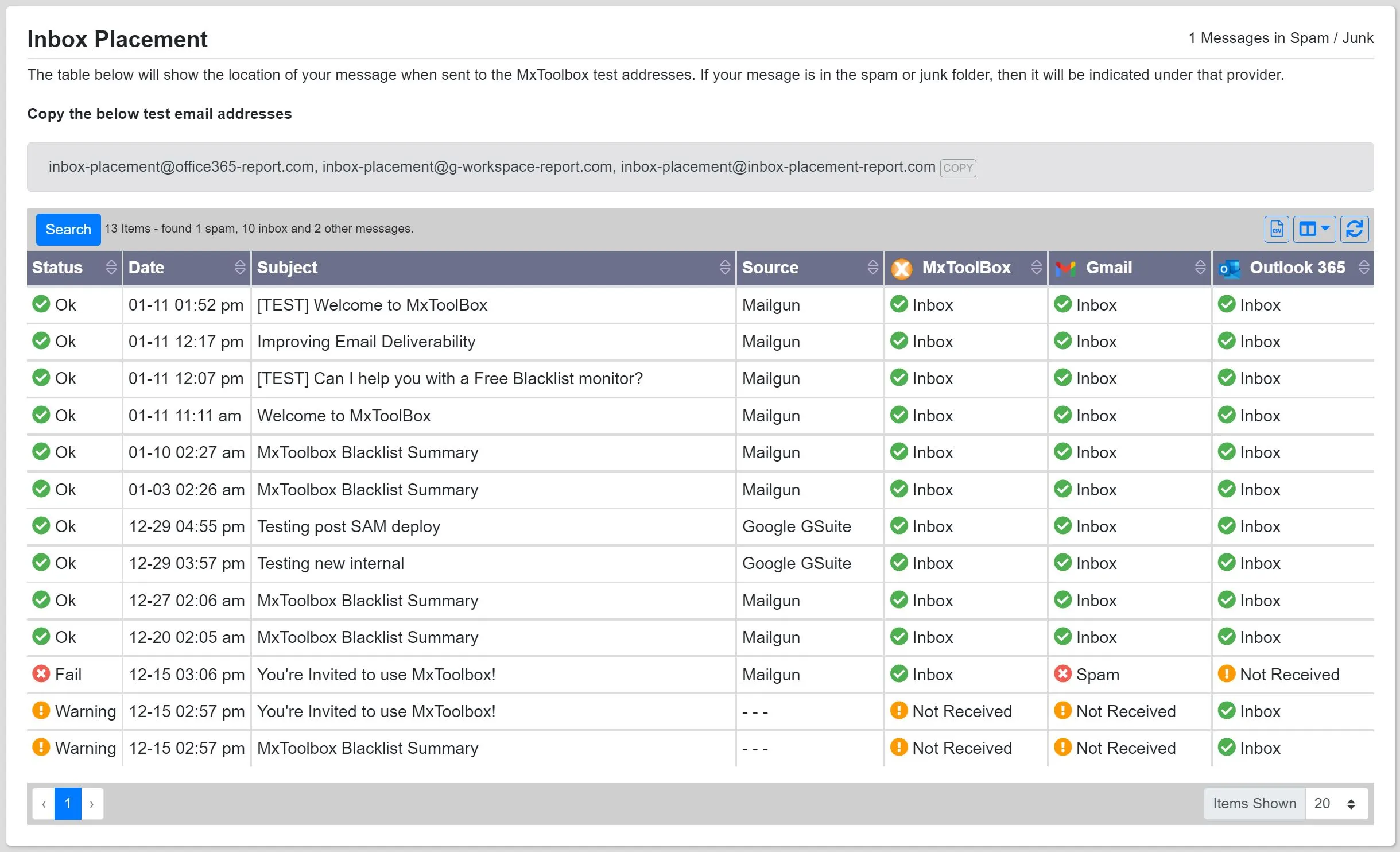
MxToolbox is an email diagnostics and monitoring tool, best known for its free SuperTool. The SuperTool looks up DNS and MX records and checks a domain against 100+ blacklists.
Where MxToolbox helps most is speed. One missing DNS record can undo weeks of warmup, and the SuperTool spots it in seconds.
For ongoing monitoring, the paid Delivery Center adds inbox placement tests and complaint reports. It helps you move DMARC to a reject policy as well.
MxToolbox does not warm mailboxes, so new domains need a separate warmup tool. For a quick first look, the free Salesforge IP and domain blacklist checker shows whether a domain is listed.
That makes MxToolbox the right choice for technical admins who manage DNS for several domains.
Key Features of MxToolbox
SuperTool lookups: Free lookups check DNS records, MX records, and blacklist status for any domain.
Inbox placement analysis: Delivery Center tests where a campaign lands at major providers. The report lists over a dozen reasons it may have failed.
Recipient complaint reporting: Complaint data from Google Postmaster and feedback loops appears in one report.
DMARC and SPF management: Delivery Center analyzes your SPF, DKIM, and DMARC setup and helps move DMARC to a reject policy.
Mailflow monitoring: Round-trip tests measure how long your email takes to send and arrive, with alerts when delays pass your limit.
What I Like About MxToolbox
Free SuperTool lookups for DNS, MX records, and 100+ blacklists
30 inbox placement analyses a month on the Delivery Center plan
Adaptive Blacklist Monitoring for third-party senders
DMARC management with a path to a reject policy
Mailflow monitoring with alerts on delivery delays
What Are the Cons of MxToolbox
No warmup feature for new mailboxes
Report pages take several clicks to reach, per a G2 reviewer
MxToolbox Pricing
Free plan: The Free plan costs $0 and includes weekly blacklist monitoring for 1 domain.
Delivery Center plan: The Delivery Center plan costs $129 per month. It includes 30 inbox placement analyses per month for up to 5 domains and 500,000 messages.
Delivery Center Plus plan: The Delivery Center Plus plan costs $399 per month. It includes 100 inbox placement analyses per month for up to 5 domains and 5,000,000 messages. It adds SPF flattening.
Free trial: The paid plans have no self-serve free trial. Its sales team can tell you whether a trial period is available.
4. MailReach
Best for: Cold email senders and agencies that want mailbox warmup and on-demand spam tests together, with placement results by provider for each mailbox.
G2: 4.7 out of 5
MailReach is an email warmup and spam testing tool. It warms mailboxes inside a network of Google Workspace and Office 365 inboxes and works with any provider that supports SMTP.
What I like most is that warmup and testing run together. Warmup with no spam test leaves you hoping it worked.
MailReach's Spam Checker answers that question with a placement test. One spam test credit buys one test with a full report by provider.
On the All-in-One plan, each mailbox sends up to 100 warmup emails per day. The plan includes at least 20 spam test credits, and the price per mailbox drops as you add more.
This list of email warmup tools compares MailReach with other warmup-first options.
That makes MailReach the right choice for agencies that warm mailboxes across several sequencers.
Key Features of MailReach
Email warmer: MailReach sends human-like warmup emails and replies, so each mailbox builds engagement with Google and Microsoft.
Spam Checker: A test shows inbox placement by provider and checks links, spam words, and reverse DNS.
Automatic spam tests: Scheduled tests send alerts to Slack or a webhook when placement changes.
Domain and inbox health checks: MailReach checks blacklists and your SPF, DKIM, and DMARC records.
Warmup and spam test APIs: Agencies can control warmup and run tests from their own tools through the API.
What I Like About MailReach
Warmup network of Google Workspace and Office 365 inboxes
At least 20 spam test credits with the All-in-One plan
Placement results by provider with Slack and webhook alerts
Warmup on any SMTP provider, including Zoho and Amazon SES
Autopilot mode for hands-off warmup and monitoring
What Are the Cons of MailReach
Per-mailbox billing that grows with each mailbox you add
No sending feature, so campaigns run from a separate sequencer
MailReach Pricing
All-in-One plan: The All-in-One plan costs $25 per mailbox per month, or $20 with annual billing. It includes at least 20 spam test credits, and the price per mailbox drops as you add more mailboxes.
Spam Tester plan: Spam test credits are sold on their own, monthly or pay as you go. A monthly bundle of 200 credits costs $210 per month.
Free trial: MailReach does not offer a free trial for warmup. A free spam test is available on its website.
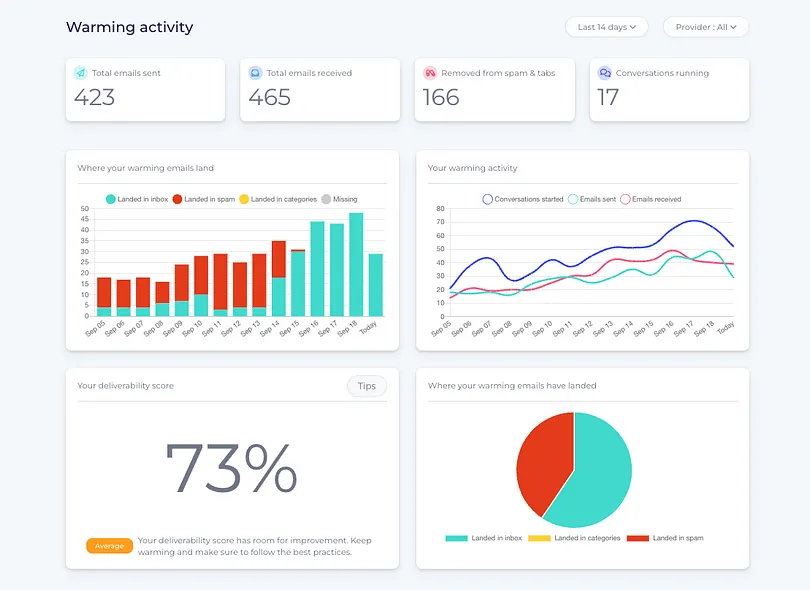
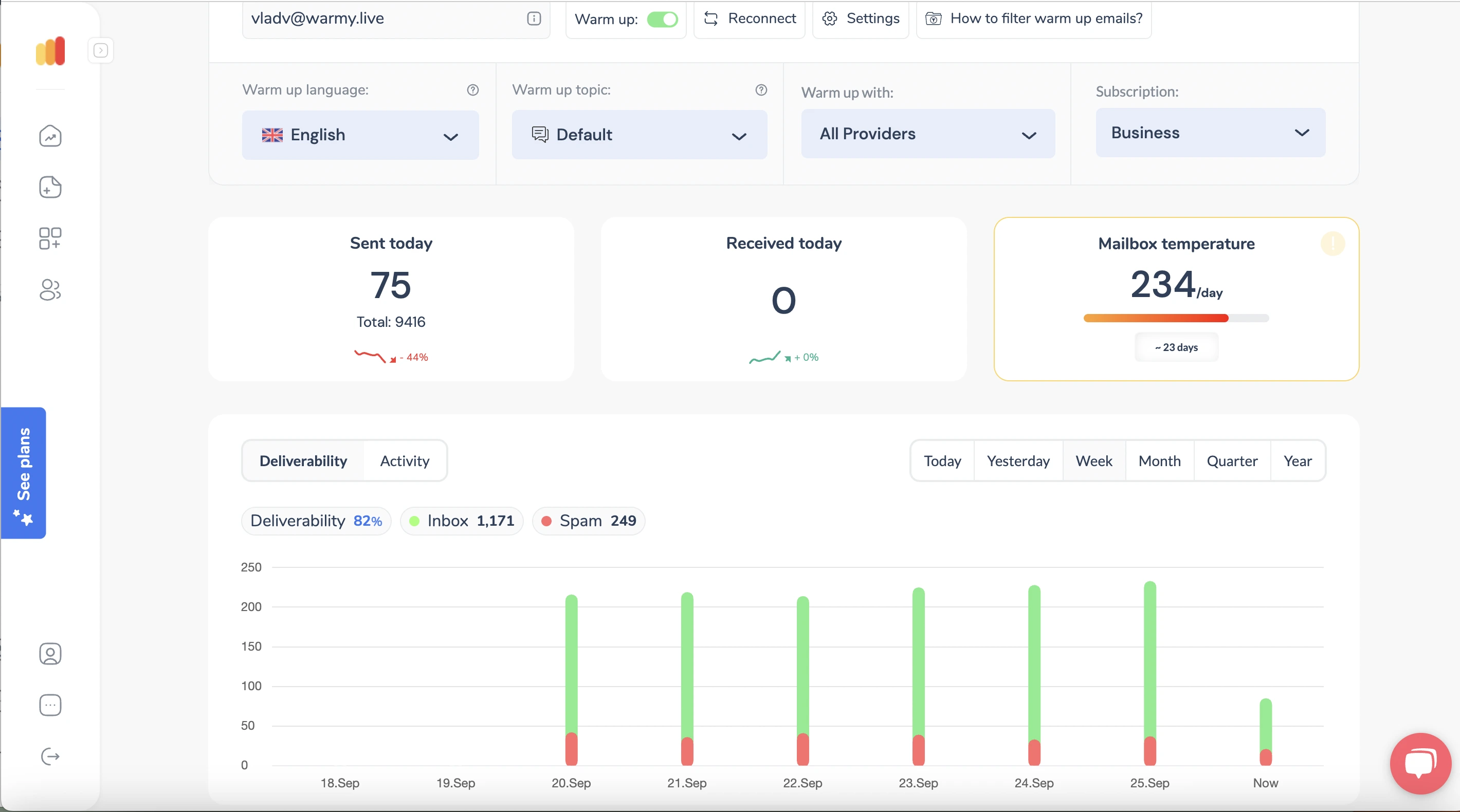
5. Warmy
Best for: Agencies and B2B or B2C senders who want warmup, seed testing, and DMARC monitoring with a named deliverability expert on the account.
G2: 4.8 out of 5 (Capterra: 4.9)
Warmy is an email deliverability platform that combines AI guidance with a named human expert. It warms domains and IPs inside a network of more than 1 million mailboxes.
The biggest difference is the expert on every account. Data can show you what broke, and an expert can tell you what to fix first.
Adeline AI, Warmy's AI co-pilot, handles the data side. It reads your test results and suggests the next fix, while your expert reviews the account.
The B2B Sender plan and the B2C Sender plan include DMARC monitoring and Google Postmaster data. Pricing starts at $49 per month and depends on how many warmup emails you need.
That makes Warmy the right choice for agencies that want an expert involved in their setup.
Key Features of Warmy
Warmup network: Warmy warms your domains and IPs inside a network of more than 1 million mailboxes.
Seed list testing: More than 500,000 US seed mailboxes open and reply to your emails and show where they land.
Email verification: Warmy checks your list before you send, so bounces do not hurt your sender reputation.
Templates AI optimizer: Warmy scores your email templates and rewrites the parts that trigger spam filters before you send.
Reputation tracker: Warmy tracks domain and IP reputation over time, with alerts when a signal drops.
What I Like About Warmy
1M+ mailbox warmup network for domains and IPs
500K+ US seed list that rotates every month
Named deliverability expert with 24/7 human support
Email verification and DMARC monitoring inside the plan
Templates AI optimizer that rewrites spam-trigger copy
What Are the Cons of Warmy
Limited warmup customization, per Capterra reviewers
Final price depends on warmup volume and needs a quote
Warmy Pricing
B2B Sender plan: The B2B Sender plan starts at $49 per month. The final price depends on the volume of warmup emails you need.
B2C Sender plan: The B2C Sender plan starts at $49 per month. It focuses on inbox placement at consumer providers such as Gmail, Yahoo, and Outlook.
Custom plan: The Custom plan has a custom quote and adds a dedicated success manager. Warmy's sales team can give you the price.
Free trial: A 7-day free trial is available with no credit card required.
6. Folderly
Best for: Funded sales teams and agencies that want root-cause fixes for spam placement, with warmup and monitoring handled on one platform.
G2: 4.8 out of 5 (Capterra: 4.9)
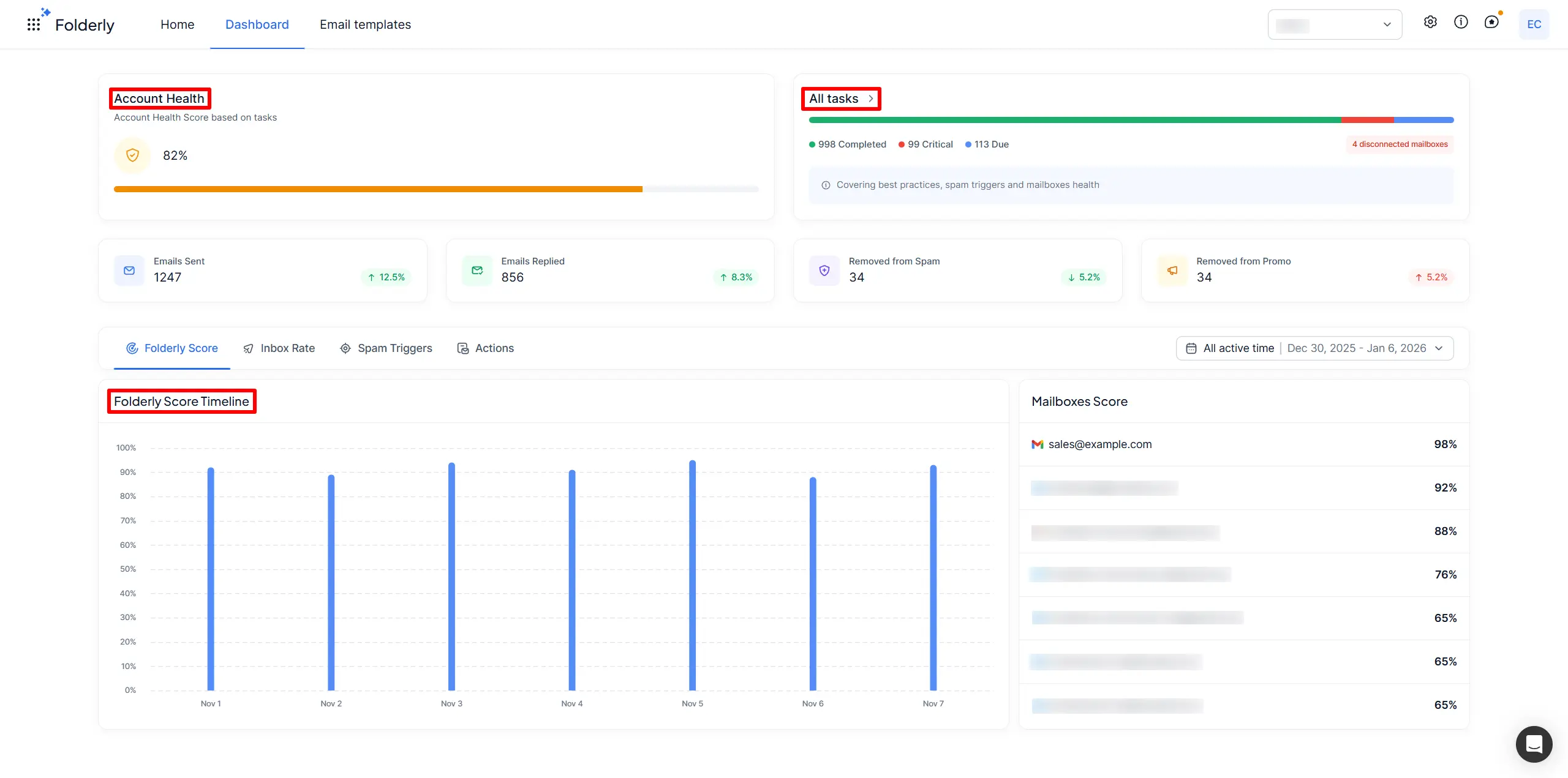
Folderly is an email deliverability platform from Belkins, a B2B lead generation agency. It finds the technical and content issues behind spam placement and explains how to fix them.
Folderly's focus is diagnosis. A spam score tells you a problem exists, and Folderly works out why it happened.
Placement testing lives in Inbox Insights, which is sold separately from the core plan. Pulse adds free alerts when placement drops, so a problem gets noticed early.
The core plan costs $96 per mailbox per month with yearly billing and starts with a demo request.
That makes Folderly the right choice for funded sales teams that need root-cause answers.
Key Features of Folderly
Deliverability diagnostics: Folderly finds the technical and content problems behind spam placement and explains how to fix them.
Inbox Insights: Placement tests show where your email lands and review your sending IPs and DNS records.
Pulse alerts: Free monitoring tracks spam placement and sends alerts through email, Slack, or SMS.
Spam words checker: The checker flags words in your copy that can trigger spam filters.
Folderly Lens: Lens inspects DNS and authentication records and blocklist signals for a domain or IP.
What I Like About Folderly
Root-cause diagnostics for technical and content issues
Free Pulse alerts by email, Slack, or SMS
Inbox Insights Free plan with 2 placement tests a month
Folderly Lens for DNS, authentication, and blocklist signals
Spam words checker for campaign copy
What Are the Cons of Folderly
$96 per mailbox per month with yearly billing
Placement testing sold separately through Inbox Insights
Folderly Pricing
Folderly core plan: The core plan costs $96 per mailbox per month with yearly billing. It starts with a demo request on Folderly's website.
Inbox Insights Free plan: The Free plan costs $0 and includes 2 tests per month.
Inbox Insights Monthly plan: The Monthly plan costs $79 per month and includes 100 tests per month.
Inbox Insights Yearly plan: The Yearly plan costs $799 per year and includes 100 tests per month.
Pulse plan: Pulse is free and includes live placement alerts.
Free trial: The core plan has no self-serve free trial. The Inbox Insights Free plan lets you test placement first.
How to Choose an Email Deliverability Tool for Cold Email
The right tool depends on what broke first. So before choosing one, find out which part of deliverability is failing right now. These ten checks make the choice easier:
Decide which jobs one tool should handle: warmup, placement testing, or monitoring.
Count your sending mailboxes and domains, since per-mailbox pricing grows with each one.
Check that the tool supports every mailbox provider you send from, such as Google Workspace and Microsoft 365.
Confirm that placement reports show results for each provider instead of one blended score.
Look for a clear ready-to-send signal, so SDRs know when a new mailbox can start a campaign.
Check that the tool scans blacklists and DNS records on a schedule instead of on demand.
Ask whether alerts reach Slack or email, so a problem gets noticed the day it starts.
Calculate the yearly cost with your own mailbox count and any placement test add-ons.
Check whether your sequencer already includes warmup, so you do not pay for it twice.
Use the free plan or trial to warm one mailbox and test it before you connect the rest.
For a quick read on your current setup, the free email deliverability test checks the health of your mailboxes and domains.
Which Email Deliverability Tool Should You Pick?
Every reply starts with an email that reached the inbox. So for cold email, the order matters. Warm the mailbox first, and then check where your emails land.
Warmforge handles both steps from one dashboard. If you already send with Salesforge, it comes at no extra cost, which makes it the easiest place to start.
The other tools make sense when your problem is narrower. If your domain already lands in spam, Folderly helps you find the cause. For agencies, MailReach and Warmy pair warmup with spam tests. When you need deeper testing or DNS management, GlockApps and MxToolbox fill that gap.
The email deliverability page explains how Salesforge handles warmup and infrastructure for your outreach.
Warm Up Every Mailbox and Test Placement in One Place
Warmforge warms your mailboxes and runs inbox placement tests from one dashboard. Start free with 1 warmup slot, or get unlimited warmup inside Salesforge.
Email deliverability tools show whether your emails reach the inbox and help you fix the problem when they do not. They warm mailboxes, test inbox placement, and monitor DNS records and blacklists. Warmforge, MailReach, and Warmy combine warmup and placement testing in one place.
2. What is the best email deliverability tool for cold email?
Warmforge is my pick for cold email because it warms mailboxes and tests placement from one dashboard. Heat Score™ tells you when each mailbox is ready to send. It comes free with Salesforge, and standalone warmup starts at $9 per mailbox slot per month with annual billing.
3. Are free email deliverability tools enough?
Free tools are enough for occasional checks. The MxToolbox SuperTool runs free blacklist lookups, and Warmforge includes 1 free warmup slot and 1 placement test per month. Ongoing sending from many mailboxes needs a paid plan with warmup and scheduled tests.
4. How often should I run an inbox placement test?
Run at least one placement test per mailbox per month, as Warmforge recommends. Test more often before a new campaign or after a drop in replies. A test after any DNS change catches setup mistakes early.
5. Why do my cold emails land in spam even with warmup?
Warmup builds sender reputation, and it cannot fix copy that reads like spam. Links, images, and certain words can push an email to spam or promotions.
The free Salesforge spam checker scans your copy for spam triggers before you send.
6. Does my mailbox infrastructure affect email deliverability?
Yes, the mailboxes you send from shape your deliverability before any tool gets involved.
Mailforge offers shared-IP mailboxes, Infraforge offers dedicated IPs, and Primeforge offers Google Workspace and Microsoft 365 mailboxes.
Warmforge then warms and monitors every mailbox from one dashboard.
Book more meetings on autopilot
Set up in minutes. No per-seat pricing. No commitment.
Compare 6 email deliverability tools for cold email on warmup, inbox placement tests, monitoring, and pricing. Warmforge, GlockApps, MailReach and more.
Trulyinbox breaks past 15 inboxes. I tested 7 alternatives (Warmforge, Mailreach, Instantly, Smartlead, and more) on warmup pool, deliverability monitoring, and pricing. Here's what actually scales.





.jpg)