

Botdog is a cloud-based LinkedIn automation tool for connection requests, follow-ups, and simple sequences, and nothing else. Dripify is a LinkedIn automation tool with basic email steps, sold per user. Neither sells email infrastructure, neither warms up mailboxes, and neither has an AI SDR.
For real multi-channel B2B outbound, Salesforge is the stronger choice. You get email and LinkedIn from one dashboard, no per-seat pricing, free Warmforge warm-up, a unified inbox (Primebox™), and an optional AI SDR, Agent Frank. Plans start at $48/mo monthly ($40/mo annual).
I have run outbound where LinkedIn was the whole plan, and I have watched that plan stall the moment a prospect stopped replying on LinkedIn. That is the real question behind this comparison: do you want a tool that only touches one channel, or a system that reaches people on email and LinkedIn and keeps the mailboxes healthy while it does?
Botdog and Dripify are both good at LinkedIn. Botdog is a clean, cloud-based tool for connection requests and messages. Dripify runs LinkedIn drip campaigns and adds light email steps. Salesforge sits in a different category: it is the outreach layer of the unified Forge Stack, built for teams that need email, LinkedIn, deliverability, and scale in one place. UniteSync ran on it to an 85.26% positive reply rate at a $2.86 cost per acquisition.
Cold Outreach Tools Compared at a Glance: Botdog vs Dripify
Here is the short version before the detail. Prices are the current published rates from each vendor, cross-checked against their live pricing pages in 2026.
| Feature | Salesforge | Botdog | Dripify |
|---|---|---|---|
| Outreach channels | Email + LinkedIn (phone on roadmap) | LinkedIn only | LinkedIn + basic email steps |
| Entry price | $48/mo monthly ($40/mo annual) - Salesforge Pro | $69/mo monthly ($35/mo annual) - Botdog Starter, per account | $59/mo monthly ($39/mo annual) - Dripify Basic, per user |
| Top self-serve plan | $96/mo monthly ($80/mo annual) - Salesforge Growth (unlimited users + LinkedIn senders) | $99/mo monthly ($49/mo annual) - Botdog Professional + AI, per account | $99/mo monthly ($79/mo annual) - Dripify Advanced, per user |
| Email infrastructure | 3 options (Mailforge, Infraforge, Primeforge) | None | None |
| Warm-up / deliverability | Free, unlimited (Warmforge) | None | None |
| AI SDR | Agent Frank (Auto-Pilot / Co-Pilot) - separate subscription from $499/mo billed quarterly | None | None |
| Unified inbox | Primebox™ (free, email + LinkedIn) | Unified inbox (Professional plan) | Dedicated inbox (Pro plan+) |
| Pricing model | No per-seat; unlimited mailboxes; unlimited LinkedIn senders on Growth | Per LinkedIn account | Per user (per seat) |
| Free trial | 14 days | 7 days | 7 days |
| SOC 2 compliant | Yes | Not publicly stated | Not publicly stated |
| Best for | SMB/mid-market B2B, $5K-$100K ACV | Solo LinkedIn outreach, small teams | Solo LinkedIn drip campaigns |
Botdog Overview: A Simple LinkedIn Automation Tool
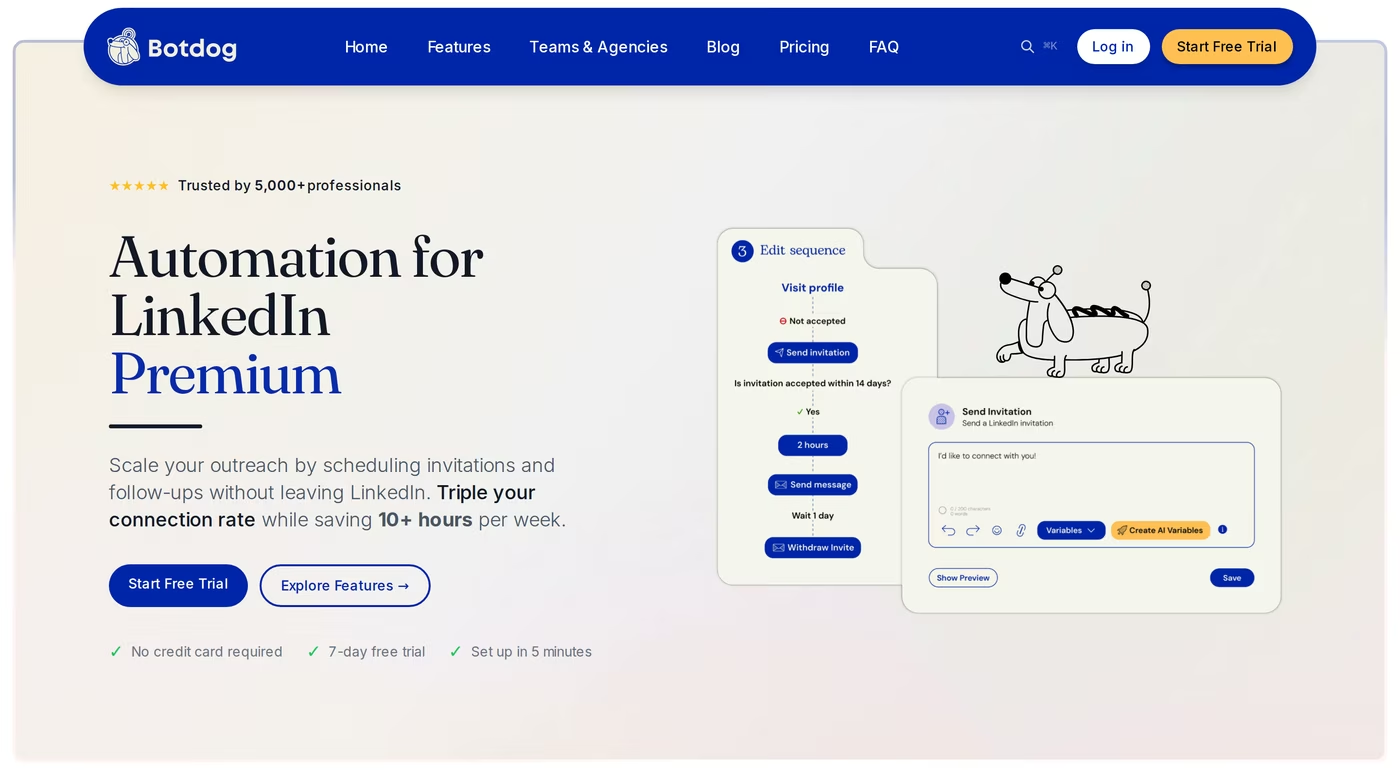
Botdog is a cloud-based LinkedIn automation tool built for salespeople, founders, and small teams who want simple, safe outreach. It runs in the cloud, so campaigns keep going with your computer off, and most people finish setup in about three minutes. The whole product is LinkedIn: connection requests, follow-ups, and message sequences.
Core Botdog features
- LinkedIn sequences: connection requests, messages, and follow-ups that stop when a prospect replies.
- Cloud-based sending: no browser extension; campaigns run 24/7 on Botdog's servers.
- Built-in safety limits: daily caps, randomized timing, and weekend pauses are hardcoded on every plan.
- Imports: pull contacts from LinkedIn Search, Sales Navigator, Recruiter, or CSV.
- Team and multi-account management: switch between LinkedIn accounts and run campaigns for others.
- AI variables: on the Professional + AI plan, AI filters and personalization variables help qualify and open.
Botdog pricing
Botdog charges per LinkedIn account. Billed annually, Botdog Starter is $35/mo ($69/mo monthly), Botdog Professional is $39/mo ($79/mo monthly), and Botdog Professional + AI is $49/mo ($99/mo monthly). Volume pricing starts at $28/mo per account for 10 or more accounts, and there is a 7-day free trial with no credit card. API access and CRM integrations start on the Professional plan; the AI features start on Professional + AI.
Who Botdog is best for
Botdog fits a solo operator or a small team whose outreach lives entirely on LinkedIn and who wants something clean and low-maintenance. If LinkedIn is your only channel and you value simplicity over depth, it does that job well. My full hands-on Botdog review goes deeper, and if you are stitching several profiles together, this guide on renting LinkedIn accounts is useful context.
Honest limitations
- LinkedIn only. There is no email channel at all. Botdog connects to email tools like Instantly through Zapier and webhooks, but that is a separate subscription and setup.
- No deliverability or infrastructure. No mailboxes, no warm-up, no inbox-placement monitoring, because there is no email to protect.
- Depth trade-offs. On Software Advice and G2, reviewers who like Botdog still flag a learning curve on advanced sequences, occasional bugs, limited integrations, and a wish for more features as needs grow.
- Not a full outbound system. The tool is cheap, but the real cost shows up in the rest of the stack you still need for email, data, and reporting.
Dripify Overview: LinkedIn Drip Campaigns With Light Email
Dripify is a cloud-based LinkedIn automation platform that launched in 2019 and is one of the most recognizable names in the category. Its core is the drip campaign: a visual sequence of LinkedIn connection requests, messages, profile views, and follow-ups that run on autopilot. It also adds basic email steps, an email finder, and an email verifier, so you can layer light email onto a LinkedIn motion.
Core Dripify features
- Drip campaign builder: multi-step LinkedIn sequences with delays and conditions.
- Basic email steps: LinkedIn and email in one sequence, with 100 email finder credits included per plan.
- Dedicated inbox: a LinkedIn conversation inbox on the Pro plan and above.
- Analytics: campaign performance, acceptance rates, and reply tracking.
- Team management: roles and multi-account control on the Advanced plan.
- Safety layers: cloud sending from a local IP, human-behavior simulation, and activity control.
Dripify pricing
Dripify is priced per user. Billed annually, Dripify Basic is $39/mo ($59/mo monthly, one campaign at a time), Dripify Pro is $59/mo ($79/mo monthly, unlimited campaigns and full quotas), and Dripify Advanced is $79/mo ($99/mo monthly, team management). There is an Enterprise tier with custom pricing, a 7-day free trial, and email finder credits beyond the included 100 cost extra. Dripify recommends LinkedIn Sales Navigator for full filtering, which is a separate cost.
Who Dripify is best for
Dripify suits a solo SDR, founder, or consultant running structured LinkedIn drip campaigns who wants a clean visual builder and can accept light email as a bonus. My full Dripify review breaks down each tier, and if you are weighing several options, this roundup of LinkedIn automation tools helps.
What reviewers say
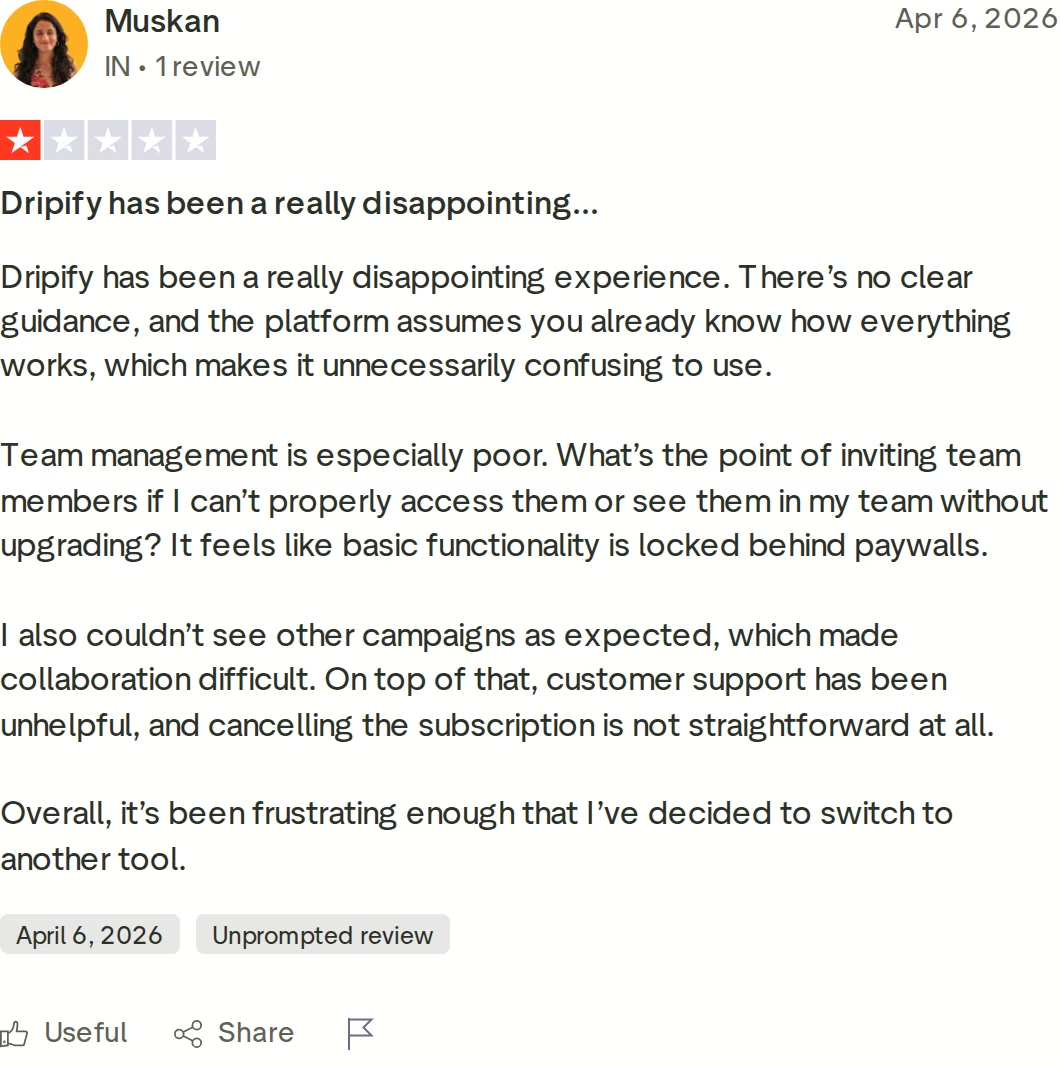
Dripify holds a solid overall rating, but its critical reviews cluster around a few themes. On Trustpilot and G2, users report team-plan features locked behind upgrades, support that is slow on the Basic plan, and auto-renewal and cancellation friction. Independent testing has also put LinkedIn account restrictions at roughly 23% of heavy users within 90 days, with reports rising after LinkedIn's 2026 enforcement wave.
Honest limitations
- Email is light. Dripify has email steps and an email finder, but no sending infrastructure, no mailbox warm-up, and no deliverability monitoring.
- Per-seat pricing. Every teammate needs their own paid license, so a five-person team on Dripify Pro is $295/mo billed annually before Sales Navigator.
- Basic personalization. Reviewers note that templated messages can feel robotic without careful setup.
- Campaign rigidity on Basic. The entry plan allows one campaign that cannot be edited once launched.
Salesforge Overview: Multi-Channel Outbound in One Platform
Salesforge is an all-in-one cold outreach platform that runs email and LinkedIn from a single dashboard. It is the outreach layer of the Forge Stack, a family of products that also covers infrastructure, warm-up, lead data, and an AI SDR. Where Botdog and Dripify focus on LinkedIn, Salesforge is built to run a complete multi-channel motion and keep deliverability healthy while it scales.
Core Salesforge features
- Multi-channel sequences: conditional email and LinkedIn steps that branch on prospect behavior, from one workflow.
- Unlimited mailboxes: connect as many sender accounts as you want on any plan, with no per-mailbox charge.
- Unlimited LinkedIn senders: run multiple LinkedIn profiles in one sequence on the Growth plan.
- Free Warmforge warm-up: unlimited premium warm-up and a Heat Score for every mailbox, included with every subscription.
- Primebox™ unified inbox: email and LinkedIn replies in one view, with AI sentiment analysis, free on every plan.
- Overdrive Mode: AI personalization that pulls from a prospect's website, blog, and LinkedIn posts.
- Agent Frank: an optional AI SDR that prospects, writes, follows up, and books meetings across email and LinkedIn.
- Smart rotation: automatic mailbox and IP rotation to spread sending safely.
- Integrations: native HubSpot, Salesforce, Pipedrive, Attio, and Clay, plus Zapier, webhooks, an API, and an MCP server.
- Compliance: SOC 2 across the stack, with a public trust center.
The stack is the real difference. Salesforge is the outreach engine, Leadsforge finds leads from a 500M+ contact database, Mailforge and Infraforge supply shared and dedicated email infrastructure, and Warmforge keeps every mailbox warm. Everything syncs natively, so you are not wiring tools together with middleware. Neither Botdog nor Dripify sells any of these layers.
Salesforge pricing
Salesforge Pro is $48/mo billed monthly or $40/mo billed annually. Salesforge Growth is $96/mo billed monthly or $80/mo billed annually, and it adds unlimited users, unlimited LinkedIn senders, the API, A/B testing, ESP matching, and Primebox AI. The annual rates reflect two months free. Email infrastructure is not bundled into these plans; you connect your own mailboxes or add Mailforge, Infraforge, or Primeforge. Agent Frank is a separate subscription that starts at $499/mo billed quarterly ($416/mo billed annually) and needs a demo plus a two-week warm-up before he sends. There is a 14-day free trial with no credit card.
Who Salesforge is best for
Salesforge publishes its own fit criteria. It is built for B2B teams selling products with ACVs between $5K and $100K, targeting startups, SMBs, and mid-market buyers, and reaching 3,000 or more businesses without hiring a large SDR team. Salesforge itself says it is a poor fit for Fortune 500 procurement, long RFP cycles, and six- to seven-figure bespoke deals. Reviewers echo the strengths; you can browse Salesforge reviews for the full picture.
Honest limitations
- Infrastructure costs extra. Email mailboxes are not included in the base price; you bring your own or add a Forge infrastructure product.
- Key features sit on Growth. The API, A/B testing, ESP matching, and Primebox AI are Growth-plan features, not Pro.
- Agent Frank is sales-led. The AI SDR requires a demo and a two-week warm-up, so there is no instant self-serve trial for him.
For proof it holds up at scale, ChannelCrawler reached an 85.71% positive reply rate on Salesforge with Infraforge and Warmforge.
Start Your 14-Day Free Trialin Action

Head-to-Head Feature Comparison: Botdog vs Dripify
Both tools are capable on LinkedIn. The gaps show up the moment your outbound needs a second channel, healthy mailboxes, or a team. Here is how they compare across the dimensions that decide real campaigns.
Multi-channel outreach
This is the clearest split. Botdog is LinkedIn only; there is no email in the product at all. Dripify adds basic email steps to its LinkedIn drip campaigns, so you can send a follow-up email, but there is no sending infrastructure behind it. Salesforge runs conditional email and LinkedIn sequences from one workflow, where a step can branch based on whether a connection request was accepted. For a walkthrough of how that looks in practice, this Salesforge tutorial covers multi-channel outreach end to end.
Email deliverability and warm-up
Neither competitor touches this. Botdog has no email, so there is nothing to warm. Dripify sends light email but includes no mailbox warm-up and no inbox-placement monitoring, so deliverability is on you. Salesforge includes Warmforge free and unlimited on every plan: a premium-by-default warm-up pool of real Google Workspace and Microsoft 365 mailboxes, plus a Heat Score from 0 to 100 for each mailbox, where 97 and up signals healthy. That is the layer that decides whether cold email lands, and it is simply absent from the other two.
AI and personalization
Botdog offers AI variables and AI lead filtering on its Professional + AI plan, which help write opening lines and qualify imports. Dripify uses variable substitution such as first name, company, and job title, with an AI icebreaker on higher tiers. Salesforge goes further with Overdrive Mode, which pulls from a prospect's website, blog posts, and LinkedIn activity to personalize at scale, and with Agent Frank, an AI SDR that can run the full workflow on Auto-Pilot or draft for your approval on Co-Pilot in 20+ languages.
Inbox management and reply handling
Botdog includes a unified inbox on its Professional plan, and Dripify includes a dedicated LinkedIn inbox from the Pro plan. Both are LinkedIn-side. Salesforge includes Primebox™ free on every plan, and it unifies email and LinkedIn replies in one place, tags each thread by sentiment, and even captures replies that come from a different address than the one you contacted. AI-drafted replies inside Primebox are available on the Growth plan.
Pricing and scalability
Here the pricing models diverge sharply. Botdog charges per LinkedIn account and Dripify charges per user, so a five-person team on Dripify Pro is $295/mo billed annually before Sales Navigator. Salesforge does not charge per seat: the Growth plan at $80/mo billed annually ($96/mo monthly) includes unlimited users, unlimited LinkedIn senders, and unlimited mailboxes. As a team grows, the per-seat tools compound while Salesforge holds flat.
Integrations and the wider stack
Botdog connects to HubSpot and Attio and offers API and webhooks on its Professional plan; Dripify connects through Zapier and webhooks. Salesforge matches the native CRM connections (HubSpot, Salesforce, Pipedrive, Attio) and adds Clay, an API and MCP server on Growth, and the rest of the Forge Stack: Google and Microsoft mailboxes from Primeforge, dedicated IPs from Infraforge, and a 500M+ lead database in Leadsforge. Both competitors are also silent on SOC 2, which Salesforge carries across the stack. If you want to compare against another LinkedIn tool, see Salesforge vs Waalaxy.
Pricing Comparison: Botdog vs Dripify vs Salesforge
Headline prices only tell part of the story, because the pricing models are different. Botdog bills per LinkedIn account, Dripify bills per user, and Salesforge does not charge per seat at all. Here are the current published rates.
| Plan tier | Salesforge | Botdog (per account) | Dripify (per user) |
|---|---|---|---|
| Entry | Salesforge Pro - $48/mo monthly ($40/mo annual) | Botdog Starter - $69/mo monthly ($35/mo annual) | Dripify Basic - $59/mo monthly ($39/mo annual) |
| Mid | - | Botdog Professional - $79/mo monthly ($39/mo annual) | Dripify Pro - $79/mo monthly ($59/mo annual) |
| Top self-serve | Salesforge Growth - $96/mo monthly ($80/mo annual) | Botdog Professional + AI - $99/mo monthly ($49/mo annual) | Dripify Advanced - $99/mo monthly ($79/mo annual) |
| AI SDR | Agent Frank - from $499/mo billed quarterly ($416/mo annual), separate subscription | None | None |
| Pricing model | No per-seat; unlimited mailboxes; unlimited LinkedIn senders on Growth | Per LinkedIn account | Per user (per seat) |
| Free trial | 14 days | 7 days | 7 days |
The models matter more than the sticker price. Botdog and Dripify both scale by multiplying: add a person and you add a full license. Salesforge Growth folds unlimited users, unlimited LinkedIn senders, and unlimited mailboxes into one flat rate, so the cost of adding your fourth or fifth rep is zero.
Say you run a three-person team doing email and LinkedIn. On Dripify Pro that is three seats at $59/mo billed annually, or $177/mo, plus Sales Navigator, and the email side is still basic. On Botdog Professional that is three accounts at $39/mo, or $117/mo, and there is no email at all. On Salesforge Growth it is $80/mo total for the whole team across both channels, with free warm-up included; you add mailboxes through Mailforge or Infraforge as a separate infrastructure line. The more the team grows, the wider that gap opens.
Who Should Use Which Tool
You might consider Botdog if:
- Your outbound is LinkedIn only and you want the simplest possible setup.
- You are a solo operator or very small team that values a clean, low-maintenance tool over depth.
- You do not need email, deliverability tooling, or an AI SDR.
You might consider Dripify if:
- You run structured LinkedIn drip campaigns and want a visual builder.
- You are a single operator who treats email as a light bonus rather than a core channel.
- You are comfortable with per-seat pricing and adding Sales Navigator separately.
Choose Salesforge if:
- You sell B2B with ACVs between $5K and $100K to startups, SMBs, or mid-market buyers, and target 3,000+ businesses.
- You need email and LinkedIn in one motion, not one channel with the other bolted on.
- You want free unlimited warm-up, a unified inbox, and mailbox rotation so deliverability holds as you scale.
- You are a growing team or agency and want to stop paying per seat.
- You want the option of an AI SDR in Agent Frank to run outbound end to end.
Final Verdict: Which Outreach Tool to Choose
Botdog and Dripify are both single-channel tools at heart. Botdog is a clean LinkedIn automation product with no email. Dripify runs LinkedIn drip campaigns and adds light email steps, priced per user. Both do LinkedIn well, and both leave you to solve email, deliverability, and data somewhere else.
For real multi-channel B2B outbound, Salesforge is the stronger choice. At $80/mo for the Growth plan billed annually ($96/mo monthly), you get unlimited users, unlimited LinkedIn senders, unlimited mailboxes, free Warmforge warm-up, and Primebox, a combination neither alternative offers at any price. Add Agent Frank when you want an AI SDR, and lean on Mailforge or Infraforge for infrastructure.
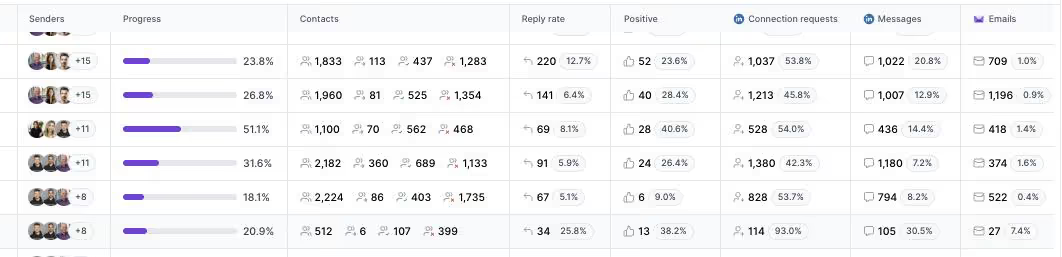
One falsifiable benchmark to hold this to: UniteSync ran on Salesforge with Mailforge and Warmforge to an 85.26% positive reply rate and a $2.86 cost per acquisition, and VAI Consulting had Agent Frank book three calls in a single week. Those case studies are public. If LinkedIn is genuinely your only channel forever, a focused tool can be enough; if outbound means email and LinkedIn together at scale, Salesforge is built for it. You can compare more options in the comparison library.
Take Salesforge for a SpinFrequently Asked Questions
Is Salesforge better than Botdog and Dripify?
For multi-channel B2B outbound, yes. Salesforge runs email and LinkedIn from one dashboard with free Warmforge warm-up, a Primebox unified inbox, unlimited mailboxes, and no per-seat pricing. Botdog is LinkedIn only, and Dripify is LinkedIn-first with light email. If your outreach is strictly LinkedIn, a focused tool can be enough, but neither competitor sells email infrastructure, deliverability tooling, or an AI SDR.
What is the main difference between these tools?
Channels and scope. Botdog does LinkedIn automation only. Dripify does LinkedIn drip campaigns with basic email steps and an email finder. Salesforge is a full multi-channel platform: conditional email and LinkedIn sequences, free warm-up through Warmforge, a unified inbox, mailbox rotation, three infrastructure options, and an optional AI SDR called Agent Frank. It is the outreach layer of the wider Forge Stack.
Which is cheaper: Botdog, Dripify, or Salesforge?
On sticker price for one LinkedIn seat, Botdog Starter is lowest at $35/mo billed annually. But the models differ: Botdog bills per account and Dripify bills per user ($39/mo Basic annually), while Salesforge Growth is $80/mo billed annually for unlimited users and senders. For a team of three doing both channels, Salesforge Growth ($80/mo total) undercuts three Dripify Pro seats ($177/mo).
Does Botdog or Dripify support email outreach?
Botdog does not; it is LinkedIn only and connects to email tools through Zapier as a separate subscription. Dripify has basic email steps and an email finder with 100 credits included, but no sending infrastructure, no mailbox warm-up, and no deliverability monitoring. Salesforge runs native email and LinkedIn together, and adds Warmforge warm-up plus Mailforge, Infraforge, or Primeforge for the mailboxes themselves.
Can I switch from Botdog or Dripify to Salesforge easily?
Yes. You can import contacts by CSV or Google Sheets, connect unlimited mailboxes, and rebuild sequences in the Salesforge builder. Warm-up starts automatically through Warmforge, usually within 24 hours of connecting a mailbox. Salesforge recommends a two-week warm-up before high-volume sending, and there is a 14-day free trial with no credit card so you can test a live campaign first.
Which tool has better email deliverability?
Salesforge, because it is the only one of the three with deliverability tooling. It includes free unlimited Warmforge warm-up using a premium pool of real Google Workspace and Microsoft 365 mailboxes, a Heat Score for every mailbox, and smart mailbox and IP rotation. Botdog has no email to protect, and Dripify sends email without any warm-up or inbox-placement monitoring, so deliverability is left to the user.
Does Salesforge offer a free trial?
Yes. Salesforge has a 14-day free trial with no credit card required, which is longer than the 7-day trials on Botdog and Dripify. The trial caps usage at 50 contacts and 100 emails, but it includes warm-up and unlimited mailbox connections so you can test the real workflow. Agent Frank is the exception; the AI SDR requires a demo and a two-week warm-up rather than a self-serve trial.
Who is Dripify best for?
Dripify fits a solo SDR, founder, or consultant who runs structured LinkedIn drip campaigns and wants a clean visual builder, with email as a light bonus. It is less suited to teams, since it charges per user and locks team management behind the Advanced plan, and independent testing has put LinkedIn restrictions at around 23% of heavy users within 90 days, so conservative daily limits matter.
.jpg)


.jpg)
