If you've been in sales long enough, you've probably tried at least three or four cold outreach tools. Maybe more.
And if you're just starting out, you're already drowning in options — every tool promising to 10x your pipeline, book meetings on autopilot, and basically do your job for you.
The problem isn't which tool you pick.
The problem is that most outreach tools are built to solve one piece of the puzzle, not the whole thing.
So you end up paying for one platform to warm up your inbox, another to find leads, another to write emails, and yet another to manage replies.
By the time you stitch it all together, half your day is gone and you haven't sent a single email.
Before building Salesforge, I spent years leading large sales teams as a VP of Sales, and the fragmented outreach stack was one of the biggest productivity killers I kept running into.
Good reps were wasting hours every week managing tools instead of having conversations.
That's exactly why I built Salesforge.
Salesforge is an all-in-one cold outreach platform that handles everything your outbound team needs. This includes AI-personalized email sequences and LinkedIn outreach to inbox warm-up, email validation, and unified reply management.
No duct-taped tech stack. No switching between five tabs just to follow up with one prospect.
But I get it. You've heard that pitch before.
So instead of just telling you Salesforge is great, we're going to show you exactly what it does, how it works, what real users think about it, and we’ll also stack it up against the competition so you can see for yourself how it holds up.
Let’s jump in!
There's no shortage of multi-channel outreach tools out there.
And most of them will claim to do everything.
The truth? They all have different strengths and very different weaknesses.
So before we dig into Salesforge's features in detail, here's a quick look at how it compares to the four other tools we've tested.
The verdict from this comparison is straightforward.
If you want email and LinkedIn outreach built to scale with deliverability, AI personalization, and unlimited mailboxes baked in from day one, Salesforge is the most complete package on this list.
We don’t want you to just take our word for it.
So we went through all G2 reviews to see what real users are actually saying about Salesforge.
Overall, Salesforge has earned a 4.5-star rating from 86 verified reviews on G2.
That puts us in a strong company on one of the most trusted software review platforms in the world.
Here’s what verified G2 users are actually saying:
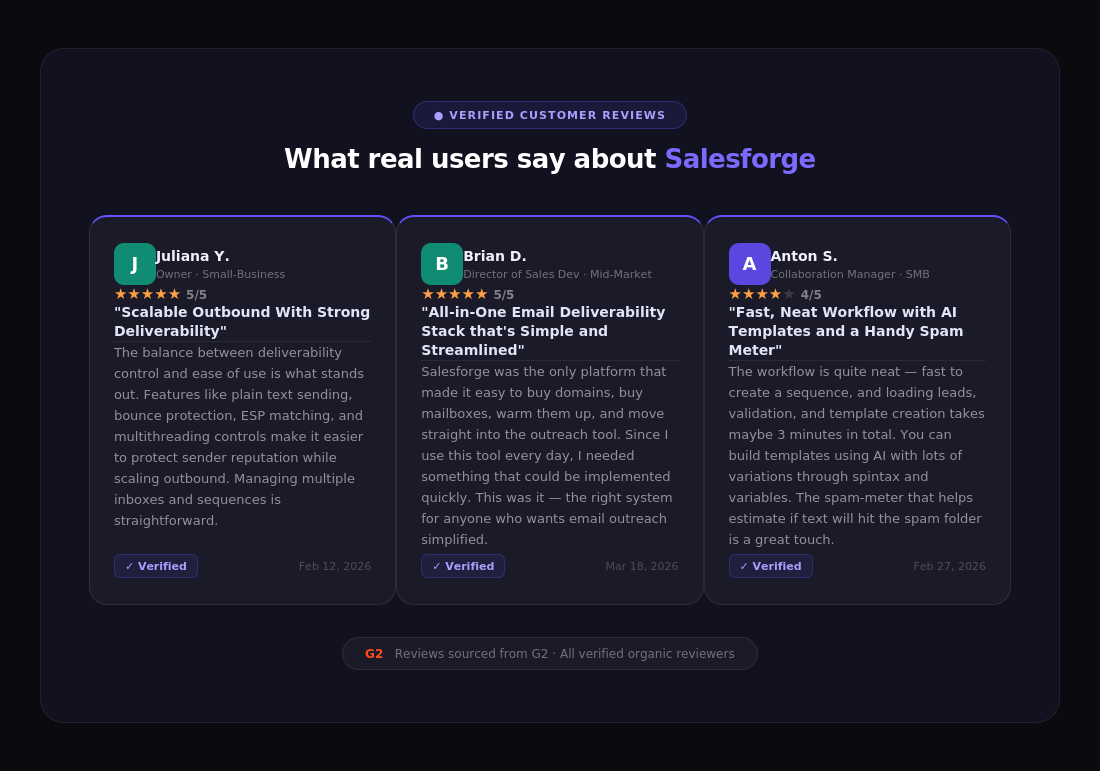
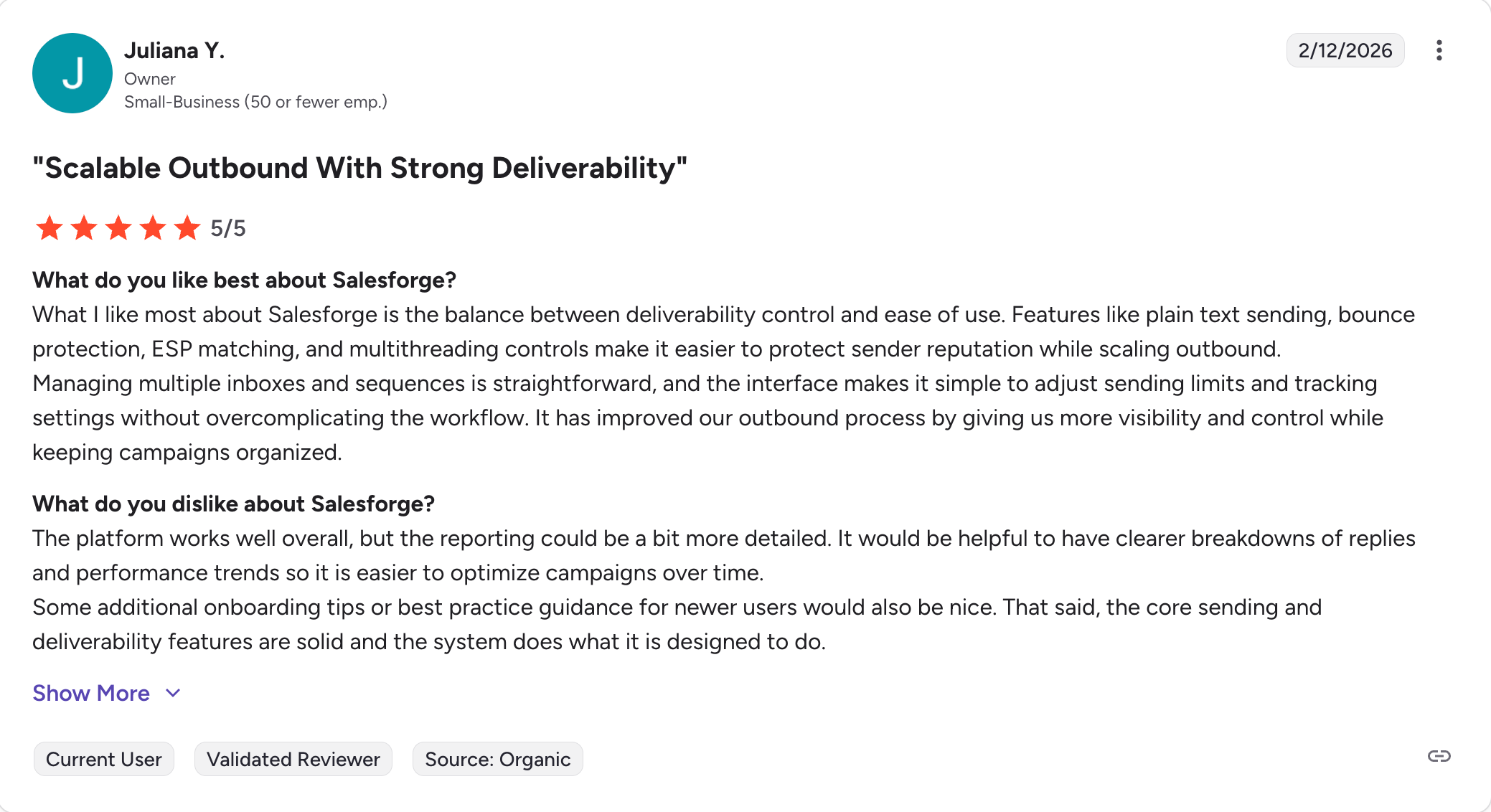


Many users highlight the responsive and helpful support team at Salesforge, noting fast response times and personalized assistance that goes beyond generic answers.
Users also appreciate how the platform drives customer engagement through personalized, automated outreach across multiple channels.
However, some users dislike the complexity of reporting and have expressed a desire for more detailed analytics and insights. While the platform is effective, there are areas for enhancement in analytics, as mentioned by several users.
Salesforge is an all-in-one cold outreach platform built for teams that do cold outreach at scale.
It combines email outreach, LinkedIn outreach, AI-powered personalization, inbox warm-up, email validation, and reply management into a single workspace.
The idea is simple: instead of paying for five different tools and spending half your day switching between them, you run your entire outbound motion from one place.
But Salesforge isn't just an email sequencer with a LinkedIn add-on bolted on top.
It was built from the ground up as a multi-channel outreach platform, which means email and LinkedIn work together natively inside the same sequence.
You can visit a prospect's LinkedIn profile, send a connection request, follow up with a personalized email, and manage the reply — all from one dashboard.
The platform runs on what we call the Forge Stack - a connected set of infrastructure tools that handle the technical heavy lifting of cold outreach so you don't have to.
Together, these tools form a complete outbound infrastructure.
Most teams using Salesforge don’t need anything else to run their outreach, no separate warm-up tool, no third-party email finder, no standalone sequencer.
That’s the core promise of Salesforge: one platform, one bill, and everything your outbound team needs to generate pipeline.
A tool is only as good as the features that power it.
So let's break down exactly what Salesforge gives you, and why each feature matters for your outbound motion.
Most cold outreach tools charge you per mailbox or per seat.
That model punishes you for scaling.
The more you grow, the more you pay, and your cost per mailbox never goes down.
We built Salesforge differently. We’re the only platform to offer unlimited mailboxes and LinkedIn senders, so you can add everyone on your team and scale your outreach without paying extra for every new inbox or profile you connect.
Whether you’re running five mailboxes or fifty, the price stays predictable. Salesforge is designed for teams that require comprehensive control over their outreach processes, making it suitable for larger sales teams and agencies.
That alone is a significant cost advantage for growing teams and agencies managing outreach across multiple clients.
You can connect mailboxes from Gmail, Outlook, or any SMTP provider. And if you need dedicated infrastructure, you can spin up new domains and mailboxes directly through Mailforge, Infraforge, or Primeforge.
Generic emails don’t get replies.
Everyone knows this.
The problem is that writing truly personalized emails at scale used to be either impossible or incredibly time-consuming.
To solve this, Salesforge leverages artificial intelligence to power its AI-driven personalization engine, powered by GPT-4.
It analyzes recipient data and crafts highly personalized emails that resonate with each individual prospect, referencing specific details about their company, role, and context.
Salesforge features an AI assistant (Agent Frank) that helps automate and personalize outbound sales efforts, such as lead outreach and message generation, improving response rates and managing repetitive tasks.
The AI features enable real-time AI-driven messaging and enhance messaging effectiveness across multiple languages, leading to better engagement and higher conversion rates.
The system works by matching your buyer data with your outreach goals to generate messages that actually feel human. You can use Standard AI for solid personalization at scale, or switch to Overdrive mode for even deeper, more tailored content per lead.
Salesforge supports enabling real time AI for decision-critical sales activities, integrating AI-driven automation and personalization to optimize your sales workflows and improve overall sales performance.
Either way, you’re not sending the same email to everyone, and your reply rates will show it.
Sending one cold email and hoping for the best isn’t a strategy.
The teams that consistently book meetings are the ones that show up on multiple channels in a coordinated, thoughtful way.
With conditional multi-channel sequences, you can orchestrate outreach that reaches your prospects across multiple touchpoints, targeting their pain points and goals to increase engagement.
You can build sequences that visit a prospect’s LinkedIn profile, send a connection request, follow up with a personalized email, trigger a LinkedIn message, and even schedule phone calls, all from one workflow, with logic that adapts based on how the prospect responds.
Salesforge supports a comprehensive outbound strategy by integrating email, LinkedIn messages, and phone calls into a single platform, making it easy to scale personalized outreach campaigns.
This isn’t LinkedIn automation bolted onto an email tool.
Email and LinkedIn are built into the same sequencing engine, which means you get one unified view of every touchpoint in the prospect’s journey.
Deliverability is everything in cold outreach.
If your emails land in spam, nothing else matters.
Not your subject lines, not your copy, not your follow-up cadence.
Every Salesforge subscription comes with free, unlimited access to Warmforge, our email deliverability tool with a premium warm-up pool, free of external SMTPs and full of healthy Google Workspace and Microsoft 365 mailboxes.
Warm-up starts automatically within 24 hours of connecting a mailbox.
Salesforge automatically warms up inboxes by sending and replying to test emails in the background, which improves inbox placement and saves time by automating deliverability tasks. It runs in the background, building your sender reputation with real engagement signals before your campaigns go live.
What’s the most common problem almost every GTM team runs into?
Replies are scattered everywhere.
One prospect responds to your Gmail. Another comes back on LinkedIn. A third replies from a different email address than the one you contacted. You miss half of them.
Primebox centralizes all your conversations, analyzes sentiment, and helps you reply faster, so you never lose a prospect in the noise.
It consolidates all replies across email and LinkedIn in one place, capturing replies from any address, even if the prospect responds from a different email than the one you contacted. Primebox provides one inbox for managing all email replies and tracking responses within the platform, making reply management convenient and efficient.
On top of that, Primebox layers in AI to help you respond smarter.
It tags incoming replies automatically (interested, not interested, out of office, referral) so you can prioritize without reading every thread. And when you’re ready to reply, Primebox AI can draft a response using your company’s knowledge base and the conversation history, so every reply feels informed and on-brand.
Primebox is included for free with every Salesforge subscription.
If you're selling into markets outside the US, you know the problem.
Sending English emails to French or German or Spanish-speaking prospects gets you ignored.
Or worse, it signals that you didn't bother to do your homework.
Whether it's 2 or 20 different languages, with Salesforge you can craft unique messages to each recipient without hiring translators or local SDRs.
The AI writes in the prospect's native language using the same personalization logic as your English campaigns.
You set up the sequence once, define the language, and Salesforge handles the rest.
This feature is particularly powerful for agencies running outreach across multiple geographies, and for any team pursuing enterprise deals where localizing outreach is the difference between a reply and a bounce.
If you're running a lead generation agency or an outbound-as-a-service business, white labeling changes everything.
Instead of asking your clients to log into a Salesforge-branded platform, you can deliver the entire experience under your own brand.
Salesforge has a dedicated agency solution and offers a white-label option that allows agencies to rebrand and resell the platform under their own name.
That means your clients see your logo, your domain, and your product name, not ours.
It's a clean way to add a recurring revenue stream to your agency without building your own software. You get all of Salesforge's infrastructure, deliverability, and AI features under the hood, while presenting a fully branded experience to your clients.
Your outreach tool shouldn’t live in a silo.
The data it generates (replies, positive responses, meeting bookings) needs to flow back into your CRM so your team can act on it without manual data entry.
Salesforge connects with the tools you already use, from Slack and Salesforce to Clay and HubSpot. Its CRM integrations support collaboration between sales and marketing teams, enabling coordinated outreach and marketing efforts. You can also plug in via Zapier, webhooks, or the Salesforge API to connect virtually any app.
The Salesforce integration in particular is worth calling out. It uses secure OAuth 2.0 authentication, supports effortless lead importing directly from Salesforce campaigns, and includes built-in field mapping for seamless data transfer between the two platforms.
For HubSpot users, the integration works in a similar way, letting you pull contacts from HubSpot into sequences and push reply data back to keep your CRM records current.
This is one of the newer and more forward-looking features on the list.
MCP, or Model Context Protocol, is an open standard originally developed by Anthropic that defines how AI agents connect to external tools and data sources.
It introduces a shared protocol for how models receive data, understand their environment, and interact with other tools, a single protocol instead of a fragmented mess of custom integrations.
Salesforge’s MCP support means that external AI agents and tools can now connect directly to your Salesforge data and trigger actions through a standardized interface. For teams building more sophisticated AI-powered GTM workflows, this opens up a new layer of automation that wasn’t possible before.
With MCP support, Salesforge enables AI-driven automation for decision-critical sales activities and other critical sales activities, helping teams optimize key sales processes and drive superior conversion rates.
It’s a feature that most outreach tools aren’t thinking about yet.
For teams that are serious about building an AI-native sales stack, it’s worth paying attention to.
Salesforge is a powerful platform. But powerful doesn't mean right for everyone. So let's be straight about who gets the most out of it.
If you’re running a go-to-market team, whether that’s a small outbound pod of three people or a full SDR team scaling pipeline for a Series B company, Salesforge was built with you in mind.
GTM teams live and die by their outbound motion. And the biggest friction points they face are almost always the same: too many tools to manage, deliverability that degrades over time, and personalization that doesn’t scale without adding headcount.
Salesforge solves all three.
Salesforge is built to streamline sales operations by automating repetitive tasks such as lead nurturing and follow-ups, improving efficiency. Workflow automation helps sales teams manage and schedule follow-ups, freeing them to focus on closing deals.
Sales managers can leverage Salesforge’s analytics and workflow tools to monitor performance, make strategic decisions, and enhance team coordination.
And if you want to take it a step further, Agent Frank can handle the prospecting and outreach entirely on autopilot, freeing your team to focus exclusively on conversations that are already warm.
If you’re a GTM team that’s currently duct-taping together multiple tools to run outbound, Salesforge is the consolidation play you’ve been looking for.
Large sales organizations, including large enterprises that require scalable, high-volume outreach solutions, have a different set of problems. Volume is rarely the issue.
What they need is control, consistency, and the ability to run sophisticated outbound programs at scale without losing visibility into what’s actually working.
Salesforge is noted for its ability to scale smoothly, allowing teams and agencies to manage multiple inboxes and high sending volumes without errors. Additionally, Salesforge provides detailed campaign performance analytics, enabling enterprises to monitor and optimize their outreach efforts based on real-time data.
Salesforge addresses this in a few ways.
For enterprises already running Salesforce or HubSpot as their CRM of record, the native integrations mean Salesforge becomes an execution layer that feeds clean data back into your existing systems.
Your team keeps using the tools they know. Salesforge just handles the outbound.
If you're running a lead generation agency, an outbound-as-a-service business, or a sales consultancy that manages outreach on behalf of clients, the white-label option is a genuine business model enabler.
You get one platform to manage all client campaigns, with unlimited mailboxes and LinkedIn senders so you're not paying per account.
The white-label option lets you deliver the entire experience under your own brand - your logo, your domain, your product name. Clients never see Salesforge. They see your agency's platform.
And because Salesforge's pricing is flat-rate rather than per-seat or per-mailbox, your margins improve as you add clients. The cost doesn't scale linearly with your client base.
That's a meaningful difference when you're running a service business.
One of the most common questions we get is: "Is Salesforge worth the price?"
The honest answer is, it depends on what you're comparing it to.
If you're comparing it to a single-channel cold email tool, it might seem like more. If you're comparing it to the five separate tools it replaces, it's almost certainly less.
Here's a full breakdown of what each plan costs and what you actually get.
During the trial, you can add up to 50 contacts, send up to 100 emails, and use 50 email validation credits, 50 personalization credits, and 100 social action credits for LinkedIn.
You can also connect unlimited mailboxes and activate email warm-up during the trial period.
The free trial is generous enough that you can run a small but real campaign and see actual results before you spend a dollar.
Yes. Salesforge is most definitely worth it. But not for everyone, and not for every use case.
If you’re a GTM team, a growing outbound agency, or an enterprise sales organization running multi-channel outreach at any real volume,
Salesforge is the right tool for teams wanting AI-assisted outbound outreach. Salesforge stands out from the competition due to its unique features and reliable platform, consistently delivering high deliverability, strong customer support, and effective outreach capabilities as reported by users.
The combination of unlimited mailboxes, free warm-up, native email and LinkedIn sequences, AI personalization in 20+ languages, and a unified reply inbox is genuinely hard to match at this price point. Salesforge's AI-driven features help achieve superior conversion rates and are effective in driving superior conversion rates by optimizing sales activities and messaging.
Most teams trying to replicate that stack with separate tools end up paying more, managing more, and getting worse results because nothing talks to each other cleanly.
The bottom line is this: if you’re serious about outbound, serious about deliverability, and serious about building a scalable outreach operation, Salesforge is the platform to be on.
If you’re still on the fence, the 14-day free trial costs you nothing.
Connect your mailboxes, run a small campaign, watch your emails land in the primary inbox, and see what it feels like to manage all your replies from one place.
👉 Start your free 14-day Salesforge trial here — no credit card required.
Salesforge is beginner-friendly for the core workflow, but new users may encounter challenges with technical setup and onboarding; however, the platform provides resources to facilitate initial adoption. Connecting mailboxes, setting up sequences, and launching campaigns is straightforward and well-documented. That said, advanced features like conditional multi-channel sequences and infrastructure setup through the Forge Stack have a learning curve.
Salesforge tackles deliverability through several layers, free unlimited warm-up via Warmforge, smart mailbox rotation, IP rotation, email validation, and ESP matching on the Growth plan. These deliverability features ensure optimal inbox placement for outbound emails, helping your messages consistently reach recipients' primary inboxes. Every mailbox you connect gets automatic warm-up within 24 hours, building a positive sender reputation with Gmail and Outlook before your campaigns go live. Additionally, Salesforge's email automation streamlines the process of sending and managing campaigns, making it easier to personalize, segment, and optimize your outreach.
Absolutely. Agent Frank is a completely optional add-on. You can run fully human-led campaigns on either the Pro or Growth plan without ever touching the AI SDR.



.jpg)

