







Salesforge MCP

Run Outbound From Any AI Assistant

Upload leads, launch multichannel campaigns and reply to prospects from Claude, Cursor or any MCP client.
Trusted by 10,000+ Businesses
How AKOOL Reached Over 214K Prospects With a 16%+ Positive Reply Rate
"Outreach at our scale requires speed, segmentation, and precision - Salesforge gave us the infrastructure to do it all at once".
AKOOL Team
How ChannelCrawler Achieved 85.71% Positive Replies With Salesforge, Infraforge & Warmforge
“We’ve been running small campaigns because I want our email infrastructure to stay strong over a long period of time. But the warm-up process, spintax, and inbox management are all winners for us.”
Jake Kitchiner
Co-Founder of ChannelCrawler
How UniteSync Achieved an 85.26% Positive Reply Rate and a $2.86 CAC With Salesforge, Mailforge & Warmforge
“Our tech identifies music creators with unclaimed royalties. That’s the core of our message - and it resonates, but cold email only works when it lands. That’s where Salesforge and Mailforge have made the difference.”
Carlos Palop Moliner
CEO at UniteSync
How VidLab7 Runs Multi-Domain Cold Outreach With The Forge Stack
“For us, outreach isn’t just about sending more emails - it’s about sending the right emails from the right setup so they actually get seen. The Forge gives us that confidence.”
Jonas Klank
Founding Team, VidLab7
How Net New Solutions Is Scaling Campaigns With Salesforge & Mailforge
“Once I had it set up and was sending, I saw excellent open rates with high deliverability. But when I saw the high number of opened emails, I was able to hone in on my calling campaigns even further.”
Tim Savage
CEO at Net New Solutions
Connect in minutes

How to connect Salesforge MCP

Pick your AI assistant and add the Salesforge server with your API key.

Salesforge MCP / CLI / API

Claude logo

Claude Desktop

Claude Desktop connects through the mcp-remote bridge, so you need Node.js installed.

1
Copy your API key in Salesforge under Settings → API
2
In Claude Desktop, open Settings → Developer → Edit Config
3
Paste the config, add your key, then restart Claude
claude_desktop_config.json
Copy
{
  "mcpServers": {
    "salesforge": {
      "command": "npx",
      "args": [
        "-y", "mcp-remote",
        "https://mcp.salesforge.ai/mcp",
        "--header", "X-Salesforge-Key:YOUR_API_KEY"
      ]
    }
  }
}

Using Mailforge or another Forge? Add one header per product, like X-Mailforge-Key.

Claude logo

Claude Code

Add the server from your terminal with one command.

1
Copy your API key in Salesforge under Settings → API
2
Run the command in your terminal
3
Ask Claude to “List my Salesforge workspaces”
Terminal
Copy
$ claude mcp add --transport http salesforge \
    https://mcp.salesforge.ai/mcp \
    --header "X-Salesforge-Key: YOUR_API_KEY"

Using Mailforge or another Forge? Add one header per product, like X-Mailforge-Key.

Cursor logo

Cursor

Add Salesforge to your Cursor MCP config as a remote server.

1
Open ~/.cursor/mcp.json, or .cursor/mcp.json in a project
2
Paste the server block
3
Replace YOUR_API_KEY with your key and save
~/.cursor/mcp.json
Copy
{
  "mcpServers": {
    "salesforge": {
      "url": "https://mcp.salesforge.ai/mcp",
      "headers": {
        "X-Salesforge-Key": "YOUR_API_KEY"
      }
    }
  }
}

Using Mailforge or another Forge? Add one header per product, like X-Mailforge-Key.

Windsurf logo

Windsurf

Add Salesforge to the Cascade MCP config as a remote server.

1
In Windsurf, open Cascade → MCPs → Open MCP config
2
Paste the server block
3
Replace YOUR_API_KEY with your key and save
mcp_config.json
Copy
{
  "mcpServers": {
    "salesforge": {
      "serverUrl": "https://mcp.salesforge.ai/mcp",
      "headers": {
        "X-Salesforge-Key": "YOUR_API_KEY"
      }
    }
  }
}

Using Mailforge or another Forge? Add one header per product, like X-Mailforge-Key.

VS Code logo

VS Code

VS Code supports remote MCP servers in Copilot Chat agent mode.

1
Run “MCP: Open User Configuration” from the Command Palette
2
Paste the server block
3
Replace YOUR_API_KEY with your key and save
mcp.json
Copy
{
  "servers": {
    "salesforge": {
      "type": "http",
      "url": "https://mcp.salesforge.ai/mcp",
      "headers": {
        "X-Salesforge-Key": "YOUR_API_KEY"
      }
    }
  }
}

Using Mailforge or another Forge? Add one header per product, like X-Mailforge-Key.

Codex logo

Codex

Add Salesforge to your Codex config as a remote server. The Codex CLI and IDE extension share the same config file.

1
Open ~/.codex/config.toml
2
Paste the server block
3
Replace YOUR_API_KEY with your key and restart Codex
~/.codex/config.toml
Copy
[mcp_servers.salesforge]
url = "https://mcp.salesforge.ai/mcp"
http_headers = { "X-Salesforge-Key" = "YOUR_API_KEY" }

Using Mailforge or another Forge? Add one header per product, like X-Mailforge-Key.

Or run it through the Forge CLI

Already use the Forge CLI? It runs as a local MCP server. Install it with npm, then add it to any MCP client as a command server, with your keys in env.

$ npm install -g @salesforge/forge-cli
MCP config
Copy
{
  "mcpServers": {
    "forge": {
      "command": "forge",
      "args": ["mcp"],
      "env": {
        "SALESFORGE_API_KEY": "YOUR_API_KEY"
      }
    }
  }
}
Your outbound, run from the chat you already use

Upload leads and enroll them by typing
Launch multichannel campaigns from one prompt
Reply to leads without opening Primebox
Check full campaign performance from your AI assistant

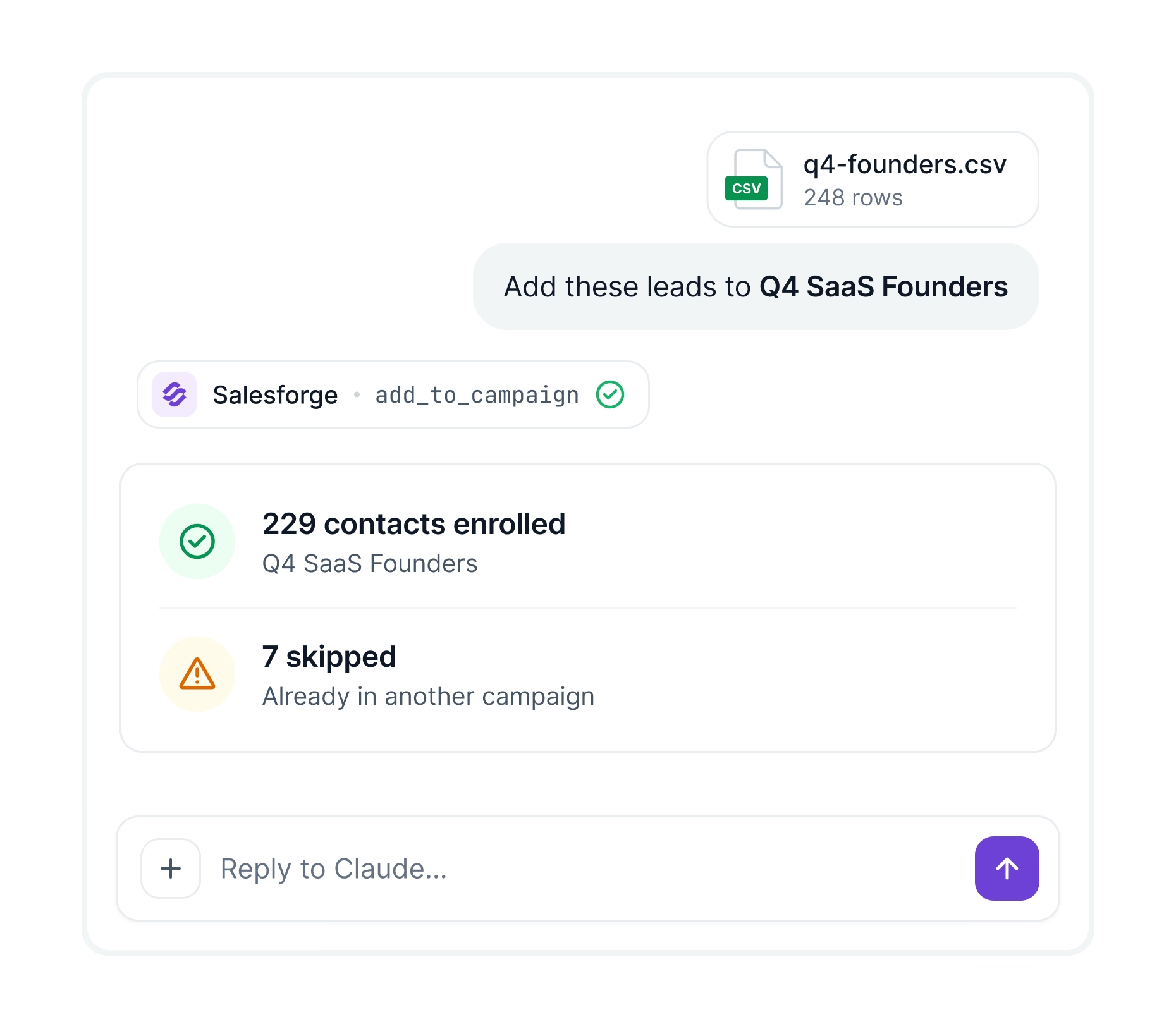
Upload leads and enroll them in one prompt

Upload your contacts and add them to a campaign. Your assistant flags anyone already in another one.
Upload contacts one by one or in bulk
Verify emails before the first send
Add contacts to your do-not-contact list
Claude chat adding uploaded leads to a Salesforge campaign via the Salesforge MCP
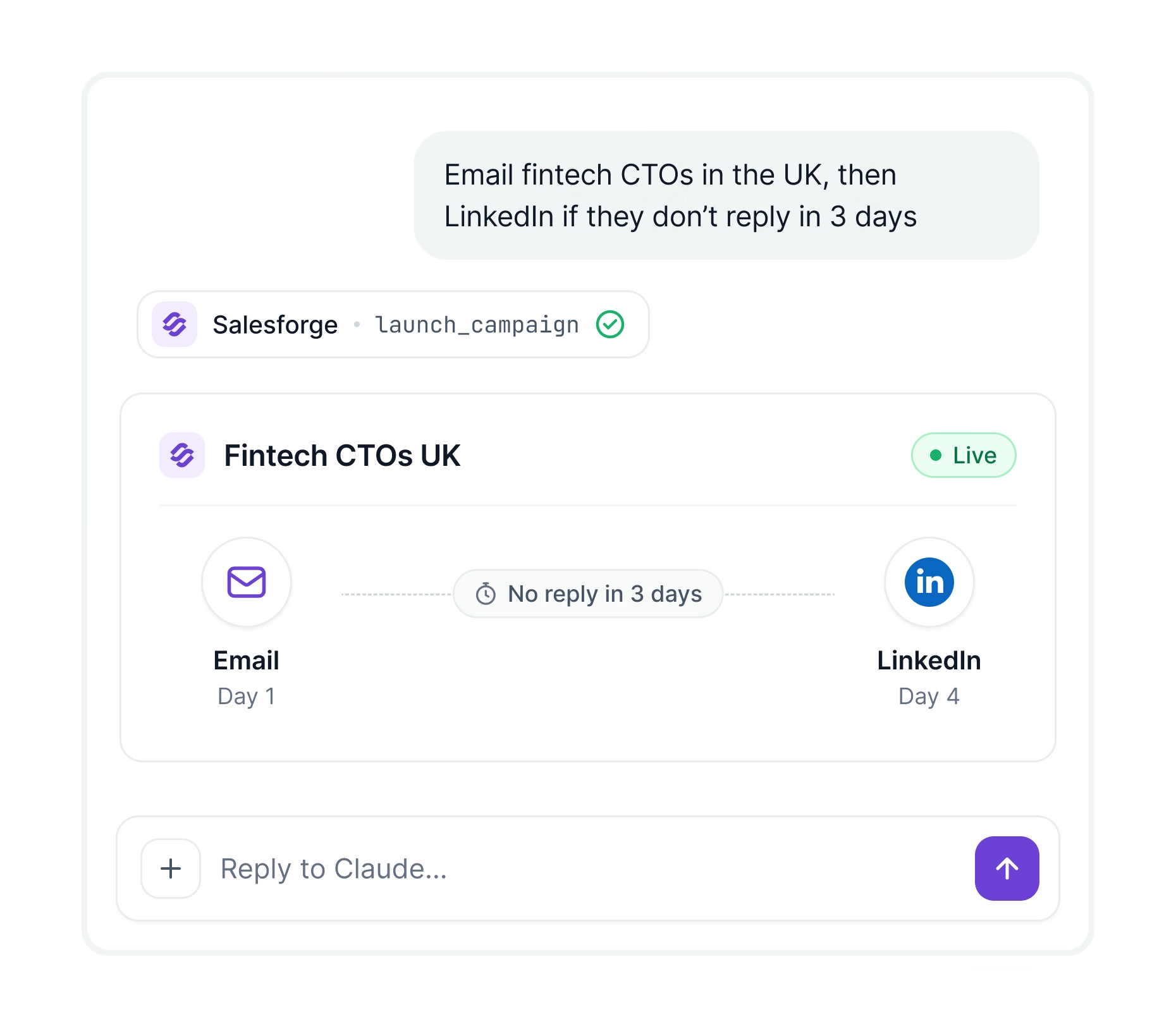
Claude chat launching an email and LinkedIn campaign in Salesforge

Prompt the campaign you want to launch

Tell your assistant who to reach, which channels and when. It builds and launches the campaign in Salesforge.
Email and LinkedIn steps with if/then paths
Assign mailboxes and LinkedIn senders in chat
Move interested leads into follow-up campaigns

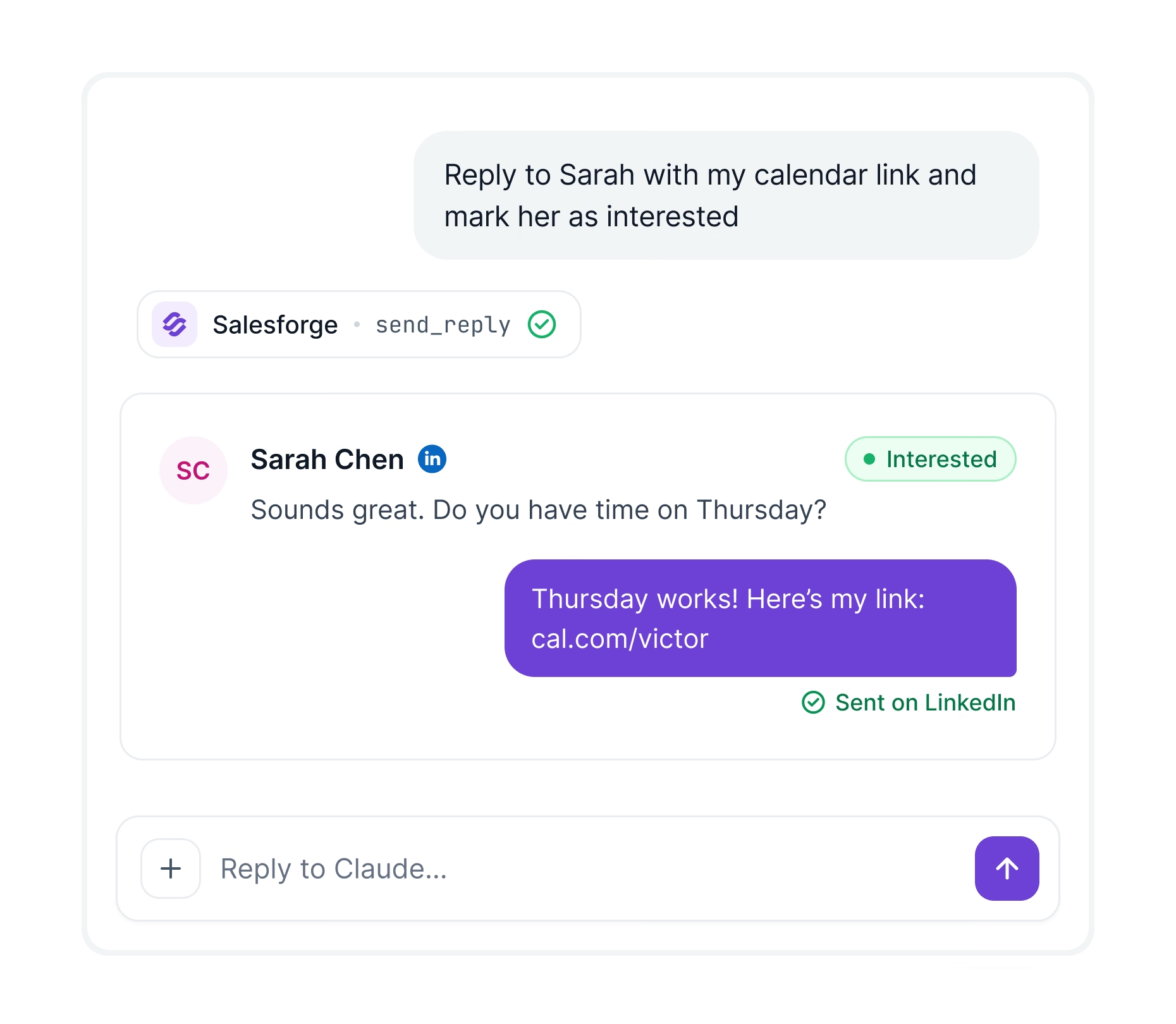
Reply to leads right from your AI chat

Read new replies and answer them without opening Primebox. Works for both email and LinkedIn.
Read reply threads and their labels
Answer emails and LinkedIn messages
Relabel threads as interested or not
Claude chat replying to a lead on LinkedIn and marking her as interested
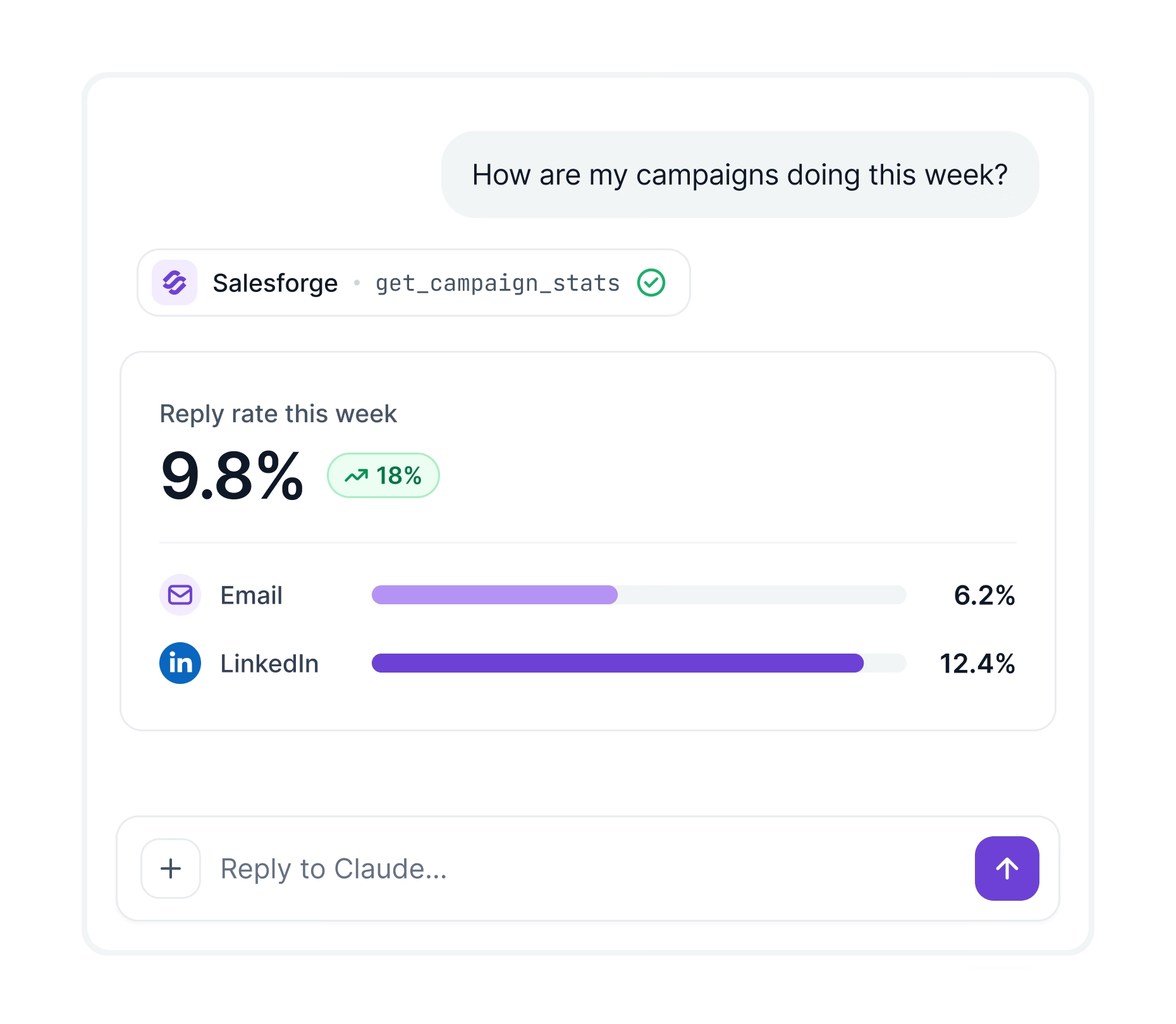
Claude chat showing Salesforge campaign reply rates by channel

Check campaign performance in your chat

Ask how a campaign or mailbox is doing. Your assistant pulls opens, replies and bounces and sums it up.
See which campaigns get the most replies
Find your best and worst mailboxes
Compare email and LinkedIn results side by side

How to use Salesforge MCP

Read documentation

Get MCP access

Start a Growth plan or free trial and generate your API key in Settings.

Connect your AI assistant

Link Salesforge to Claude, Cursor, Windsurf, VS Code, Claude Code and more.

Start prompting

Upload leads, launch campaigns and check results right inside your AI assistant.

Über 10.000 Unternehmen nutzen Salesforge

Alle Fallstudien anzeigen
Erreicht
ein
85,26%
Positiv
Antworten
Bewerte
und
ein
2,86$
CAC
Mit
Verkaufsschmiede,
Mailforge
&
Warme Schmiede
Case Study
Wie
Erreicht
Über
214 K
Aussichten
Mit
ein
16% +
Positiv
Antworten
Bewerte
Case Study
„Salesforge und Ihre anderen Produkte sowie Ihr schneller Support waren in meinen ersten zwei Jahren als Leiter einer Agentur für Lead-Generierung von entscheidender Bedeutung. Als alleiniger Gründer ist es eine Herausforderung, Leads für mich selbst und meine Kunden zu generieren. Salesforge hat mir dabei geholfen, eine „schlanke und effiziente” Pipeline aufzubauen. Mit einem geringen Aufwand an Zeit und Geld erhalte ich oft so viele Leads, dass ich meine Kampagnen unterbrechen muss.”
Vytas Mikulenas
Founder, Lean Sales Systems
„Ich habe schon viele Plattformen ausprobiert, aber keine ist besser als Salesforge, was die Zustellbarkeit von E-Mails und die Benutzerfreundlichkeit angeht. Jede Woche fügt das Team neue Funktionen hinzu und der Support ist ausgezeichnet!“
Sam Momani
CEO, LinkedDNA
„Die neue Infrastruktur von Salesforge ist bahnbrechend. Sie hat meine Zustellbarkeit und Versandkapazität erheblich verbessert. Ich habe mehrere Outreach-Tools ausprobiert und kann Ihnen sagen: Dieses Tool ist ein Muss für alle, die ernsthaft daran interessiert sind, Cold E-Mails in großem Umfang zu versenden.“
Roman Hipp
Co-founder, bettercontact.rocks
„Unser CAC liegt derzeit bei 2,86 $ und wir gehen davon aus, dass er noch weiter sinken wird. Derzeit gewinnen wir täglich 4 bis 5 neue Musikschaffende hinzu. Wir glauben fest an das, was Sie bei Salesforge aufbauen. Ihre Anleitung, wie wir skalieren und die richtigen Kunden erreichen können, hat für uns einen entscheidenden Unterschied gemacht. Die Verknüpfung Ihrer Strategie aus Einrichtung von Domains + Posteingängen + Warm-up + Tageslimits mit unserem Lead-Magneten für Lizenzgebühren-Audits hat uns ein effizientes Wachstum ermöglicht und ohne übermäßigen Aufwand zu starken Ergebnissen geführt. Das hat wirklich einen Unterschied gemacht.“
Carlos Palop
CEO, UniteSync
„Ich habe nur 40 Kontakte hochgeladen und bereits 3 positive Antworten erhalten.“
Stuart Brent
Founder, Vacord Screen Printing
Wie
Läuft
Multi-Domain
Kalt
Reichweite
Mit
Das
Schmiedestapel
Case Study

Frequently asked questions

If we don’t answer your question below, please contact us via chat

What is the Salesforge MCP server?

It connects your AI assistant to Salesforge. You upload leads, launch campaigns and answer replies by typing.

Can it find new leads?

No. It works with contacts you upload. To search for new leads, connect Leadsforge with its own API key.

Which AI assistants can I use?

Claude, Cursor, Windsurf, VS Code and any app that supports MCP.

Does it work for LinkedIn outreach?

Yes. You can add LinkedIn steps, connect LinkedIn accounts and reply to LinkedIn messages.

Do I need to code?

No. You paste one setup block with your API key into your AI app. Claude Desktop also needs Node.js installed.

Which plan includes MCP?

The Growth plan. It's $80 a month billed yearly or $96 billed monthly. Both start with a 14-day free trial.