If you are looking into LinkedRent, you are probably looking to buy or rent ready-to-use accounts for LinkedIn outreach.

Finding the right account is not always straightforward, and that is likely why you are here. 

Before buying a ready-to-use LinkedIn account, the key question is what happens if LinkedIn restricts it, and whether you can get a replacement after purchase. 

Public feedback does not answer many of those questions. LinkedRent has only four Trustpilot reviews at the time of writing. All four are positive, with customers mainly praising quick delivery and helpful support. 

None of them gives much detail about account quality, restriction rates, or performance over several months.

For this review, I have reviewed customer feedback from users who have actually used it, and I have also compared its offerings with those of other providers selling LinkedIn accounts.

My initial assessment is that LinkedRent may work for agencies and lead-generation teams that need to quickly acquire accounts. However, the small number of detailed reviews makes it difficult to judge how reliable the accounts are over time.

In this LinkedRent review, I will cover everything that will help you understand LinkedRent deeply.

TL;DR

  • LinkedRent offers LinkedIn account rentals with warmed-up accounts, dedicated proxies, a replacement policy, and optional LinkedIn Premium or Sales Navigator. Pricing starts at $140/month for Basic, $170/month for Premium, and $190/month for Sales Navigator. The company says it has a restriction rate of around 3% and an average replacement time of about 12 hours.
  • Independent trust is the biggest concern: Trustpilot shows 4.0/5 from 4 reviews. G2 removed the vendor, its products, and its reviews for violating G2's Terms of Use, so there is no usable G2 rating. Capterra has no verified customer reviews.
  • Long-term reliability remains unproven: The available reviews praise fast delivery and responsive support, but they do not provide enough evidence about account stability, replacement quality, or performance over months of outreach.
  • LinkedRent rents accounts, not an outreach platform: You still need separate software for LinkedIn automation, multichannel sequencing, CRM sync, analytics, and AI outreach.
  • For teams that want an all-in-one outbound platform instead of renting LinkedIn accounts, Salesforge is the better option: it brings email and LinkedIn outreach, AI personalization, reply management, and deliverability tools together in one place, rather than relying on separate account rentals and outreach software.

LinkedRent Review: What You Get vs What You Don't

LinkedRent provides warmed-up LinkedIn accounts with dedicated proxies and replacement coverage. You can also add LinkedIn Premium or Sales Navigator, with pricing starting at $140 per month.

In practical terms, that means you do not have to worry about creating accounts, warming them up, or managing proxies yourself.

For teams that already use outreach software, LinkedRent can slot into the setup as the account layer and help scale LinkedIn outreach.

The table below compares LinkedRent with Salesforge to show the difference between renting LinkedIn accounts and using a platform that also manages the outreach workflow.

Feature
Salesforge Best Overall
LinkedRent
Starting Price $48 per month for Pro $140 per month for Basic
Main Product Email and LinkedIn outreach software LinkedIn account rental service
LinkedIn Accounts Connect one LinkedIn sender on Pro or unlimited senders on Growth Rent warmed-up LinkedIn accounts
Email Outreach Included Not included
LinkedIn Outreach Included through LinkedIn sequences Requires separate outreach software
Multichannel Sequences Email and LinkedIn in one sequence Not included
AI Personalization Included through personalization credits Not included
Reply Management Primebox manages email and LinkedIn replies Not included
Mailboxes Unlimited mailbox connections Not applicable
Proxy Not included as a rented account service Dedicated mobile or residential proxy included
Account Age Connect your own LinkedIn account Accounts are at least one year old
Replacement Policy Not applicable Replacement coverage included
LinkedIn Premium Use your connected LinkedIn account Included with the $170 plan
Sales Navigator Use your connected LinkedIn account Included with the $190 plan
Automation Tools Salesforge provides its own outreach software Compatible with tools such as Expandi and HeyReach
Free Trial 14-day free trial No free trial listed
Best For Teams that want email and LinkedIn outreach in one platform Teams that need additional LinkedIn accounts

What Real Users Are Saying About LinkedRent in 2026

LinkedRent has very little public review data. Trustpilot is the only major review site with customer reviews. G2 has removed the vendor from its platform, and Capterra has none. That leaves just four public customer reviews to evaluate.

I. Trustpilot (4.0/5, 4 reviews)

All four Trustpilot reviews are five-star ratings from July 2026, and they tell a very consistent story. Customers repeatedly praise fast delivery, responsive support, and smooth onboarding. 

One reviewer wrote:

"Great experience, very pragmatic and fast delivery. Would recommend!"

Another customer said:

"It was great working with Michael. He has helped me with everything, and I never encounter any problem working with him."
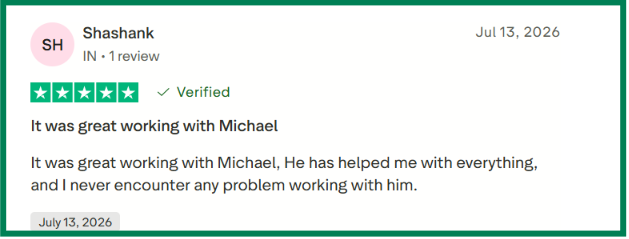

LinkedRent Trustpilot review regarding customer service
This image shows the LinkedRent Trustpilot review regarding customer service

II. G2

G2 review of LinkedRent
This image shows this G2 review of LinkedRent
G2 no longer lists LinkedRent.

The platform displays a notice stating that the vendor, its products, and its reviews were permanently removed because of a violation of G2's Terms of Use.

III. Capterra

LinkedRent has no customer reviews on Capterra at the time of writing. That means there is no additional independent review source beyond Trustpilot.

My Experience Reviewing LinkedRent

I reviewed LinkedRent from the perspective of an outbound team that rents LinkedIn accounts. I looked closely at account setup, dedicated proxies, replacement coverage, pricing, customer support, and automation compatibility.

I. Account Quality

LinkedRent says each rented account is manually warmed up before delivery. Every profile comes with a dedicated proxy and a unique browser environment, and the company says the accounts are at least one year old. Premium plans also include LinkedIn Premium or Sales Navigator.

  • What I tested: I looked at how LinkedRent prepares each account before delivery. I checked the account requirements, the dedicated proxy, the browser environment, the replacement policy, and the usage guidance provided to customers.
  • What I liked: LinkedRent handles the basics well. Each account comes with the core setup already in place, including a dedicated proxy and its own browser environment. I also liked that every plan includes replacement coverage if an account gets restricted.
  • What could be better: I wanted more detail about the warm-up process. LinkedRent says the accounts are manually warmed up, but it does not explain how that process works or how it decides when an account is ready for outreach.
  • My take: LinkedRent does a solid job of preparing accounts before delivery. The dedicated proxy and replacement policy are clear strengths. I would still like more detail about the warm-up process, since that would make it easier to judge the overall account quality.

II. Dedicated Proxies

LinkedRent includes a dedicated mobile or residential proxy with each rented account. The company also gives access through an anti-detect browser profile with a unique browser fingerprint and a fixed proxy. Each account remains tied to that dedicated environment.

  • What I tested: Looked at how LinkedRent delivers account access, including the dedicated proxy, browser environment, fingerprint, and login process. 
  • What I liked: Every account arrives with its own dedicated environment instead of requiring extra configuration before outreach begins.
  • What could be better: LinkedRent explains what is included, but it shares very little technical detail about its proxy infrastructure. I would have liked more information about proxy locations, browser management and how the setup is maintained over time.
  • My take: Dedicated proxies are one of LinkedRent's stronger features. The setup should help keep logins consistent, although more technical documentation would make the infrastructure easier to evaluate.

III. Automation Compatibility

LinkedRent supports a number of cloud-based LinkedIn automation tools, including Expandi, HeyReach, Linked Helper, GetSales, Dripify, Salesforge, Aimfox, Unipile, and Skylead. The company also says customers should stay within its outreach limits and use the provided proxy when running automation.

  • What I tested: I reviewed the automation tools LinkedRent says it supports and checked its guidance on connection limits, proxy use, and unsafe automation settings.
  • What I liked: It is useful that LinkedRent works with several tools many outreach teams may already use. That makes it easier to plug a rented account into an existing campaign setup.
  • What could be better: LinkedRent lists the supported platforms, but it gives little detail on how to set up each one. I would have liked clearer steps for connecting every supported tool.
  • My take: Automation compatibility is a plus for teams already using third-party LinkedIn tools. The account still needs careful settings, though, because LinkedRent says aggressive automation can lead to restrictions.

IV. Profile Customization

LinkedRent says its rented LinkedIn accounts are highly customizable. Even so, the company recommends leaving the account name, profile photo, and location unchanged, since updates to those details can affect identity verification or raise the risk of account restrictions.

It also suggests updating the profile gradually over three to five days rather than changing everything at once.

  • What I tested: I reviewed which profile details LinkedRent allows customers to customize. I also looked at the restrictions on changing the account name, profile photo, and location, along with the recommended timeline for making profile updates.
  • What I liked: It clearly explains which profile details should stay the same. The company also gives helpful guidance on making profile updates gradually instead of all at once.
  • What could be better: I would have liked to see more examples of the profile sections customers commonly customize after receiving an account.
  • My take: LinkedRent gives customers flexibility to personalize the profile while also setting clear limits on changes that could trigger identity verification or account restrictions.

V. Sales Navigator & Premium Accounts

LinkedRent offers Basic, Premium, and Sales Navigator account plans. The higher plans include LinkedIn Premium or Sales Navigator Advanced subscriptions instead of requiring you to add them separately.

After reviewing the plans, I found the differences easy to understand. The included subscriptions make the higher tiers more complete, although I wanted more guidance on which plan fits different outreach teams.
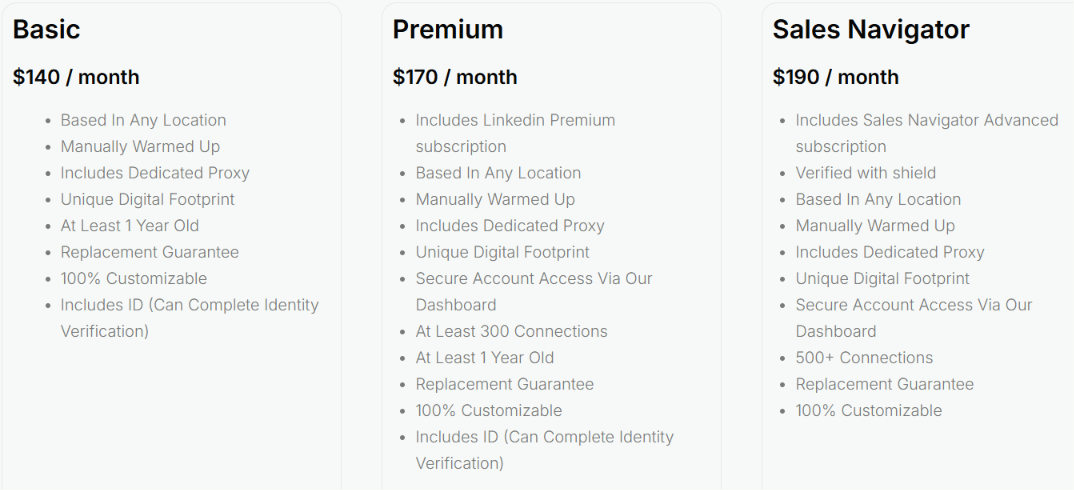
  • What I tested: I compared the Basic, Premium, and Sales Navigator plans. I checked the included subscriptions, minimum connection counts, and account features.
  • What I liked: The plans are clearly separated. I could quickly see what changes between each tier without digging through multiple pages.
  • What could be better: The documentation explains what each plan includes, but it doesn't explain which type of customer each plan is intended for.
  • My take: The plan structure is straightforward and easy to compare. A simple buying guide would make choosing between Premium and Sales Navigator much easier.

LinkedRent Pricing in 2026

LinkedRent pricing
This image shows the LinkedRent pricing

LinkedRent offers three monthly plans. The main difference between them is the LinkedIn subscription that comes with the rented account. Every plan includes a manually warmed-up account, a dedicated proxy, a replacement guarantee, and profile customization. Bulk discounts start at five accounts.

Plan Monthly Price LinkedIn Subscription Connections Best For Notable Differences
Basic $140/month None Not specified Teams that only need a warmed-up LinkedIn account Includes a manually warmed-up account, dedicated proxy, unique digital footprint, account at least one year old, replacement guarantee, customizable profile, and ID for identity verification.
Premium $170/month LinkedIn Premium 300+ Teams that want LinkedIn Premium included Adds LinkedIn Premium, secure dashboard access, and at least 300 connections while keeping the core account features.
Sales Navigator $190/month Sales Navigator Advanced 500+ Teams that prospect with Sales Navigator Includes Sales Navigator Advanced, secure dashboard access, 500+ connections, replacement guarantee, and profile customization.

There are no setup fees, and you can cancel at any time. LinkedRent also applies automatic volume discounts: 5% for 5 to 9 accounts, 10% for 10 to 19 accounts, and 15% for 20 or more accounts.

6 Risks to Consider Before Choosing LinkedRent

After reviewing LinkedRent, I found that the company is transparent about the trade-offs involved in renting LinkedIn accounts. None of these points are deal breakers, but they are worth understanding before deciding whether the service fits your workflow.

1. LinkedIn Limits Still Apply

LinkedRent provides warmed-up accounts, but LinkedIn's usage limits still apply. The company recommends staying below 20 connection requests per day and 100 to 120 per week because exceeding those limits can increase the chance of warnings or restrictions.

2. Some Profile Details Should Stay Unchanged

The accounts are customizable, but LinkedRent advises against changing the account name, profile photo, or location. Those details are tied to identity verification and changing them can increase the risk of account issues.

3. LinkedIn's Policies Still Matter

LinkedRent explains that renting a LinkedIn account is not illegal. However, it also notes that LinkedIn's User Agreement discourages account sharing. Anyone considering the service should understand that policy before getting started.

4. Restrictions Can Affect Active Campaigns

If an account is restricted, LinkedRent may first attempt identity verification before replacing it. The company says identity verification typically takes two to four business days, although replacement is also available under its policy.

5. Safe Automation Still Depends on Good Practices

LinkedRent supports several automation tools, but it also warns against aggressive automation settings and recommends using the provided proxy. Following those guidelines remains an important part of using the service.

6. Managing Multiple Accounts Takes Planning

LinkedRent supports teams that need multiple accounts, but it also recommends keeping operators, locations, and usage patterns consistent. Running several accounts still requires careful management rather than simply adding more profiles.

Who LinkedRent Is Built For (And Who Should Look Elsewhere)

LinkedRent makes the most sense if you already have an outreach process in place and just need more LinkedIn accounts to support it.

I. When LinkedRent Is a Good Fit

  • You manage LinkedIn outreach for multiple clients and want each campaign on its own account. LinkedRent also offers discounts starting from five accounts, so it is a better fit for agencies than for someone renting just one profile.
  • You have already pushed one LinkedIn account as far as it can realistically go. Rather than increasing activity on the same profile, you can spread outreach across several accounts and keep usage lower on each one.
  • You recruit at scale and need separate profiles for different recruiters, roles, or hiring campaigns.
  • You already use tools like Salesforge, Expandi, HeyReach, Dripify, or Skylead. In that case, LinkedRent can supply the accounts while your existing software handles the outreach
  • It may also suit agencies planning to grow from five accounts to ten or more while keeping client campaigns separate.

II. When to Look Elsewhere

  • You want to change every part of the rented profile. LinkedRent recommends keeping the original name, photo, and location, so there is limited room to rebuild the account around your own brand or employee.
  • You want to use your own proxy or browser setup. Each account comes with a dedicated proxy and anti-detect browser profile, which gives you less control over the technical setup.
  • You plan to send a high number of connection requests from each account. LinkedRent recommends staying below 20 requests per day and around 100 to 120 per week.
  • You also need to be comfortable with the risks involved in using rented LinkedIn accounts. LinkedIn discourages account sharing under its User Agreement, so restrictions remain possible even when you follow LinkedRent’s activity guidance

LinkedRent vs Salesforge: which one do you need?

LinkedRent and Salesforge handle different parts of LinkedIn outreach.

LinkedRent is a good fit if you need extra LinkedIn accounts. You get aged profiles with dedicated proxies, replacement coverage, and the option to add LinkedIn Premium or Sales Navigator. It makes sense if you already use an outreach tool and just need more accounts to plug into it.

Salesforge is the better option when you need the outreach software itself. It lets you run email and LinkedIn sequences, manage replies, connect multiple senders, and track campaigns in one place.

Some teams may use both: LinkedRent provides the LinkedIn profiles, while Salesforge runs the campaigns behind them.

Why you might choose Salesforge

I. Run email and LinkedIn in the same sequence

Salesforge lets you combine email and LinkedIn steps in a single campaign. That means a prospect can receive an email and then a LinkedIn touchpoint, without your team having to build and manage two separate sequences.

This is especially useful when LinkedIn is just one part of your outbound strategy, rather than the whole campaign.
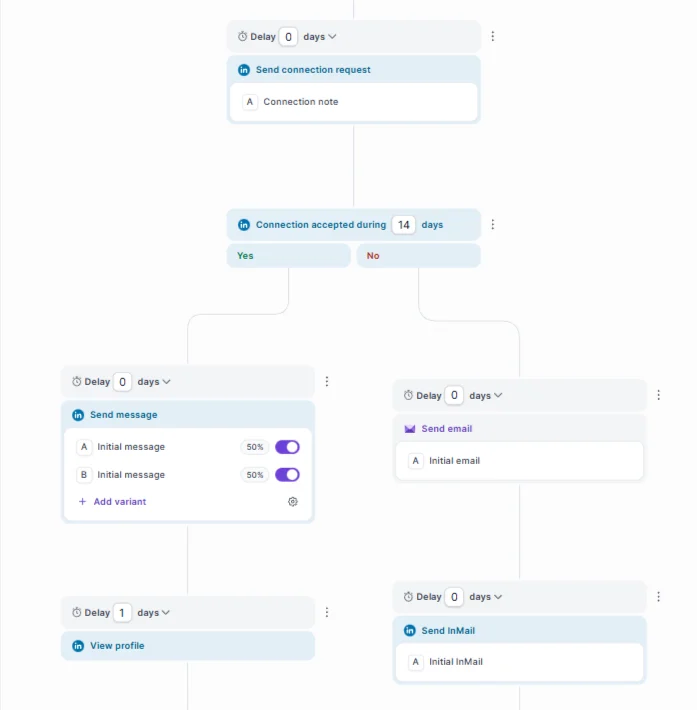
Multichannel sequence by Salesforge
This image shows the Multichannel sequence by Salesforge

II. Manage replies from one inbox

Replies from different campaigns can quickly become difficult to follow, particularly when several mailboxes and LinkedIn senders are involved.

Salesforge brings conversations into Primebox, giving your team one place to review replies and continue conversations.

III. Add email deliverability tools

LinkedRent takes care of the LinkedIn account setup, while Salesforge handles the email side of the campaign with Warmforge warmup, mailbox rotation, and Dynamic ESP Matching.

That matters if your sequence includes cold email and you want deliverability covered without adding another warmup platform

IV. Add senders without rebuilding the setup

Salesforge’s Growth plan gives you unlimited LinkedIn senders, connected mailboxes, users, and workspaces, which makes it a practical choice for agencies running separate campaigns for different clients or teams managing multiple outbound efforts.

Your overall costs can still rise because of email credits, LinkedIn accounts, data providers, and other infrastructure, but you will not be charged extra for each additional Salesforge user or workspace on this plan.

V. Connect it to the rest of your stack

Salesforge connects with tools like HubSpot, Salesforce, Slack, Clay, Zapier, and webhooks, so campaign activity and replies can flow into the systems your team already uses.

It also ties into other Forge products for lead data, mailbox infrastructure, and email warmup.
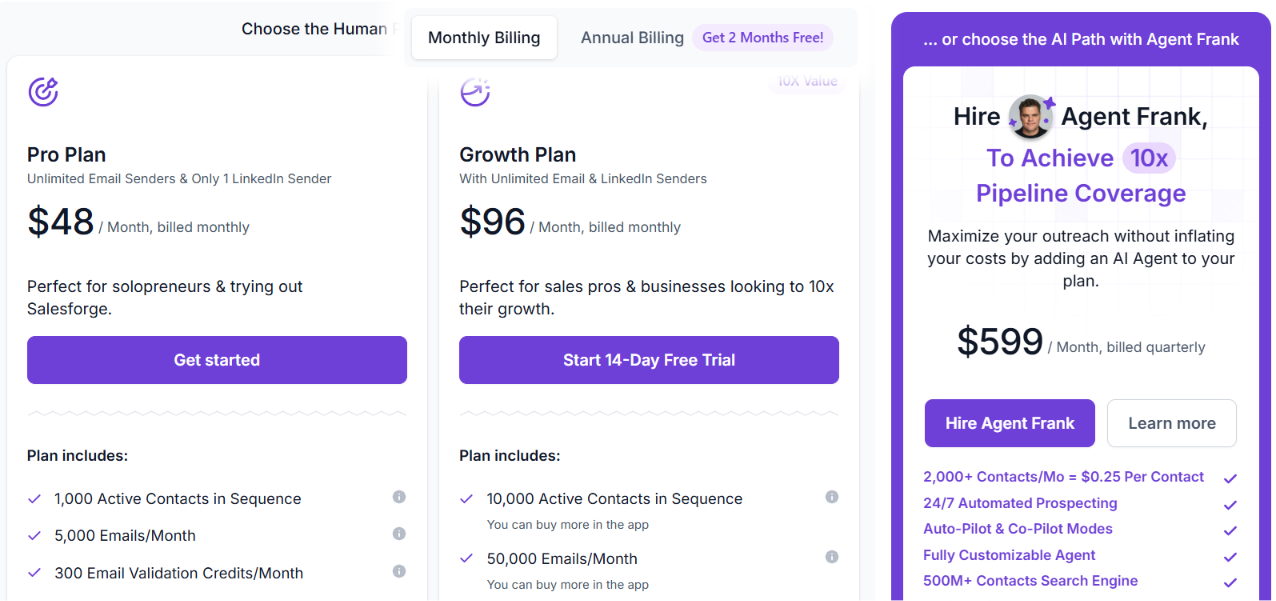
Salesforge Pricing

Salesforge pricing
This image shows the Salesforge pricing

Salesforge has two main plans for outbound teams.

  • Pro: $48/month. Includes unlimited mailboxes, one LinkedIn sender, unlimited Warmforge warmup, and Primebox.
  • Growth: $96/month. Adds unlimited LinkedIn senders, unlimited users, unlimited workspaces, API access, and more advanced features.
  • Agent Frank: $599/month, billed quarterly. An AI SDR that can handle prospecting, outreach, follow-ups, and meeting booking.

What Users Say About Salesforge

Salesforge has a 4.6 rating on G2. Many users mention email deliverability, multichannel outreach, and helpful support as the main reasons they chose the platform.

One user, Vytas Mikulenas, said Salesforge helped him build a steady pipeline for both his business and his clients. Another user, Sam Momani, said the platform stands out for its deliverability, ease of use, and fast product updates.

Personalized Outbound Strategy

Get The Right Outbound Strategy In Minutes

Enter your email to get a custom plan & stack recommendation for your business

It's being carefully crafted by AI

Please check your mailbox in 5 minutes

Is LinkedRent Worth It in 2026?

LinkedRent is a good option if you want aged LinkedIn accounts without waiting months to build them yourself. It takes care of the setup, so you can start outreach sooner. But LinkedRent is only one piece of the process. You still need a way to run campaigns, manage replies, and handle email outreach.

If you want everything in one place, take a look at Salesforge. It lets you run email and LinkedIn campaigns together, keeps replies in one inbox, and includes unlimited Warmforge warmup with every plan. You can also try it free for 14 days and see if it works for your team.

If LinkedRent gives you everything you need, it is a solid choice. But if you want to spend less time switching between tools, give Salesforge a try and compare both before you decide.
Book more meetings on autopilot

Set up in minutes. No per-seat pricing. No commitment.
Try
free
4.6 rating on G2
Add as a preferred
source on Google