
Personalized Outbound Strategy
Get The Right Outbound Strategy In Minutes
Enter your email to get a custom plan & stack recommendation for your business
It's being carefully crafted by AI
Please check your mailbox in 5 minutes
Lead enrichment tools give you emails, titles, LinkedIn URLs, and company data. But they often miss the part you actually need before outreach: clarity. I’ve seen this a lot while working across sales automation, email outreach, and lead generation workflows.
You enrich a list, but still end up checking the company website, reading LinkedIn, and asking the same questions:
That is why teams are testing Claude for company research and enrichment. Claude can take a company domain and turn it into useful context around the company, ICP fit, recent signals, and outreach angles.
But Claude is not a contact database. It cannot replace verified emails or CRM-ready enrichment by itself. In this guide, you’ll see where Claude helps, where it falls short, and how to use it with enrichment tools to build better prospect lists.
Yes, but only for one part of the job. Claude (AI assistant) helps you understand a company better. It can tell you what the company does, who they likely sell to, and if they match your ICP. It can also point out recent changes and give you ideas for what to say in your outreach.
This makes your prospect data more useful. You stop guessing and start sending to accounts that actually make sense.
But Claude does not give you real contact data. It cannot reliably find verified emails, phone numbers, or clean records you can push into your CRM.
So you still need enrichment tools for that part. In simple terms, Claude helps you think better about your prospects, but it does not replace the tools that give you
actual lead data.
Claude for company research and enrichment means using Claude Code to turn a company input (like a domain) into a qualified prospect. You give Claude a company, and it researches what the business does, its industry, size, and positioning.
It then checks whether the company matches your ICP. If it is not a good fit, the process stops there.
If it is a good fit, Claude goes deeper. It identifies relevant roles to target and prepares context you can use for outreach. When connected to tools like Leadsforge, it can also pull contact data and make it usable.
In simple terms, it helps you go from a company name to a qualified and ready-to-target account without doing each step manually.
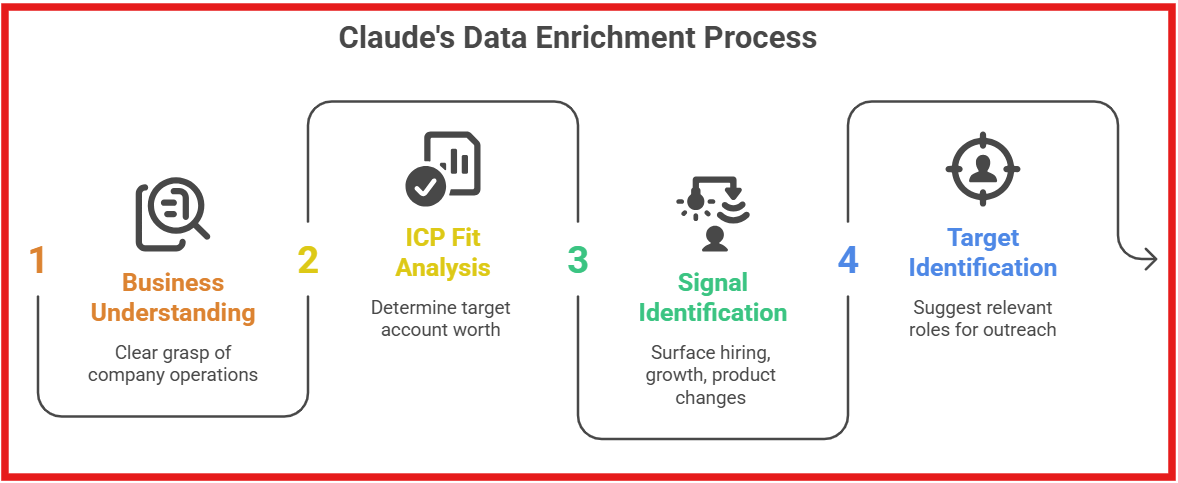
Claude enriches data by adding context, not by acting as a contact database. It starts with a company input and builds a clear understanding of the business. Then it checks ICP fit and explains whether the account is worth targeting.
After that, it surfaces useful signals like hiring, growth, or product changes. These signals help you decide when and how to reach out. It also suggests who to target by identifying relevant roles inside the company. If connected to tools like Leadsforge, it can move from context to actual contact data.
With setups like the Salesforge MCP Server, this can directly flow into outreach campaigns. In simple words, Claude makes your prospect data clearer and more actionable, while enrichment tools provide the actual contact data.
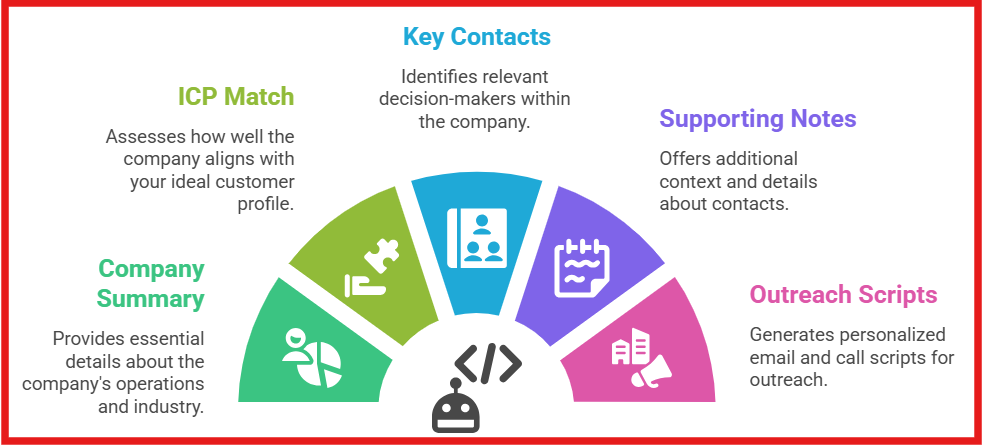
When you use Claude Code for company research and enrichment, the output is a clean, structured profile you can directly use for outreach. Here’s what that profile includes:
In simple words, you don’t just get raw data. You get a ready prospect profile you can act on immediately.
Claude (via Claude Code) makes the process faster, but it is not a complete data source on its own. Its output depends on how the workflow is set up and which tools are connected.
No, not on its own. Claude is strong at understanding companies and helping you think clearly. It can read a company website, explain what the business does, check if it matches your ICP, and even suggest what you should say in your outreach. That makes your targeting and messaging much better.
But prospecting is not just about understanding companies. You also need clean, usable data. Claude does not reliably give you:
That part still needs proper enrichment tools like Leadsforge. So if you try to use Claude alone, you will still end up doing extra work. You will understand the company better, but you will still need another tool to actually find and use the contacts.
In simple words, Claude is great for research and decision-making, but it is not enough for full prospecting. You still need enrichment tools to complete the workflow.
The Forge MCP Server is the link between Claude Code and the Forge tools. Claude Code can prepare the work. It can read the campaign brief, check the copy, fix spintax, map variables, and help decide what needs to happen next. But without MCP, it cannot directly use Salesforge, Leadsforge, Warmforge, or the other Forge products.
That is why the MCP server is needed. It gives Claude Code controlled access to the tools in the Forge stack. Here’s how to connect Claude with Forge MCP Server:
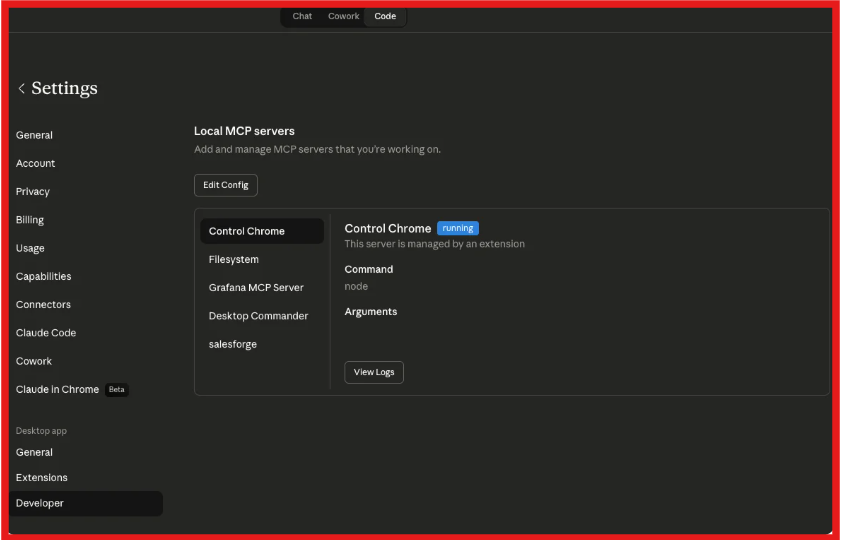
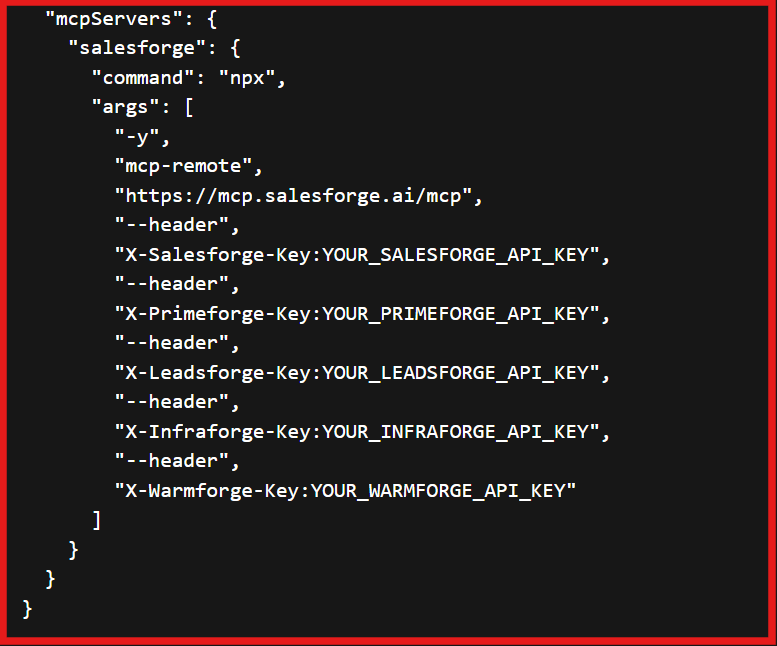
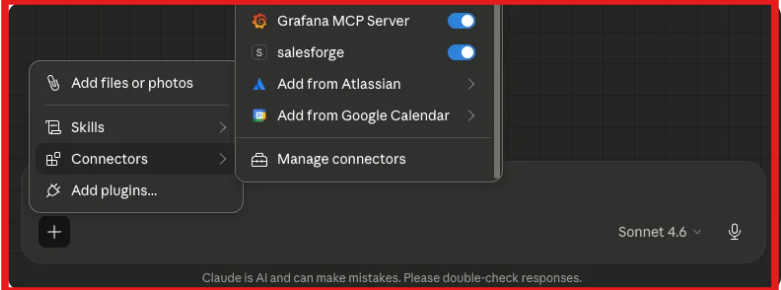
If Claude returns real data, the connection is working. Once connected, Claude can use Salesforge to create sequences, Leadsforge to find and enrich contacts, Warmforge to check warmup stats, and Primeforge, Infraforge, or Mailforge to work with domains and mailboxes. So the workflow becomes much clearer.
First, Claude prepares the campaign. It checks the contact list, fixes formatting issues, reviews the copy, and makes sure the sequence is ready. Then, the MCP server lets Claude send that prepared work into the right tools.
For example, the campaign can be created inside Salesforge, contacts can be added, mailboxes can be assigned, and performance can later be checked from the same place.
This is different from using Forge tools alone. Forge tools can already do the work, but I still have to open each tool and manage the steps myself. With Claude Code plus MCP, I can give one instruction and let Claude move across the tools for me.
In simple words, Claude Code prepares and decides. Forge tools execute. MCP connects both. That is the actual use. It does not replace Salesforge or Leadsforge. It makes them easier to operate from one place.
Enter your email to get a custom plan & stack recommendation for your business
Please check your mailbox in 5 minutes

Claude can help improve your prospect data, but it is not a complete solution on its own. It is useful for understanding companies, checking ICP fit, and improving your outreach thinking. This helps you focus on the right accounts and send more relevant messages. But it does not give you verified contacts or ready-to-use data.
That is why it works best when used with enrichment tools like Leadsforge, which handle contact data and list building. If you want to bring everything into one workflow, you can connect Claude with the Salesforge MCP Server.
Overall, Claude helps you make better decisions, while enrichment tools help you take action. Using both together gives you better prospecting results.




.jpg)
