If you use Instantly for cold email, your emails are sent from the Gmail or Outlook inboxes you connect, not from Instantly itself.
When emails stop landing in the inbox or inboxes start getting burned, the issue is usually not the campaign.
It’s the infrastructure behind it: your domains, inbox reputation, warm-up setup, and how Instantly handles sending at scale.
So what are you actually sending on when you use Instantly? And how much of deliverability is Instantly’s responsibility versus yours?
In this post, we break down Instantly's email infrastructure and explain what really matters before you scale.
Instantly works as a control layer between your email inboxes and the people you send emails to.
It does not replace Gmail or Outlook, it manages how those inboxes send emails at scale.
Here’s how Instantly email infrastructure works in practice:

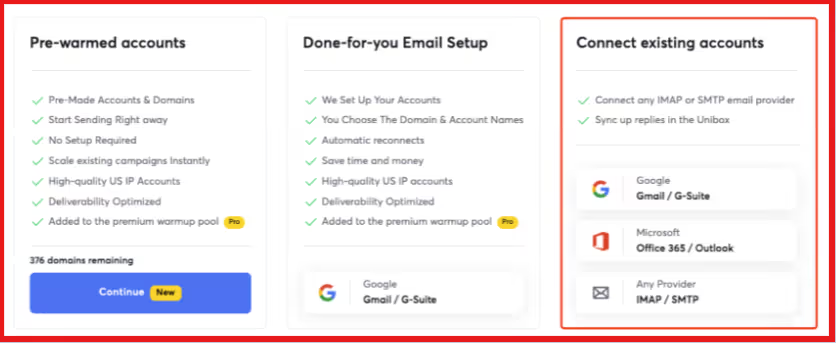
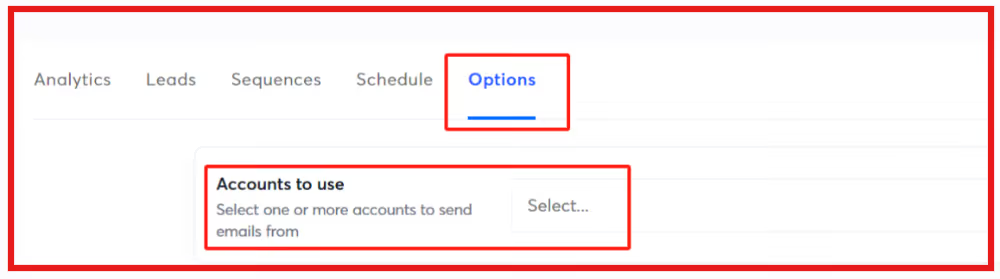
In simple terms, Instantly controls how emails are sent, while your inboxes and domains control whether emails are trusted.
It uses the inboxes and domains you connect and sends emails through them using its own sending controls and deliverability features.
Here’s what you are actually sending emails from:
In short, Instantly controls how emails are sent and managed, but the sending identity always belongs to your inboxes and domains.
No, Instantly does not provide a fully dedicated email infrastructure by default.
Instantly runs on top of the Gmail or Outlook inboxes you connect.
Your inboxes and domains are yours, but parts of the surrounding infrastructure, like warm-up networks, tracking domains, and IP routing, are shared unless you configure isolation.
Instantly controls sending behavior, warm-up, inbox rotation, and routing through its proxy IP system.
This helps manage scale, but it is not the same as sending from a private mail server or a fully isolated environment.
Warm-up is shared by default, and tracking uses a shared domain unless you add a custom tracking domain.
More isolation is available through premium or private warm-up and SISR, but final delivery is still handled by Google or Microsoft.
In short, Instantly provides managed sending infrastructure, not fully dedicated email infrastructure.
Instantly includes automatic email warm-up for every connected inbox. Warm-up can run before and during campaigns.
Your inbox sends and receives warm-up emails inside Instantly’s network of real inboxes. These emails are opened and replied to, creating normal email activity.
This helps signal to Gmail and Outlook that your inbox and domain are legitimate, which supports better inbox placement over time.
Warm-up is shared by default, with premium and private options available for more isolation.
Instantly also controls sending behavior. It manages sending speed, inbox rotation, reply handling, and delivery settings like text-only emails and provider matching.
Instantly supports reputation management, but it does not own it. Inbox placement is still decided by Google or Microsoft.
Instantly helps manage sending and protect deliverability, but it does not control everything.
Some limits are built into how email providers like Gmail and Outlook work.
Here are the main limitations to be aware of:
In short, Instantly manages how emails are sent, but email providers enforce the final limits.
Instantly works best for teams that want to send cold emails at scale without building their own sending systems.
It is a good fit for:
Instantly is most useful when you understand that it manages sending behavior, not ownership of inbox reputation.
Teams that follow sending limits, warm-up rules, and proper domain setup get the most value.
If you need full control over mail servers or dedicated email infrastructure from day one, Instantly may not be the right fit.
Both Instantly and Salesforge help you send cold emails at scale, but they work very differently when it comes to email infrastructure.
Neither platform replaces Gmail or Outlook. Your emails always come from real inboxes and real domains.
The key difference is how much of the setup, control, and infrastructure management each platform helps you with.
Instantly focuses on sending and campaign management, assuming you already have inboxes ready.
Salesforge is built as part of a larger ecosystem, where infrastructure tools exist alongside the sending platform, making setup and scaling easier.
In short, Instantly gives you more control but expects more setup. Salesforge reduces setup work by bundling more infrastructure tools into its ecosystem.
Instantly is a strong platform for managing cold email at scale.
It helps control sending behavior, warm-up, and deliverability, but it does not replace your inboxes, domains, or email providers.
What you send from, and how well it performs, still depends on how your infrastructure is set up.
If you are comfortable managing domains, inboxes, and reputation on your own, Instantly can work very well.
But if you want less setup work and more of the email infrastructure handled for you, it helps to look at platforms built with that in mind.
Salesforge is made for teams that want outreach and infrastructure to work together.
With tools that support inbox setup, warm-up, and scaling inside one ecosystem, it reduces the manual work needed to get started and grow safely.
If you want to spend less time managing email infrastructure and more time closing deals, Salesforge is worth exploring.
Start your 14-day free trial with Salesforge!
.jpg)

.jpg)

.jpg)

