
Personalized Outbound Strategy
Get The Right Outbound Strategy In Minutes
Enter your email to get a custom plan & stack recommendation for your business
It's being carefully crafted by AI
Please check your mailbox in 5 minutes
If you are looking into Closely, you are probably trying to save time on LinkedIn outreach without putting your account at unnecessary risk.
That is the tricky part with tools like this. Automating connection requests and follow-ups sounds useful, but you are also giving a third-party tool access to an account your sales pipeline may depend on.
So before paying for Closely, there are a few things worth knowing:
Closely has a 4.6/5 rating from 196 G2 reviews. Many users like how easy it is to set up campaigns and automate LinkedIn and email outreach.
But on Trustpilot, Closely has a 1.4/5 rating from 77 reviews. Some customers report problems with billing, cancellations, support, and LinkedIn account restrictions.
That difference caught my attention.
So, I tested Closely myself and went through its customer reviews to see where that gap comes from. In this Closely review, I'll show you how the platform works, what I found while using it, what customers are saying, how much it costs, and where it falls short. By the end, you should have a much clearer idea of whether Closely is worth paying for in 2026.
Closely does more than basic LinkedIn automation. It lets you run LinkedIn and email together in the same sequence, find contact details, personalize messages with AI, manage replies, and sync activity with your CRM.
The main downside shows up when you need to add more LinkedIn accounts. The $49/month Starter plan only includes one LinkedIn account. Growth gives you three accounts for $127/month, while Essential gives you five for $205/month. Starter also does not include monthly enrichment credits.
Growth includes 3,000 credits, and Essential includes 5,000. You can use those credits to find emails, phone numbers, or personalize messages with AI.
The table below compares Closely with Salesforge on the features that matter most if you are choosing a tool for LinkedIn and email outreach.
Closely’s biggest advantage is that it combines prospecting data and LinkedIn automation in one product. Salesforge works a bit differently. Its Growth plan costs $96/month and includes unlimited LinkedIn senders, unlimited mailboxes, unlimited Warmforge warm-up, and multichannel outreach.
So, if you only need a few LinkedIn accounts and want built-in lead enrichment, Closely is simpler because everything stays in one tool. But if you plan to add more LinkedIn senders or care more about email deliverability as you scale, Salesforge gives you more flexibility.
The review data for Closely is hard to ignore because G2 and Trustpilot tell very different stories.
On G2, most users like the simple setup, LinkedIn automation, and the fact that email can be added to the same campaigns. On Trustpilot, the complaints are much more serious and mostly focus on billing, cancellations, support, and LinkedIn account restrictions.
Closely has a 4.6/5 rating from 196 G2 reviews. The positive feedback mostly comes down to ease of use and how much manual outreach it can remove.
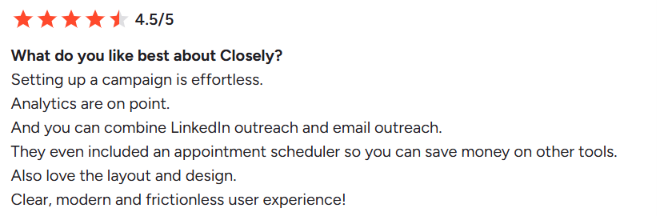
One user gave Closely 4.5/5 and said setting up campaigns was easy, the analytics were useful, and they liked being able to combine LinkedIn and email outreach in one campaign. Another reviewer gave it 4/5 after using Closely for nine months. They liked the campaign stats, LinkedIn warm-up, and the ability to export LinkedIn profiles.
But they also said the email campaign features felt limited, the lead finder did not work well for them, and some campaign data could not be edited once uploaded.
The biggest concern in the newer G2 reviews is LinkedIn account safety. One of the reviewer gave Closely 0/5 after saying their LinkedIn account was banned and that the HubSpot integration did not work for them.
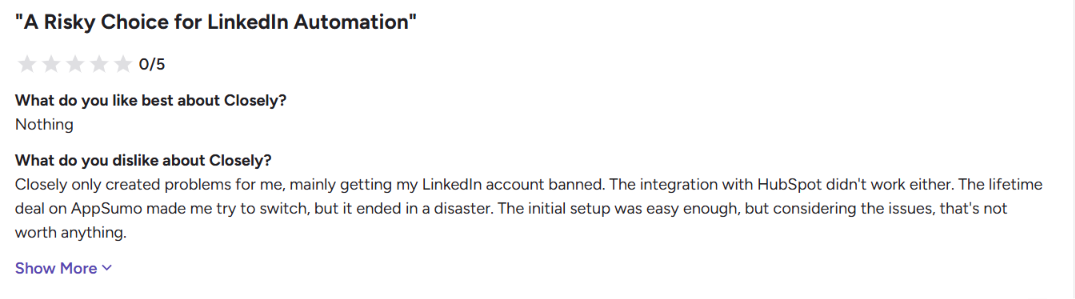
Users like the product when the automation works well, while the more serious complaints are around account restrictions, integrations, and billing
Trustpilot looks very different. Closely has a 1.4/5 rating from 77 reviews, and 34% of those reviews are one-star.
The biggest pattern is not actually the outreach features. It is subscription and cancellation problems. One reviewer said they could not change their payment method inside the app and were refused a refund after an upgrade was charged to the wrong card.
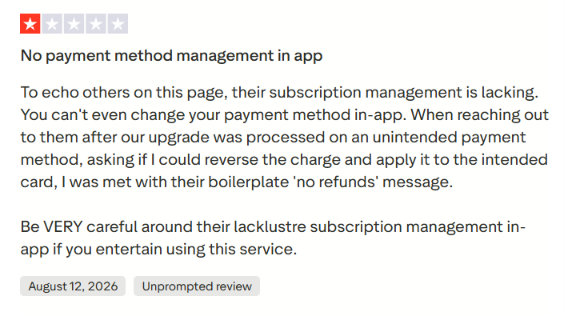
Another reviewer said cancelling and getting a refund was difficult, while other users reported renewal charges they did not expect. There are also complaints about the product itself. One user said incoming LinkedIn messages appeared to sync slowly, making the inbox difficult to use for live conversations.
Another user said several LinkedIn accounts were restricted while using the tool.
Older Trustpilot reviews are much more positive. Users from 2022 often praised Closely for saving time, making LinkedIn outreach easier, and running in the cloud without keeping a computer on.
That timing matters. The positive Trustpilot feedback is mostly older, while several of the more recent reviews focus on billing, support, syncing, and account restrictions.
My take: Closely clearly works well for some users, especially for simple LinkedIn and email outreach. But the recent complaints are serious enough that I would pay close attention to the cancellation terms and test the LinkedIn automation carefully before moving a large part of your outbound into it.
For this review, I focused on the parts of Closely that matter most for day-to-day outbound: setting up LinkedIn campaigns, combining LinkedIn with email, managing replies, and understanding the safety limits around automation.
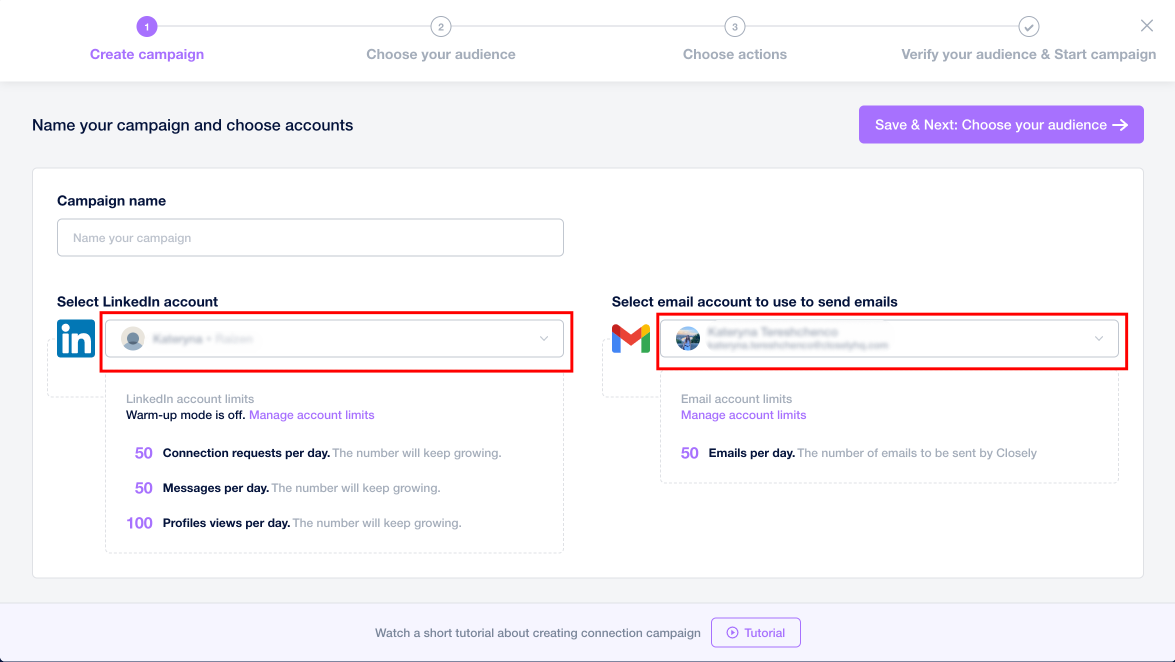
Setting up a campaign is fairly simple. You choose a LinkedIn account, add prospects from LinkedIn Search, Sales Navigator, posts, events, groups, or a CSV, and then build your sequence.
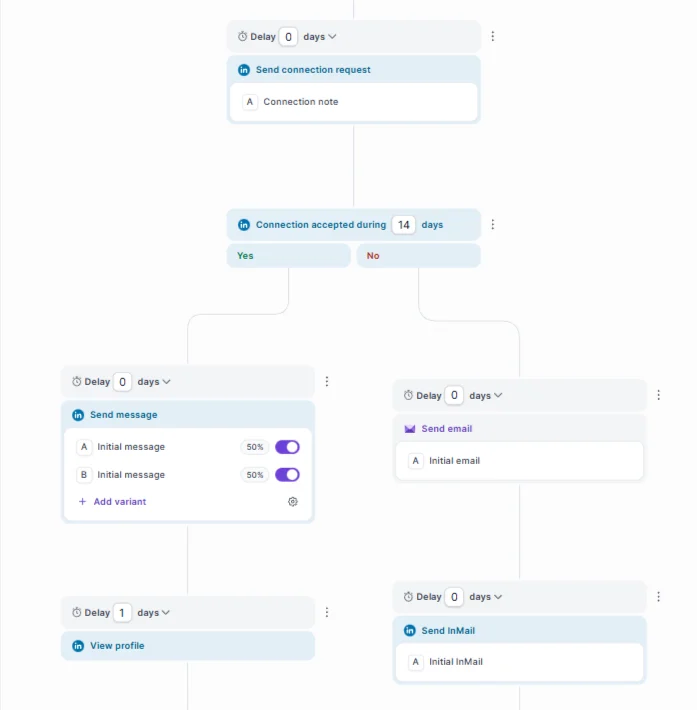
The sequence builder gives you useful LinkedIn actions such as connection requests, profile views, post likes, messages, and skill endorsements. You can also add conditions based on whether someone connects or whether an email is found.
Closely lets you put LinkedIn and email into the same sequence. You can send a connection request, follow up on LinkedIn, find the prospect's email, and then add email steps without creating a second campaign.
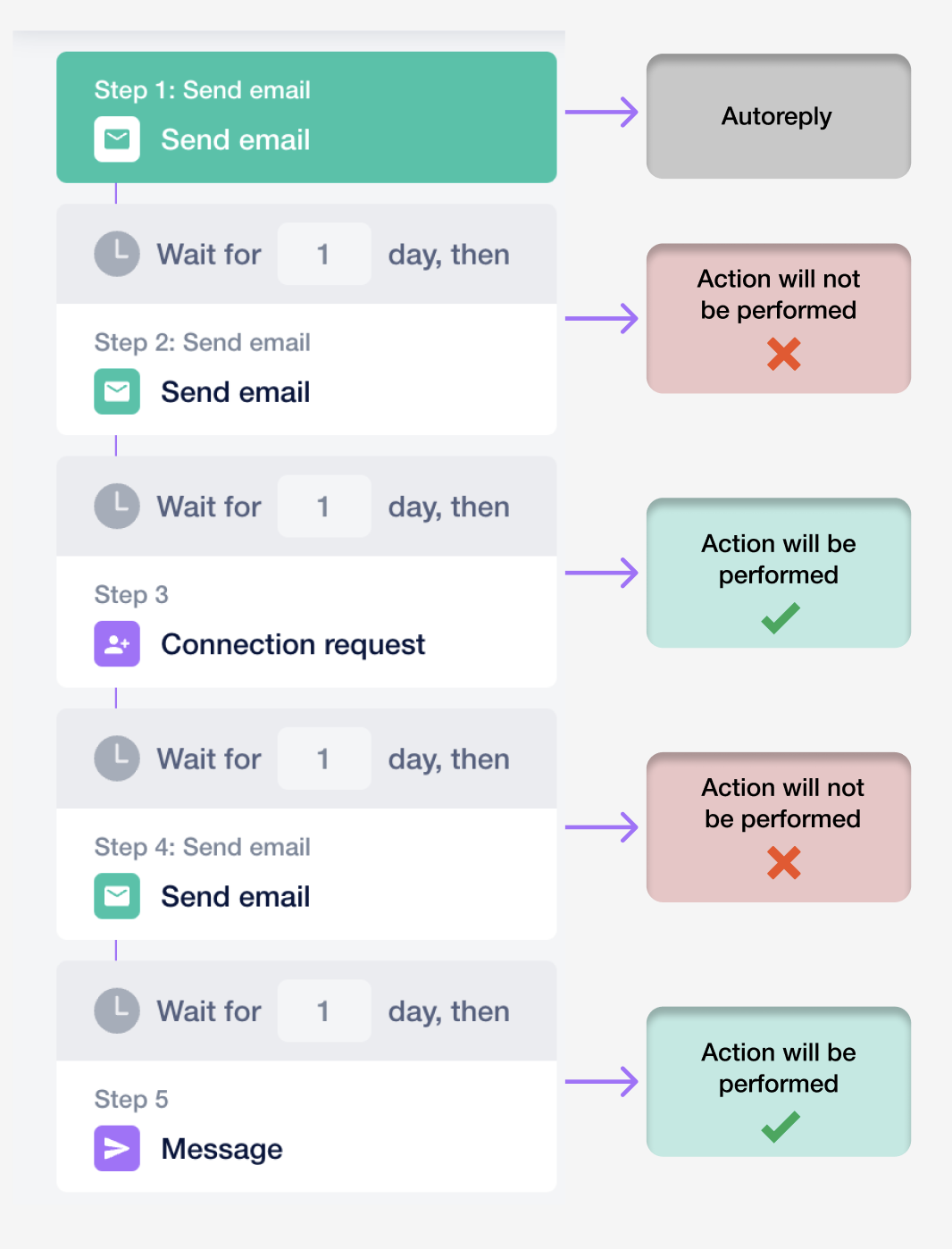
One thing to know is that the setup depends on where your leads come from. If you import prospects from LinkedIn instead of a CSV with email addresses, you need to add a Find Email step before Closely can send them an email. If no email is found, that email step is skipped.
Closely also gives you one place to manage LinkedIn conversations. You can filter messages by account, campaign, or tag and leave notes on conversations. If you manage several LinkedIn accounts, you can see their messages in the same inbox.
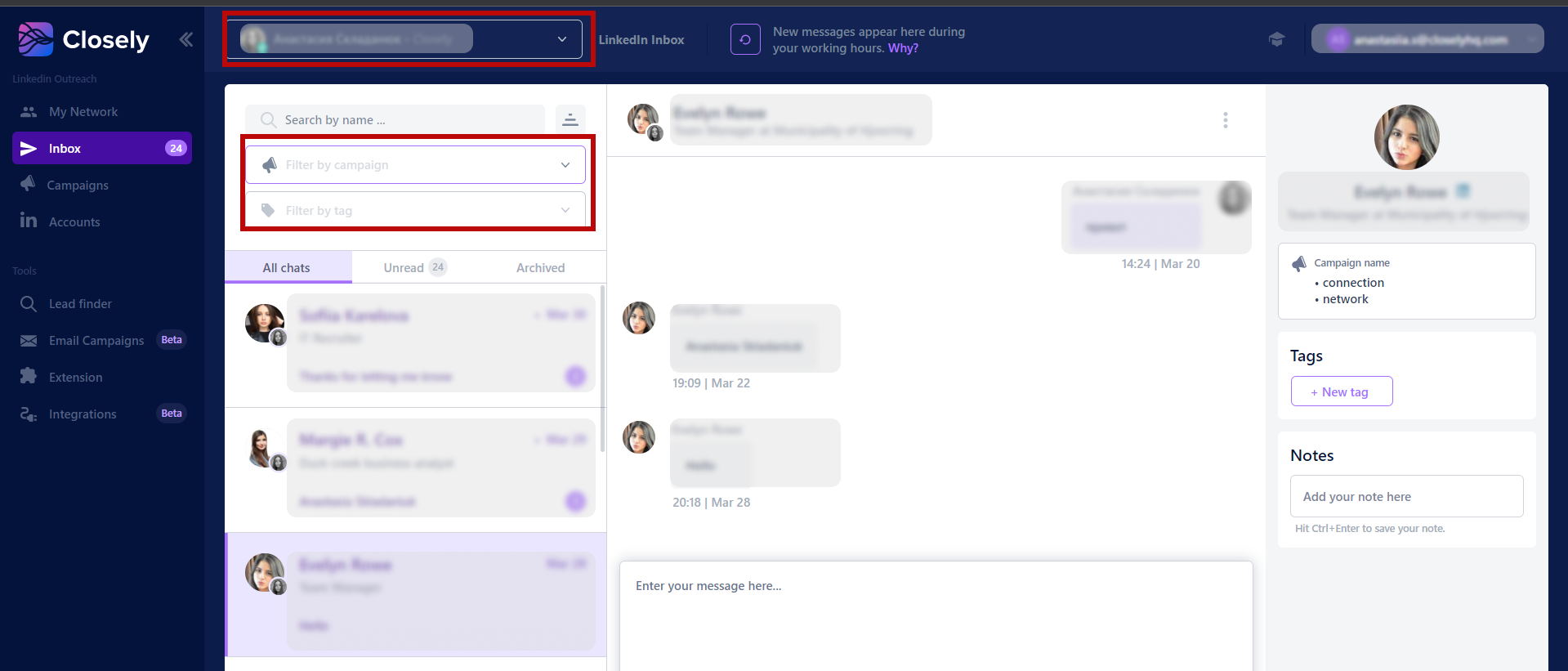
One important thing to note is that the inbox isn’t real-time. Closely says new LinkedIn messages can take a few hours to show up. That’s because each inbox refresh requires its automation to access LinkedIn, so updates are limited to avoid too much account activity.
This is the part I’d pay the closest attention to. Closely uses warm-up periods, daily limits, delays, and dedicated proxies on paid plans to help reduce unusual LinkedIn activity. Closely also recommends warming up an account for at least one month and not using other LinkedIn automation tools at the same time.
That said, this doesn’t mean your account is completely safe from restrictions. Closely’s own help docs say LinkedIn may still warn or restrict accounts if automation activity goes beyond its limits.
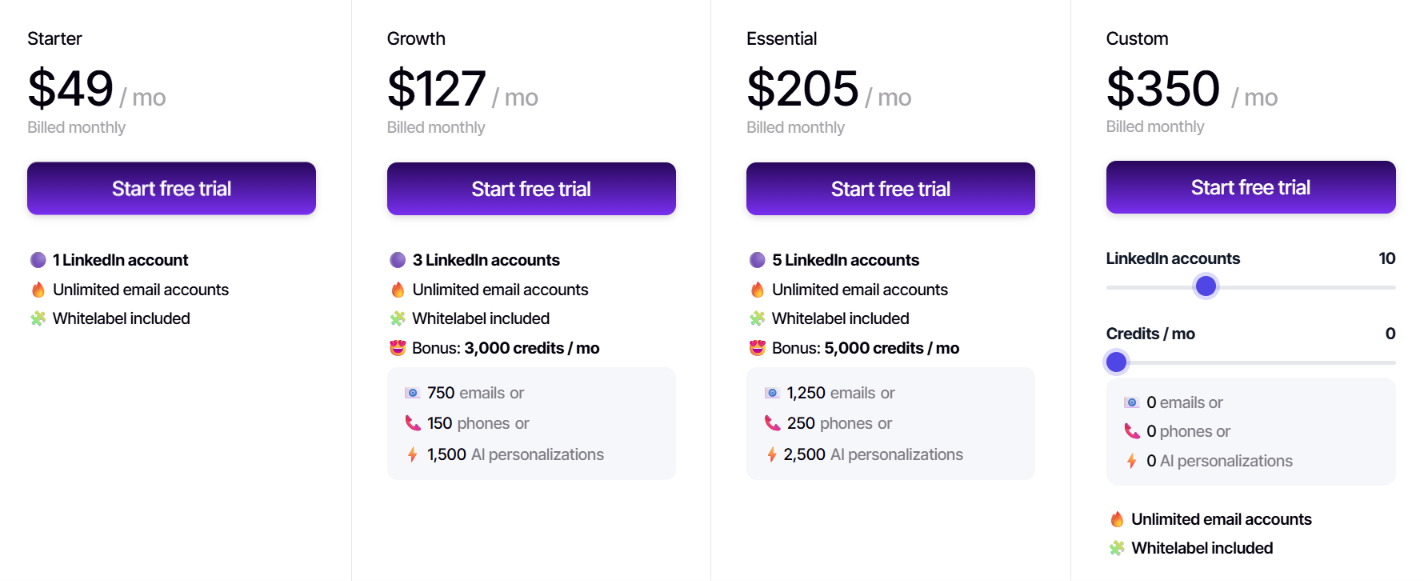
Closely keeps the main outreach features available across its plans. Even the Starter plan includes unlimited campaigns, unlimited email accounts, LinkedIn warm-up, multichannel campaigns, Smart Inbox, CRM integrations, and white labeling.
The main difference is how many LinkedIn accounts you can connect and how many enrichment credits you get.
The main thing to watch is how quickly the cost increases as you add LinkedIn accounts. Going from one account to five raises the monthly price from $49 to $205, so agencies or sales teams managing multiple LinkedIn profiles should figure out how many accounts they actually need before choosing a plan.
Closely also advertises 40% off with annual billing, but the information provided doesn’t show the exact annual price for each plan.
Closely is a good fit for teams that rely heavily on LinkedIn for outbound and want to manage email in the same workflow.
Closely can work well for:
Closely also positions itself for individual sellers, sales leaders, founders, agencies, marketers, and recruiters. Overall, it’s a stronger fit if you want one tool that combines LinkedIn automation, email campaigns, Smart Inbox, CRM integrations, and prospect enrichment.
Closely may not be the best fit if:
My take: Closely makes the most sense for teams that want to lead with LinkedIn and use email as a secondary channel. If your main priority is high-volume email, real-time reply handling, or managing a large number of LinkedIn senders, I would compare it with other tools before committing.
Closely and Salesforge both help you manage email and LinkedIn outreach from one place. The real difference becomes clear when you start adding more LinkedIn senders.
Closely charges based on how many LinkedIn accounts you use. Its monthly plans are $49 for 1 account, $127 for 3 accounts, and $205 for 5 accounts.
Salesforge works differently. Its Growth plan is $96 per month and includes unlimited LinkedIn senders, unlimited mailbox connections, and unlimited users. You also get 10,000 active contacts and 50,000 emails per month.
This is especially useful for agencies and larger sales teams. As your team grows, you can add more people and LinkedIn senders without being forced into a higher plan. Salesforge also supports conditional sequences across email and LinkedIn, and you can manage replies from both channels in Primebox.
Deliverability is another big difference. Every Salesforge subscription includes free unlimited Warmforge warm-up, and you can connect unlimited mailboxes.
And if you want to go beyond basic campaign automation, Salesforge also offers Agent Frank, an AI SDR that can help with prospecting, outreach, follow-ups, and booking meetings.
So I’d think about the choice like this.
Salesforge also offers a 14-day free trial, so you can try the workflow before committing to a paid plan.
Enter your email to get a custom plan & stack recommendation for your business
Please check your mailbox in 5 minutes

Closely is worth looking at if LinkedIn is a key part of your outbound strategy and you want email outreach built into the same platform. It lets you automate connection requests, messages, follow-ups, and email steps, and it also includes AI features for research and personalization.
That said, there are a few things I’d think through before paying for it. The biggest factor is LinkedIn account scaling. Closely starts at $49/month for one LinkedIn account. The Growth plan costs $127/month for three accounts, and the Essential plan costs $205/month for five.
Customer feedback is also mixed. Some users like the simple setup, campaign analytics, and multichannel outreach, while others mention issues with LinkedIn restrictions, billing and cancellations, support, and certain product features.
So, Closely is probably a better fit for individuals or smaller teams that want LinkedIn automation with email included. But if you have a larger outbound team and plan to add more LinkedIn senders, the pricing structure matters a lot more.
For that kind of use case, Salesforge looks like the stronger alternative. Its Growth plan includes unlimited LinkedIn senders, unlimited mailbox connections, and unlimited users, which makes it easier to scale outbound without paying more for each LinkedIn account.
If that sounds closer to how your team works, you can try Salesforge free for 14 days before making a decision.

.jpg)

.jpg)