Every outbound team asks the same question sooner or later: when should this sequence actually go out? I have run enough send-time tests to know the clock matters, just not in the way most timing charts claim.
Most advice online still ranks days and hours by open rate. That number stopped being trustworthy once mail clients and security scanners began loading tracking pixels on their own, so a Tuesday "open" can be a bot rather than a buyer. In this guide I judge timing on the metrics that pay: replies, and the meetings they turn into.
Below you will find the short answer, the day and hour data behind it, how timing shifts by role, industry, time zone, and season, and the way I test send times in Salesforge so the answer fits your own list.
If you only read one section, this is the one that gives you a schedule to use today.
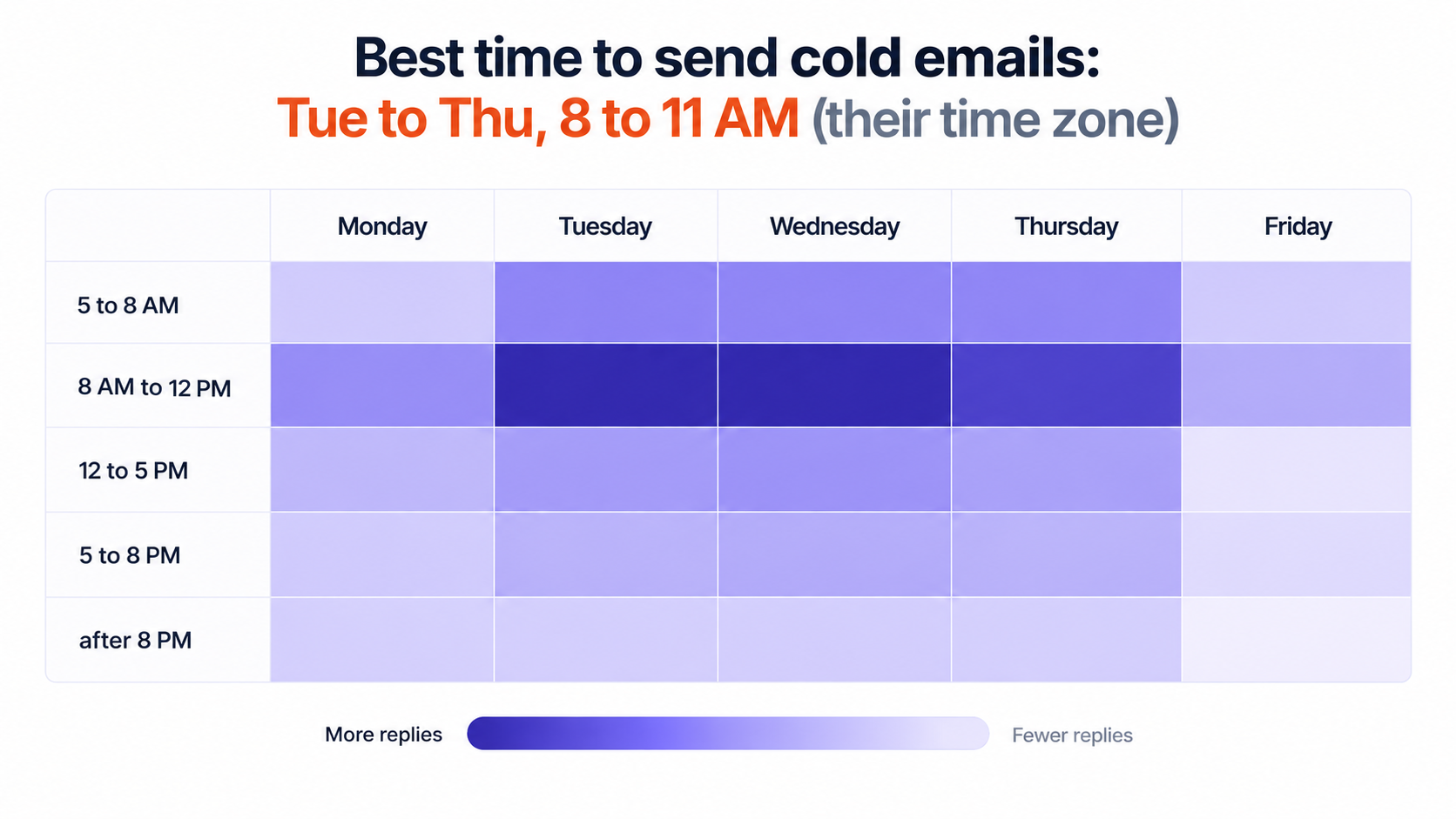
The best time to send cold emails in 2026 is Tuesday, Wednesday, or Thursday between 8 AM and 11 AM in the recipient's time zone. For founders and executives, an earlier slot between 6 AM and 8 AM often lands better because their calendars fill up by mid-morning.
That recommendation lines up with the largest recent reply-based dataset I could find. Belkins analyzed 7.5 million cold emails sent in 2025 and found the 8 AM to 12 PM window produced the highest reply rate (0.54%), with Wednesday and Thursday tied as the best days (0.48% each). Morning and early morning sends also turned replies into meetings at 0.4%, four times the rate of afternoon and night sends.
One note on those numbers: the study divides replies by every email sent, not by opens, so the percentages look small. The gaps between days and hours are what you should act on.
Most send-time charts still rank hours by opens, and that metric broke years ago.
Apple Mail Privacy Protection preloads images, including tracking pixels, whether or not a person reads the email. Corporate security gateways scan incoming mail the moment it arrives and trigger the same pixel. The result is a spike of "opens" right at delivery time, which makes almost any send hour look good on an open-rate chart.
That is one reason Salesforge sends text-only emails without heavy HTML or tracking pixels by default. A cleaner payload helps inbox placement, and it pushes you toward the numbers that tell the truth: reply rate, positive reply rate, and meetings booked. My breakdown of cold email metrics covers how to read each one.
Older studies also disagree with each other, which is a useful warning. Siege Media's analysis of 85,082 personalized outreach emails found Monday between 6 and 9 AM Pacific performed best, with a 2.8% reply rate against 2.6% for Wednesday. Their audience was publishers receiving content pitches, not software buyers. Audience changes the answer, so treat any benchmark, including the ones in this post, as a starting hypothesis for your own test.
Midweek wins on replies, but each weekday can still do a specific job inside a sequence.
My first touch goes out Tuesday or Wednesday morning. The first follow-up lands on Thursday, and later steps move to the following Tuesday, so no two touches share the same day and hour. Fridays get only short bump emails, if anything at all.
For most B2B lists, no. The exception is owner-operated local businesses such as restaurants, clinics, and trades, where the owner often catches up on email Sunday evening. If that is your market, a weekend slot deserves a test rather than an automatic no.
The hour matters less than your buyer's routine, but mornings keep earning more replies.
Mornings work because most people triage email before their first meeting. Your message sits near the top of the inbox at the moment the reader is deciding what deserves attention today, and a quick "yes, let's talk" costs them less effort than it will at 4 PM.
One practical tip: avoid scheduling everything at exactly 8:00 or 9:00. Scheduled sends from every other vendor land at the top of the hour too. Spreading volume across the whole window, and across several mailboxes through sender rotation in Salesforge, puts you in a quieter moment and looks more natural to inbox providers.
Your buyer's workday shapes the right send time more than any global average does.
Local prospecting has its own rhythm, and the list itself tells you the time zone. The Local Companies Search in Leadsforge uses Google Maps data: you set a location and radius, pick a business type such as dentists, law firms, or marketing agencies, then extract the matches or enrich them to find the right contacts. Because every result sits in one area, the whole list shares one sending window.
A perfect 9 AM send is wasted if it lands at 3 AM for the person reading it.
Once a list spans regions, the "best time" has to be calculated per recipient, not per sender. My guide to time zone management for cold email goes deeper, but this is the routine I follow:
Use the company headquarters as a fallback. For US-wide lists, a 10 AM Eastern send reaches the West Coast at 7 AM, which still sits inside a strong window. International campaigns also benefit from writing in the reader's language, and Salesforge supports AI personalization across 21+ languages so a Berlin prospect gets a German email at a German morning hour.
The gap between touches matters as much as the moment the first email goes out.
I space follow-ups two to three business days apart at first, then widen the gap. Each step moves to a different day and hour, because a prospect who ignored a Tuesday 9 AM email may reply happily to a Thursday 7 AM one. A sample schedule:
Salesforge runs this as multichannel with conditional sequences, so the LinkedIn and email steps react to what the prospect does. If the connection request is accepted, the next step becomes a LinkedIn message. If it is not, the sequence falls back to email. All six native LinkedIn actions (connection requests, messages, InMails, post likes, follows, and withdraw requests) can sit in the same flow as your email touches.
The calendar moves reply rates too, and the first quarter is the strongest.
In the 2025 data, reply rates peaked in February at 0.54% and bottomed out in December at 0.35%. The first half of the year averaged 0.50% against 0.40% in the second half. New budgets and fresh priorities make buyers more open to new vendors early in the year.
Check regional holidays as well. A campaign timed for a Tuesday morning in Germany loses its edge if that Tuesday is a public holiday.
The best time to email a prospect is the week something changes at their company.
Clock timing gives you a modest lift. Relevance timing gives you a much bigger one. A new VP of Sales in their first 90 days, or a startup that just closed a round and is hiring SDRs, is far more likely to reply than a perfectly timed prospect with no reason to care.
This is where Signals in Leadsforge changes the approach. Instead of searching only by ICP filters, you build lists from real events:
For company-based signals, Leadsforge matches each company against its 500M+ contact database and surfaces the relevant employees. Every result comes with evidence from public sources explaining why it matched, and waterfall enrichment fills in emails and phone numbers across multiple data providers. The list then moves straight into a Salesforge sequence with no CSV export, so you can hit the buying window and the right hour in the same campaign.
If you prefer describing your ICP in plain English, the chat-based lead finder builds the list for you, and the LinkedIn email and phone finder Chrome Extension pulls verified contacts while you browse. New users get 100 free credits on signup.
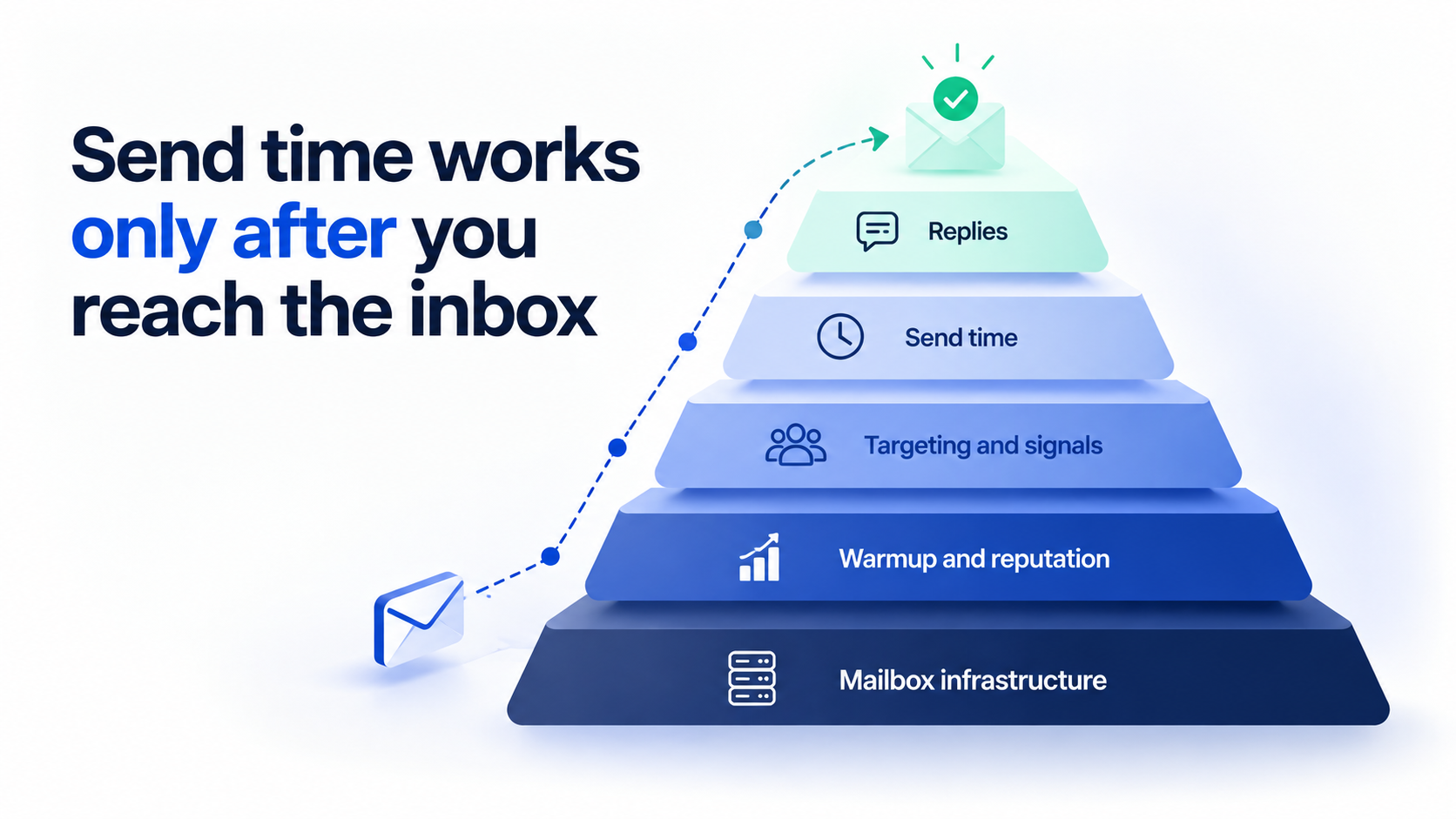
A 9 AM email that lands in spam has no send time worth measuring.
Before I test a single time slot, I check that mail is actually reaching the inbox. My guide to cold email deliverability covers the full setup, and these are the pieces that matter most for timing tests:
Your infrastructure choice matters here too. Mailforge gives you shared infrastructure built for cold outreach, Infraforge gives you dedicated IPs with pre-warmed mailboxes, and Primeforge gives you real Google Workspace and Microsoft 365 mailboxes that pair well with ESP matching. All three run from one Salesforge login, so you can move between them as volume grows without migrating. If a new mailbox is still ramping up, my email warm-up guide explains how long to wait before scaling.
Benchmarks give you a starting point, and your own reply data gives you the final answer.
For more ideas on what to test next, see these cold email A/B testing tips. And since timing never rescues weak copy, it is worth reviewing how to write a cold email that earns a reply at any hour.
Good timing produces replies at inconvenient moments. Primebox™ pulls every email and LinkedIn reply into one inbox. In Autopilot mode, AI handles replies end to end. In Co-pilot mode, it drafts each response for you to approve. Either way, a 7 AM "sounds interesting" does not sit unanswered until your afternoon.
You can run the Forge Stack three ways. Your own team can operate Salesforge directly. Agent Frank, the autonomous AI SDR, can run it for you: he prospects from the Leadsforge database, enriches contacts, writes personalized email and LinkedIn messages, handles follow-ups and replies through Primebox, and books meetings on your calendar 24/7. Or a certified Forge Expert agency can run it on your behalf.
Skipping these slots protects both your reply rate and your sender reputation.
Sending bursts of volume in any single slot can also trip spam filters. Here is how cold email differs from spam in the eyes of inbox providers.
If you want one rule to start with, this is the schedule I would use tomorrow.
Send first touches Tuesday to Thursday between 8 and 11 AM in the prospect's time zone, move founders and executives to 6 to 8 AM, and launch your biggest campaigns in the first quarter. Then treat that schedule as a hypothesis and let your own reply data refine it.
Timing is the smallest of the levers that decide whether a cold email works. Inbox placement, targeting the right buying moment, and fast replies move results far more. That is why I run outbound on the Forge Stack: Salesforge runs email and LinkedIn in one sequence, Warmforge keeps every mailbox warm at no extra cost, Leadsforge finds prospects with active buying signals, Mailforge, Infraforge, and Primeforge cover every infrastructure option under one login, and Agent Frank can run the whole thing for you. Everything sits under one roof, so the send time you choose actually gets its chance.
These are the timing questions I hear most often from teams setting up their first sequences.
The best time to send cold emails is Tuesday, Wednesday, or Thursday between 8 AM and 11 AM in the recipient's local time zone. Recent reply data from 7.5 million cold emails shows the 8 AM to 12 PM window earns the highest reply rate, with early mornings a close second.
Wednesday and Thursday tied for the highest reply rate in 2025 data, with Tuesday close behind. Monday is fine for first touches, while Friday and weekends earn the fewest replies for B2B outreach.
Morning is better for most B2B audiences. Emails sent before noon earned more replies and converted into meetings at four times the rate of afternoon and night sends in 2025 data. Afternoons work best for follow-ups and for roles that clear their inbox after lunch.
For B2B outreach, weekends usually underperform because few people triage work email on Saturday or Sunday. Owners of small local businesses are the main exception, and a Sunday evening send is worth testing for that audience.
Founders and C-level executives tend to respond best between 6 AM and 8 AM, before their meeting blocks start. Founders and owners also had the highest reply rate of any seniority group in 2025 data.
Wait two to three business days before the first follow-up, then stretch the gap to four or five days, and a week before the final touch. Sending each follow-up on a different day and hour gives you a second chance to catch the prospect at a better moment.
Segment your list by region and set each sequence's sending window to the recipient's morning. When you only know the company location, use its headquarters time zone. For US-wide lists, a 10 AM Eastern send lands at 7 AM Pacific and covers both coasts.
No. Send time gives a modest lift, while relevance, targeting, and inbox placement drive most of your results. A well-timed email that lands in spam or reaches the wrong person earns nothing, so fix deliverability and targeting first, then test timing.