HeyReach MCP Server grabs attention because it turns AI from a message writer into a LinkedIn campaign operator inside HeyReach. You can use Claude, Clay, Cursor, or n8n to check replies, filter leads, create icebreakers, draft responses, and move prospects into campaigns.
But the problem showed up pretty quickly for me. Most outbound teams do not run only on LinkedIn. You still need cold email, lead sourcing, mailbox warmup, deliverability checks, and one place to manage replies. HeyReach MCP does not cover all of that.
So while it can reduce manual work inside HeyReach, it still leaves most teams dependent on the rest of their outbound stack. In this review, I’ll break down where HeyReach MCP is useful, where it feels limited, and why Forge MCP Server may be a better alternative if you want AI to manage the full outbound workflow.
HeyReach MCP is an MCP (Model Context Protocol) server that connects AI tools like Claude, Clay, Cursor, n8n, VS Code, and ChatGPT directly with your HeyReach workspace. Instead of manually managing LinkedIn campaigns inside HeyReach, you can use prompts to perform actions through AI. For example, you can ask AI to:
The goal of HeyReach MCP is to reduce the manual campaign work inside LinkedIn outbound workflows. HeyReach provides native MCP support, so every workspace gets its own MCP connection URL and MCP key. That makes it easier to connect AI tools without building custom API integrations manually.
Right now, HeyReach MCP is mainly focused on improving LinkedIn outreach operations through AI-assisted workflows.
HeyReach MCP works by giving your AI tool a direct connection to your HeyReach workspace. Instead of building a custom API setup, you copy your workspace’s MCP connection URL and key into an MCP-supported tool like Claude, Clay, Cursor, n8n, Make, or VS Code. Once connected, the AI can read your prompt and perform supported actions inside HeyReach.
HeyReach MCP setup is relatively simple because HeyReach already provides a built-in MCP server inside the platform. You mainly need the MCP connection URL from your HeyReach workspace and an MCP-supported AI tool like Claude, Clay, Cursor, n8n, Make, or VS Code.
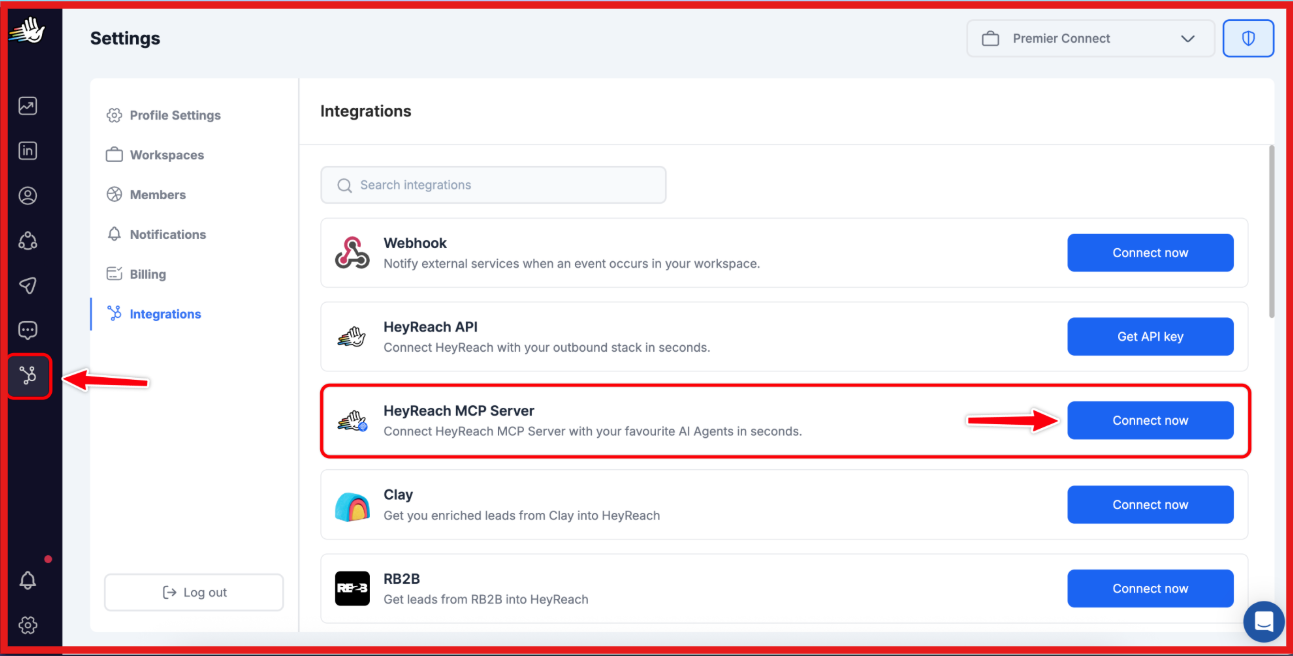
Inside your HeyReach workspace, go to: Integrations → HeyReach MCP Server
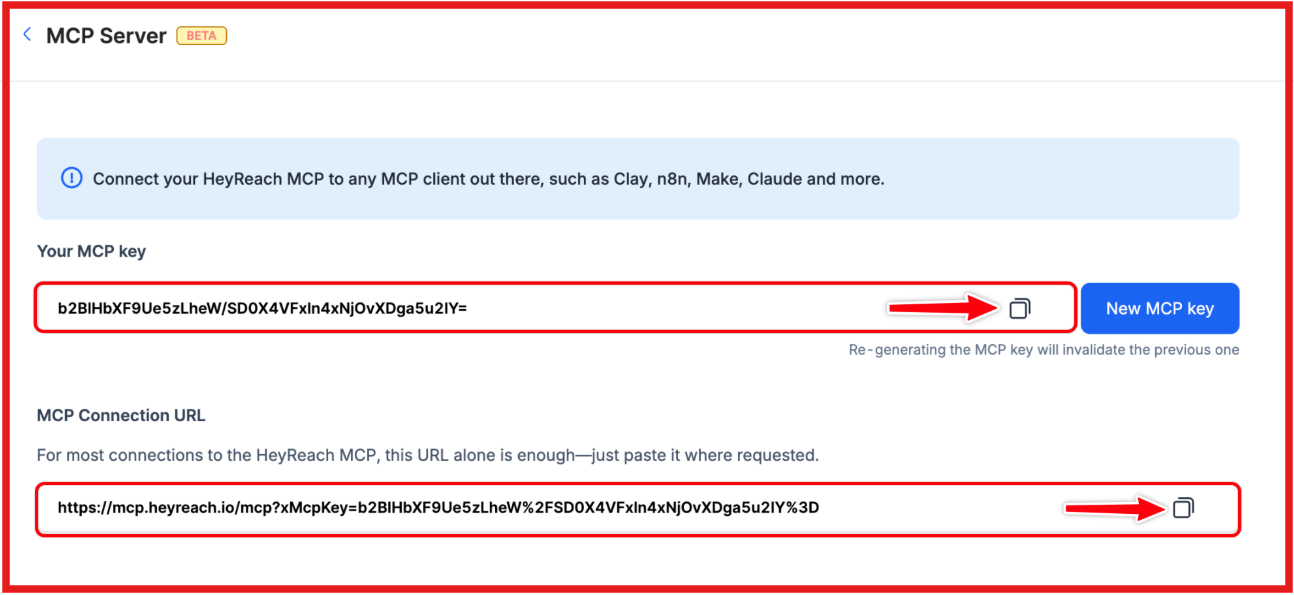
Click New MCP Key. HeyReach will generate:
These are unique to your workspace.
Copy the MCP connection URL generated by HeyReach. This is the URL you will use to connect AI tools with your HeyReach workspace.
Open the AI tool you want to connect, such as:
Paste the MCP connection URL into the MCP connector setup section.
Some tools, especially Claude, may also ask for your HeyReach API key during setup. For Claude Web specifically:
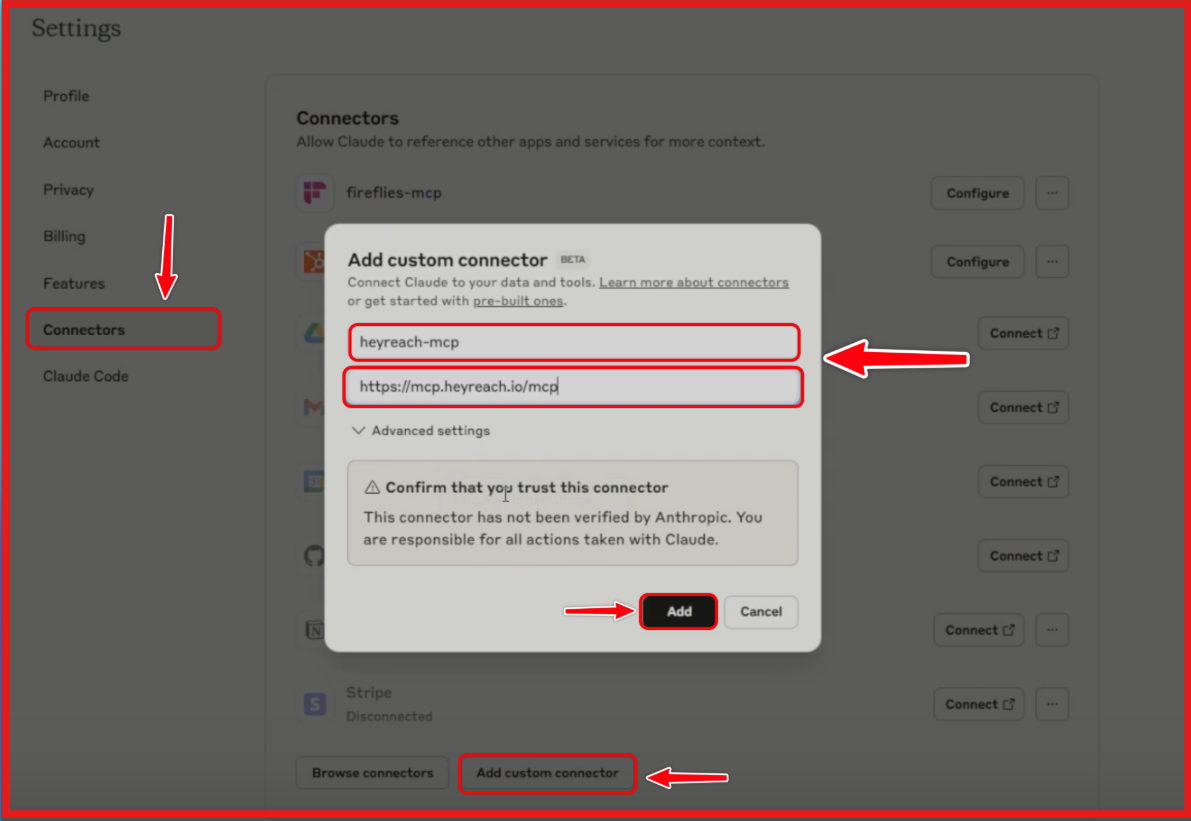
Once the connection is active, your AI tool can start interacting directly with your HeyReach workspace through prompts. At this point, HeyReach MCP is fully connected and ready to use inside tools like Claude, Clay, Cursor, n8n, or VS Code.
The main advantage is that you do not need to build separate API workflows manually because HeyReach already handles the MCP connection layer internally.
How to Automate LinkedIn Outreach with Claude Code and Salesforge MCP
HeyReach MCP lets AI handle parts of your LinkedIn outbound workflow inside HeyReach. Instead of opening HeyReach to clean lists, check replies, create messages, or move leads, you type a prompt. Your AI reads the data available through HeyReach MCP and performs the action inside your workspace.
Lead management becomes faster. You can ask Claude to scan a lead list, keep founders, CEOs, owners, or other senior roles, and filter out irrelevant profiles before they enter a campaign.
Personalization also becomes easier. You can ask AI to create custom LinkedIn icebreakers or draft full LinkedIn messages using details from the prospect’s role, company, profile, or recent activity.
Inbox management is another strong use case. HeyReach MCP can help classify replies, tag positive responses, and draft responses for leads who replied, while still keeping human review before anything is sent.
Campaign tasks can also be handled through prompts. You can push qualified leads into sequences, pull live campaign stats, audit campaign activity, and review reply sentiment through prompts instead of checking everything manually.
So, HeyReach MCP does not control your entire outbound stack. But inside HeyReach, it can reduce a lot of the manual work around list cleanup, personalization, campaign movement, and reply handling.
HeyReach MCP connects your HeyReach workspace with AI tools and automation platforms that support MCP (Model Context Protocol). Once connected, those tools can interact with your HeyReach campaigns, replies, lead lists, and workflow data through prompts.
HeyReach also states that MCP can work with other apps that support MCP, so integrations are not limited to only these platforms.
HeyReach MCP does not have separate pricing. HeyReach says MCP is included inside the platform and can be used immediately from your workspace. However, you still need a HeyReach plan to use the MCP server with your LinkedIn outreach workflows.
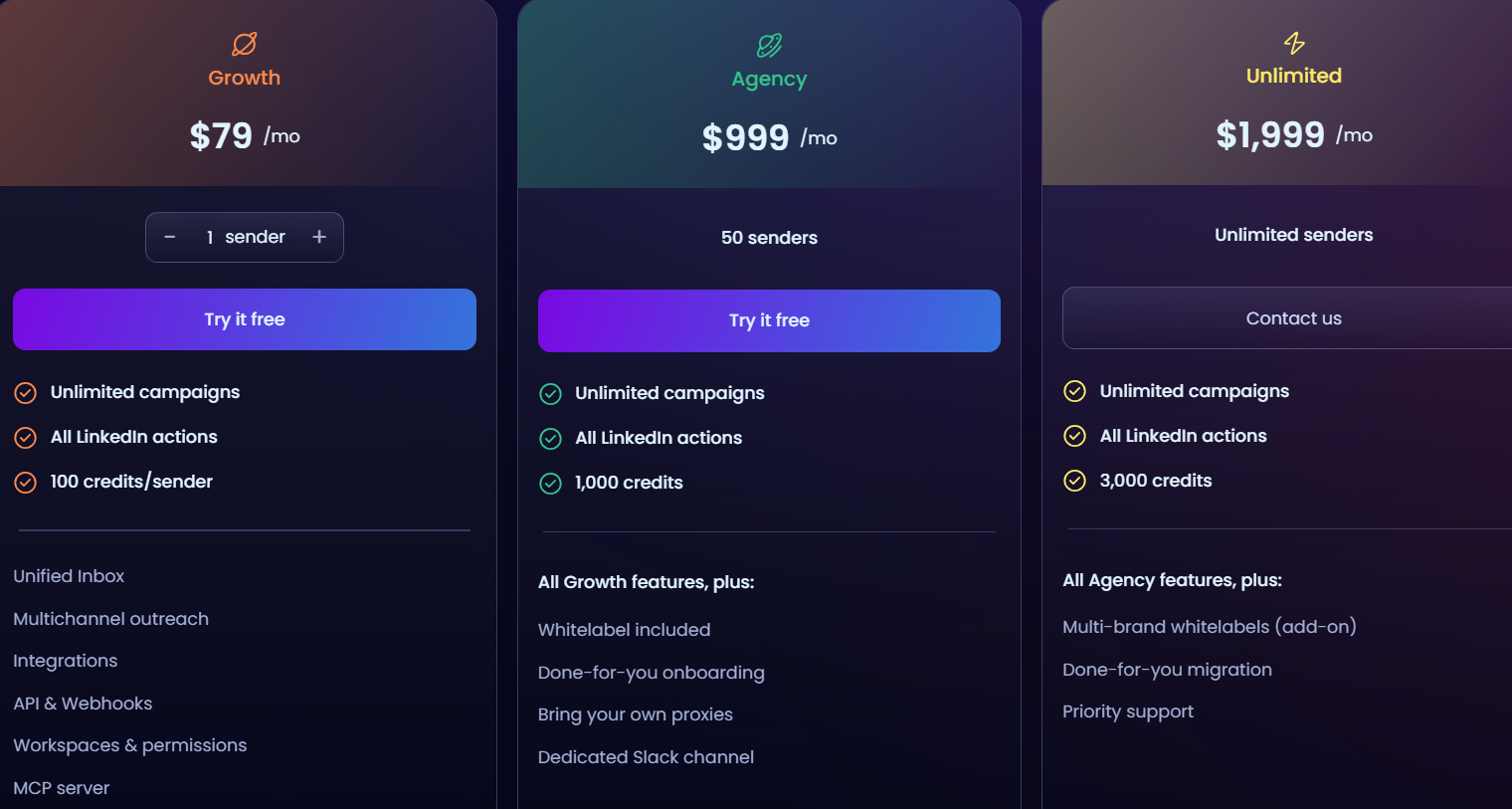
A few important things to know:
So, while HeyReach MCP itself is technically free, you still need a paid HeyReach subscription to actually use the MCP workflows inside your outreach setup.
HeyReach MCP is useful for LinkedIn workflow automation, but there are still a few limitations you should know before depending on it heavily.
HeyReach MCP makes the most sense if LinkedIn is already a major part of your outbound workflow and you want AI to reduce manual campaign work inside HeyReach. It is a good fit for:
The biggest value is operational speed. Instead of manually filtering leads, checking replies, creating icebreakers, or moving prospects into campaigns, AI can help handle those tasks through prompts. But it is important to understand what HeyReach MCP is actually built for. It improves LinkedIn outreach workflows inside HeyReach. It does not replace your full outbound stack. If your workflow also depends heavily on:
then you will still need additional tools outside HeyReach. So, if your main goal is improving AI-assisted LinkedIn outreach operations, HeyReach MCP is a strong option. But if you want AI connected across your entire outbound workflow, the setup may still feel fragmented.
HeyReach MCP is a good fit if your outbound workflow is mainly built around LinkedIn campaigns inside HeyReach. It can help AI manage LinkedIn tasks like reply tagging, lead filtering, personalization, and campaign movement. But most outbound teams do not run LinkedIn in isolation. They also need lead sourcing, enrichment, cold email, mailbox warmup, domain setup, deliverability checks, and campaign analytics working together. HeyReach MCP doesn’t cover these parts. That is where Forge MCP Server is a stronger alternative.
Forge MCP Server connects Claude, Cursor, Windsurf, and other MCP-compatible tools to the full Forge outbound stack through one MCP endpoint. Instead of using AI only for LinkedIn campaign tasks, you can use it across the full outbound process.
The Forge MCP Server includes:
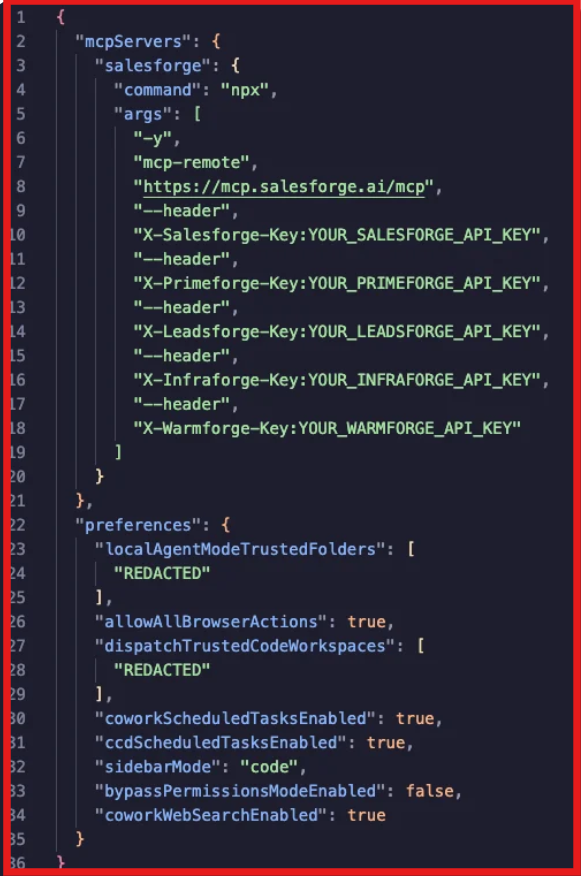
Alt text: Forge MCP server config connecting Salesforge, Leadsforge, and other outbound tools via one MCP endpoint
Here’s a quick comparison:
The difference is clear. HeyReach MCP helps AI work inside your LinkedIn outreach setup. Forge MCP Server helps AI work across the full outbound system, from finding leads to enriching them, building sequences, checking warmup, managing infrastructure, and tracking performance.
So if your workflow goes beyond LinkedIn outreach and includes email, leads, warmup, and infrastructure management, Forge MCP Server is the better alternative.
This demo shows how one MCP setup connects Leadsforge and other tools into a single outbound workflow:
HeyReach MCP is a solid option for teams focused mainly on LinkedIn outreach. It helps reduce manual work around campaigns, replies, personalization, and lead management inside HeyReach. The limitation is that outbound today usually goes beyond LinkedIn. Most teams also manage email outreach, lead enrichment, mailbox warmup, deliverability, and infrastructure across multiple tools. If you want AI connected only to LinkedIn campaign workflows, HeyReach MCP does the job well.
If you want one AI-connected workflow across leads, email, LinkedIn, warmup, and infrastructure, Forge MCP Server is the more complete option to look at.



.jpg)
