
Personalized Outbound Strategy
Get The Right Outbound Strategy In Minutes
Enter your email to get a custom plan & stack recommendation for your business
It's being carefully crafted by AI
Please check your mailbox in 5 minutes



For the most thorough understanding of what each option offers, a simplified comparison table isn't enough to grasp all intricacies that come with each tool, therefore, let's dive deeper into what makes both Waalaxy and Salesforge unique.
Both products pitch themselves to sales and marketing teams focused on cold outreach, with certain distinctions.
Waalaxy positions itself strongly as a simplest LinkedIn automation tool with a Chrome extension that automates invitations, messages, and profile visits, geared for quick LinkedIn prospecting and basic automation from a single dashboard.
Salesforge, built by a former Googler and VP of sales, pitches a broader “scale outreach” approach - unlimited senders, deeper email deliverability tooling, advanced AI personalization and a unified place to manage both LinkedIn conversations and email campaigns (via Primebox).
Alternatively, you can let Salesforge's results speak for themselves:

Salesforge provides 2 plans oriented around outreach scale, including team management and enterprise plans with custom pricing for high-volume sending and integration needs, as well as a 14-day free trial.
The plans are as follows (with 2 free months granted when using annual billing):
Waalaxy offers a free version with very limited features to get started with LinkedIn prospecting and provides paid plans and team/enterprise plans for more advanced features and higher send limits:
If your primary need is a simplified LinkedIn automation tool to send connection requests, visit LinkedIn profiles, and send LinkedIn messages via templates, Waalaxy’s Chrome extension and in-dashboard sequences make that extremely straightforward, though it's worth mentioning that there has been the occasional complaint when it comes to international outreach.

Salesforge supports LinkedIn outreach at scale as part of a unified outbound stack, focusing on the ability to add unlimited LinkedIn senders and tie LinkedIn activities into email sequences and replies management.
For teams that want a powerful LinkedIn automation tool integrated with extensive email and deliverability controls, Salesforge tilts toward enterprise-style scale and safety at pricing which even smaller teams can find manageable.
Managing multiple LinkedIn accounts or multiple clients requires safeguards, a workflow for inboxes, and team collaboration tools:
That makes Salesforge especially attractive for agencies and sales and marketing teams who want to scale outreach while keeping per-account overhead low.
Waalaxy advertises up to a monthly cap on invitations (“up to 800 invitations per month” on the pricing page) and provides many pre-built campaigns for sending connection requests and LinkedIn messages.
Salesforge emphasizes unlimited LinkedIn senders, which effectively increases safe sending capacity when used correctly across multiple LinkedIn accounts.
For teams needing to send many connection requests and run numerous outreach sequences in parallel, Salesforge’s model generally scales better while letting you distribute outreach to preserve account safety.
Account safety matters - both tools advertise protections:
When you plan aggressive outreach, distributing load across multiple LinkedIn accounts while preserving account safety is a best practice - and Salesforge’s unlimited sender model better supports that practice without forcing you to manually rotate accounts.
Waalaxy offers basic cold emailing features and an email finder to enrich prospects via higher tiered plans.
Salesforge treats email outreach as a first-class part of multi channel prospecting, with a heavy emphasis on email deliverability:
All of which are critical for successful cold emailing automation at scale.
If your outreach relies on cold email for pipeline generation, the extra infrastructure and deliverability controls in Salesforge are a major differentiator.
Enter your email to get a custom plan & stack recommendation for your business
Please check your mailbox in 5 minutes

Cold emailing automation only works if emails land:
Waalaxy includes cold emailing capabilities, but nothing to warm those emails up.
Salesforge places heavy emphasis on premium email deliverability by offering unlimited access to Warmforge which unlocks:
Features that directly reduce the risk of being marked as spam and protect your long-term sending reputation.
For serious cold emailing automation that needs repeatable results, delivery-first tooling is non-negotiable and Salesforge invests heavily here.
A bonus for Waalaxy is an integrated LinkedIn email finder that enriches leads automatically and pushes data to CRMs; it’s convenient when you want email addresses attached to LinkedIn contacts quickly.
Salesforge’s real advantage is that emails are fed into delivery-aware sequences and unified reply handling - not just stored in a list.
Additionally, another Forge stack tool, Leadsforge, offers lead generation capabilities with thorough enrichment options (firmographics, email, phone numbers, intent signals, company lookalikes, etc.) that can be seamlessly pushed into Salesforge.
Waalaxy advertises linkedin + email sequences on higher tiers + simple pre-made campaign templates that combine both channels.
Salesforge frames multi-channel prospecting as a core strength: LinkedIn outreach and email outreach (with phone outreach planned in the future) that are tightly linked to inbox aggregation and reply handling, enabling multi-channel campaigns that keep every reply visible.
When you run multi-channel campaigns, seeing LinkedIn conversations and email campaigns in the same pipeline reduces lost opportunities and improves sequencing decisions - a reason Salesforge’s unified view is especially useful for sales professionals and marketing teams coordinating follow ups.
Waalaxy offers an inbox to manage LinkedIn conversations, schedule reminders, save templates, and automate follow ups.
Salesforge’s Primebox (a unified inbox) consolidates replies across both email and LinkedIn, capturing responses even if a prospect replies from an unexpected address. The unified inbox + AI analysis is designed to keep conversations actionable and ensure contact requests or replies don’t get lost.
For teams juggling many LinkedIn contacts and email accounts, Primebox-style inbox consolidation reduces manual reconciliation and speeds up reply management.
Waalaxy ships with many pre-made sequences, templates and an easy selection process for outreach sequences - simple and quick, but not always effective.
Salesforge offers advanced campaign management where you can run hyper-personalized campaigns at scale and combine email campaigns with LinkedIn sequences while tracking deliverability and replies.
Salesforge’s campaign tooling and reporting are designed to simplify complexity and provide the highest possible reply rates. The ability to run many sequences in parallel while preserving inbox health is also a practical advantage for agencies and sales teams.
Waalaxy supports basic analytics for teams, and a dashboard for agencies to share leads and metrics.
Salesforge targets sales and marketing teams with collaboration and also API access, but its emphasis is on convenience and giving teams a single place to manage replies, apply team analytics, and keep unlimited mailboxes and LinkedIn contacts synchronized.
Both platforms integrate with major CRMs:
Waalaxy points out automatic syncs with HubSpot, Pipedrive and the rest through Zapier/Make, so leads and LinkedIn contacts flow into your sales CRM.
Salesforge offers robust integrations + API access and, importantly, ties CRM data into deliverability-aware outreach:
And many more. If your business relies on existing CRM workflows and needs reliable CRM integrations that respect reply handling and sync contact requests back to your pipeline, Salesforge’s integration model and API access are built to keep outreach sequences and CRM lead management consistent.
Waalaxy’s chrome extension is a core part of its value prop: quick import from LinkedIn Search or Sales Navigator and click-to-import prospects.
That makes basic LinkedIn search and prospect import very accessible to users with minimal technical skills, although severely limits Waalaxy's features and is prone to bugs:

Salesforge’s approach is more integrated: it supports imports and workflows but places emphasis on central management, deliverability, and automations that go beyond browser extensions.
For teams who prefer a basic chrome extension to import prospects while prospecting in Sales Navigator, Waalaxy has the edge in simplicity; for teams that need centralized automation, Salesforge’s integrated UI scales better.
Waalaxy instructs users to import prospects from LinkedIn Search or Sales Navigator and provides tools to build boolean LinkedIn search queries.
Salesforge expects prospect lists as part of a broader pipeline and can accept leads from multiple sources - but its strength is in syncing those lists to deliverability, warm up, and inbox tracking.
If you commonly use Sales Navigator and advanced search filters to build lists, Waalaxy’s import path is very convenient; if you’re building complex outbound programs and need advanced campaign management tied to company data and reply tracking, Salesforge’s stack gives you the systems to operationalize those lists.
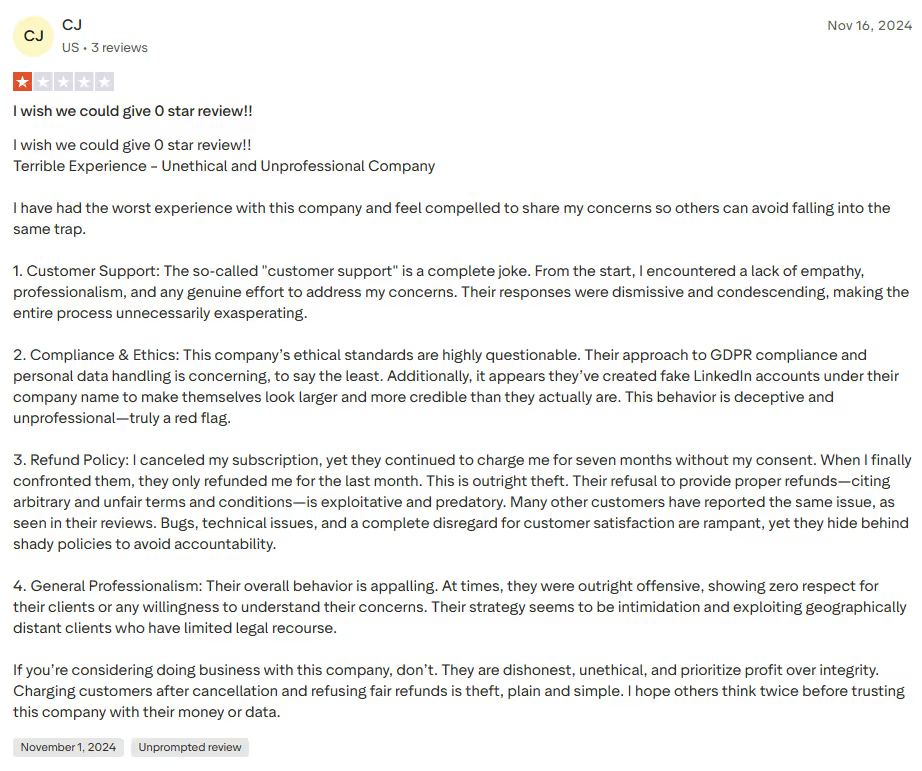
Waalaxy’s biggest promise is accessibility: “No technical skills required,” a simple chrome extension and pre-made campaigns. Now while the tool itself might be simple, a user could still run into problems. Unfortunately, some people have reported issues with support:

Salesforge tends to be more configuration-focused and feature-rich - you get more options for mailboxes, deliverability, and multi-account scale, which may require slightly more technical setup but rewards that effort with greater sending capacity and pipeline hygiene.
Truly efficient sales teams prioritize high quality lead generation, follow ups, inbox hygiene, and measurable outcomes.
Waalaxy helps fast-moving sellers get LinkedIn connections, manage LinkedIn conversations, and run lightweight email campaigns with an easy interface.
Salesforge targets the same sales professionals but layers in features that agencies and larger teams need:
For larger teams running many clients and many campaigns, Salesforge reduces friction around mailbox setup, warm up, and reply management - practical things that directly affect conversion rates and CAC at pricing that even smaller teams can afford.
If your immediate goal is to start prospecting on LinkedIn right now with minimal setup and low care regarding the quality of results - Waalaxy is a great, lightweight option within a user friendly interface.
However, if your roadmap includes high-volume cold emailing automation, many LinkedIn accounts, unified inbox management across LinkedIn and email, rigorous deliverability and long-term inbox placement, Salesforge is the far stronger choice for teams that must scale safely, effectively and keep outreach sequences sustainable.
No matter what your team size is, teams who measure success in pipeline and need reliable follow ups will appreciate Salesforge’s emphasis on deliverability, personalization and scalable senders.
Ultimately, the perfect tool is different for every business, but with Salesforge's 14-day free trial, why not give it a shot?
Salesforge supports LinkedIn automation as part of multichannel sequences: you can run basic LinkedIn automation, schedule connection requests, manage LinkedIn tasks, and surface replies in a unified LinkedIn inbox alongside email replies. The platform targets scale (unlimited LinkedIn senders) so teams can safely distribute LinkedIn activities across accounts.
Yes - Salesforge is built for Email and LinkedIn automation as a single sales engagement tool. It ties automated outreach across multiple channels (LinkedIn + email), so sequences, follow ups, and replies are coordinated for better lead generation and campaign outcomes.
Deliverability is a core key feature: Salesforge includes Warmforge (unlimited email warm-up), inbox rotation and deliverability monitoring to avoid spam folders and preserve sender reputation - critical when running cold emailing automation at scale.
Salesforge offers team analytics, API access, and broad CRM integrations (Zapier, webhooks, direct connectors) so reports, users report data and pipeline events flow from outreach into your sales CRM. That makes it easier for sales and marketing teams to measure lead generation and campaign performance.
Launching automated outreach is straightforward: create sequences, import prospects, and run multiple campaigns across channels. Built-in campaign metrics, A/B testing, and unified inbox reporting help you optimize and produce users report–style summaries for lead generation and revenue-focused analytics.