
Personalized Outbound Strategy
Get The Right Outbound Strategy In Minutes
Enter your email to get a custom plan & stack recommendation for your business
It's being carefully crafted by AI
Please check your mailbox in 5 minutes
I manage outbound for three clients. Monday morning, I open Instantly and spend the first hour doing the same thing I did last Monday.
“Clicking through campaigns, checking reply rates, exporting data, and figuring out which sending accounts are underperforming.”
By the time you have answers, half the morning is gone.
This is the exact problem the Instantly MCP Server is supposed to solve.
It connects AI assistants like Claude directly to your Instantly account, so instead of clicking through dashboards, you ask a question in plain English and get a live answer back.
What caught my attention is how far this actually goes.
You're not just pulling stats, you're telling your AI to update lead variables across 200 contacts, scan every active campaign for out-of-office replies, and get a full ranked breakdown.
All without opening the Instantly dashboard once.
If you're about to spend time and money on Instantly MCP Server, this review will help save you from hours of setup time, failed client campaigns, and a decision you'll regret three weeks in.
Instantly MCP Server is a connector between your AI assistant and your Instantly account.
It uses the Model Context Protocol, an open standard Anthropic introduced in 2024. MCP lets AI assistants talk directly to external tools.
Before MCP, you had to export data manually. You'd copy campaign stats, paste them into ChatGPT, and work with numbers that were already outdated.
With Instantly MCP Server, your AI reads live data straight from your Instantly account. No exports. No copy-pasting.
You type a question in plain English. The AI calls the right Instantly API, pulls the data, and responds.
For example: "Which of my campaigns has the lowest reply rate this week?" The AI checks all your campaigns in real time and returns a ranked answer.
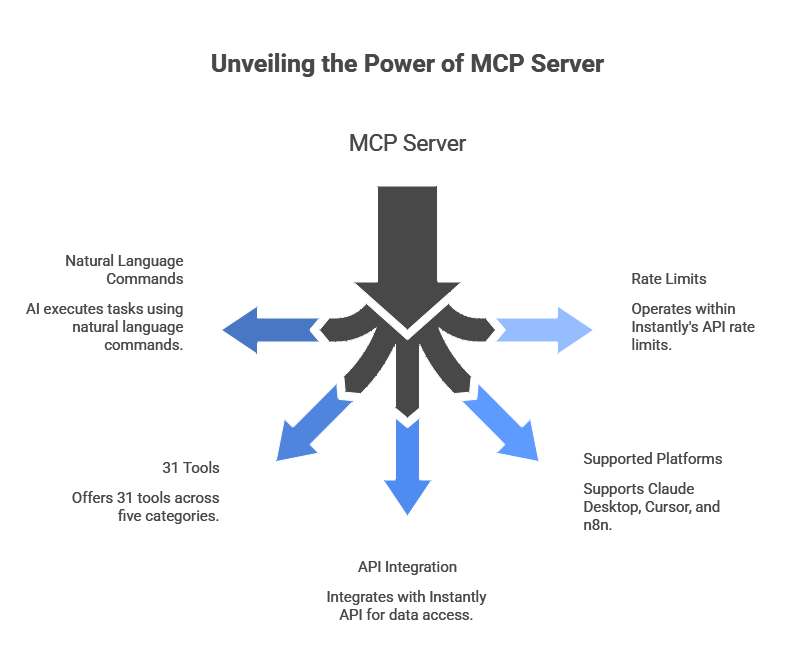
Instantly MCP Server connects your AI assistant directly to your Instantly account through the Model Context Protocol.
Instead of you logging in, clicking through menus, and pulling data manually, your AI does it through natural language commands.
You type: "Show me which campaigns have open rates below 2%." The AI reads your live data and returns the answer in seconds.
Under the hood, the server exposes 31 tools across five categories — campaigns, leads, email, analytics, and account management. Each tool maps to a specific action inside your Instantly account.
When you send a command, your AI picks the right tool, calls the Instantly API, and executes the action.
It supports Claude Desktop, Cursor, and n8n. Set up connections through a remote MCP server URL tied to your API key.
One thing to note: the server operates within Instantly's API rate limits. Run too many commands at once, and you hit a 429 error.
The short answer: you can control your entire Instantly account through your AI assistant.
Instead of logging into dashboards, you type a command. Your AI reads live data and executes the action.
Here's what that looks like in practice.
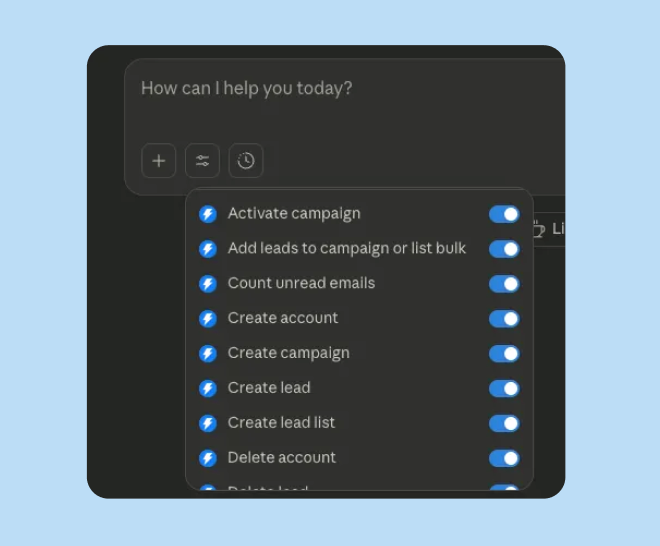
Campaign management becomes simple. Create, launch, pause, or archive campaigns with a single prompt.
Lead management works similarly. Add contacts, move them between sequences, update status, and manage blocklists.
Analytics work the same way. Ask your AI which campaign has the best reply rate this week. It pulls live data and returns the answer in seconds.
You can also manage your sending accounts directly. Check account health, enable warmup, adjust sending limits, and rotate inboxes — without clicking through multiple settings pages.
The MCP server exposes 31 tools across five categories: campaigns, leads, cold email, analytics, and account management.
Every action you'd normally take inside Instantly, you can now trigger through a natural language prompt.
Signal-Based Outbound: How to Find and Act on Buying Signals Before Your Competitors
There are two ways to set up Instantly MCP Server: through a remote URL or by editing a config file directly. Both work. The remote URL method is faster.
Log in to your Instantly account. Go to Settings → Integrations → API Keys. Click Create API Key.
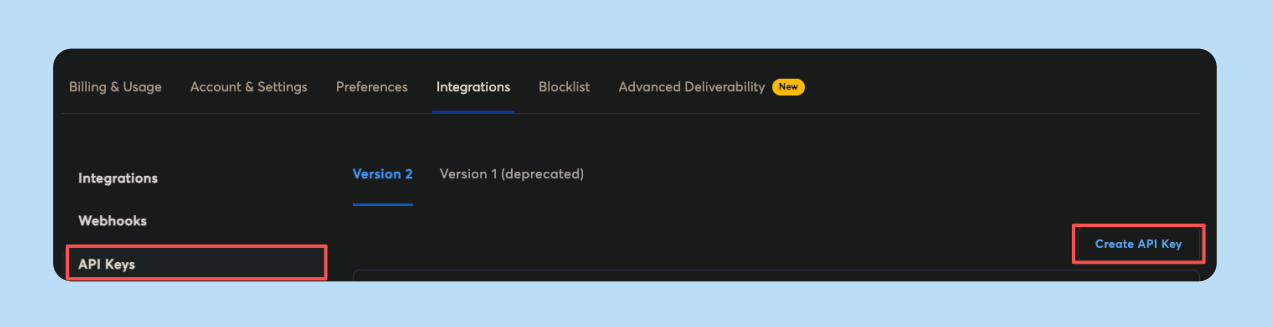
Copy it and store it somewhere safe — this key gives full access to your campaigns, leads, and sending accounts.
Instantly MCP Server works with Claude Desktop, Cursor, and n8n. Here's how to connect each one.
Go to Settings → Connectors → Add Custom Connector. Enter the name and paste this URL:
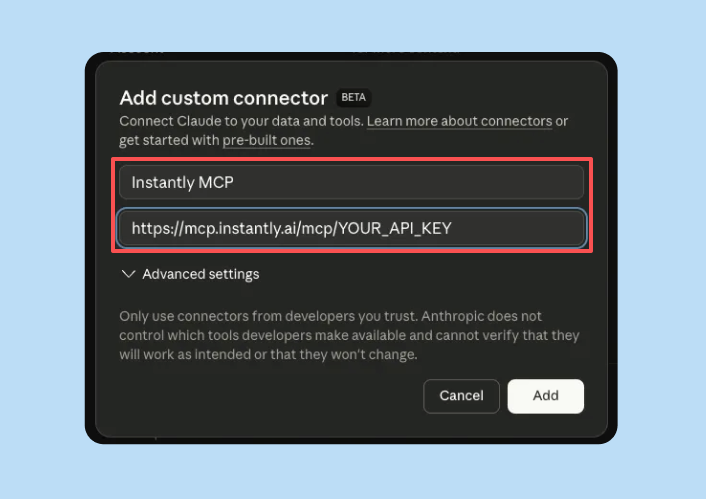
https://mcp.instantly.ai/mcp/YOUR_API_KEY
Click Add. No restart needed.
Go to Settings → Developer → Edit Config. Add this:
{
  "mcpServers": {
    "instantly": {
      "url": "https://mcp.instantly.ai/mcp",
      "headers": {
        "Authorization": "PASTE_YOUR_API_KEY_HERE"
      }
    }
  }
}
Save and restart Claude Desktop.
Open Settings → search MCP → Edit settings.json. Add the same config block above. Save and restart.
Add the MCP Client node to your workflow. Select Streamable HTTP as the transport. Enter:
https://mcp.instantly.ai/mcp/YOUR_API_KEY
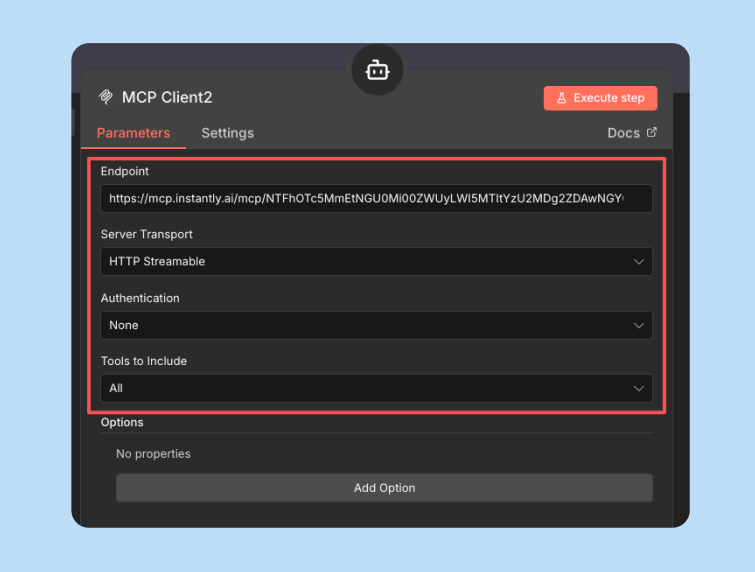
Connect it to your AI agent node.
Ask your AI: "What campaigns do I have in Instantly?"
If your campaign list comes back, you're connected.
Claude Code for Sales: 4 Outbound Workflows That Replace Hours of Manual Work
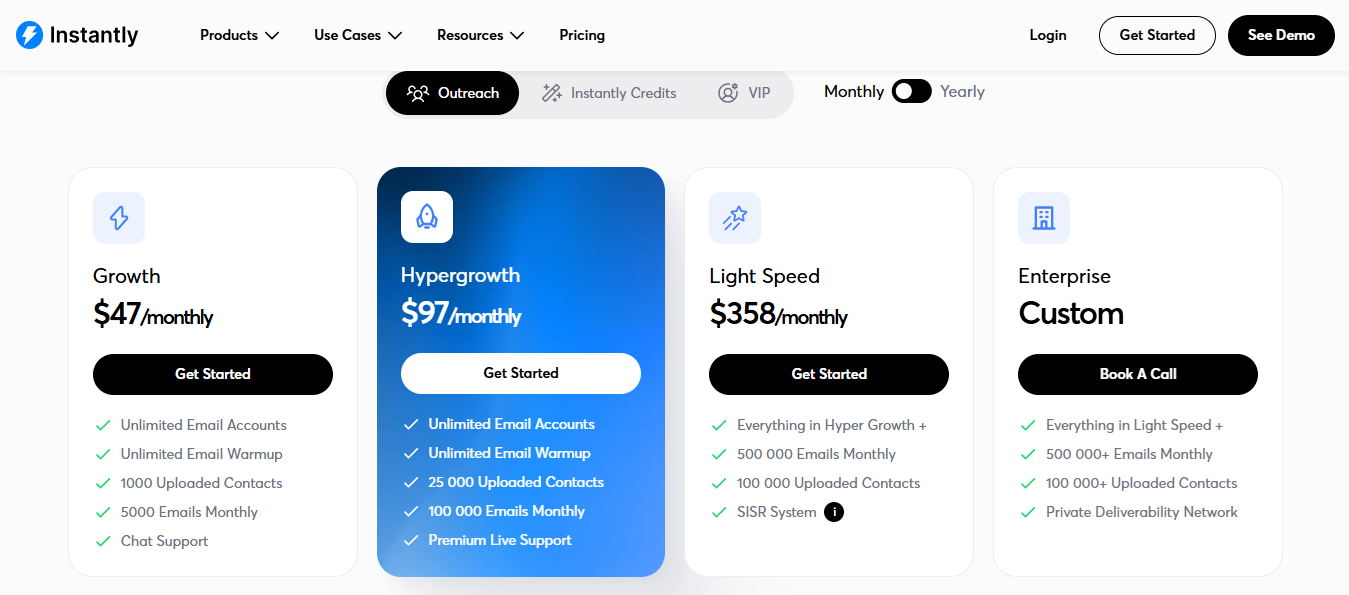
The Instantly MCP Server is not a separate paid product. It comes included with your Instantly subscription.
You need to be on the Growth plan or above to get API access. Without API access, the MCP server does not work.
Yearly pricing:
Monthly pricing:
For most SDRs or small agencies, the Growth plan gets you in the door. But at 5,000 emails per month, you will hit the ceiling fast.
If you run campaigns for multiple clients, Hypergrowth is the realistic starting point. The jump from $37.6 to $77.6 is significant for a one-person operation.
One thing worth knowing — API rate limits are shared across all keys in your workspace. The more you automate through MCP, the faster you burn through that quota.
It depends on how you currently run outbound.
If you manage multiple client workspaces in Instantly, the MCP server saves real-time. Instead of clicking through each campaign, you ask Claude one question and get answers across all workspaces.
If you run a single campaign for one client, the setup effort does not justify the output.
You need Python 3.10+, comfort with command-line configuration, and an Instantly Growth plan or above. If your team has no one technical, the setup will be a blocker.
The MCP server works best for operators who already use Claude Desktop daily. If you are switching AI tools just for this, the workflow rarely sticks.
It also does not replace judgment. The AI reads data and executes commands. But deciding what to test, how to position your offer, and why a campaign is underperforming — that stays with you.
If you send high volume across many clients and want to cut reporting and hygiene time, Instantly MCP Server gives you that. If you want it to run your outbound strategy, it will not.
How I Use Claude Code to Automate My Entire Cold Email Operation
The core problem with Instantly MCP Server is that it adds an AI layer on top of a platform that still requires you to manage the infrastructure, the warmup, the leads, and the sequences separately.
You're connecting pieces yourself. And when something breaks, you're debugging it yourself, too.
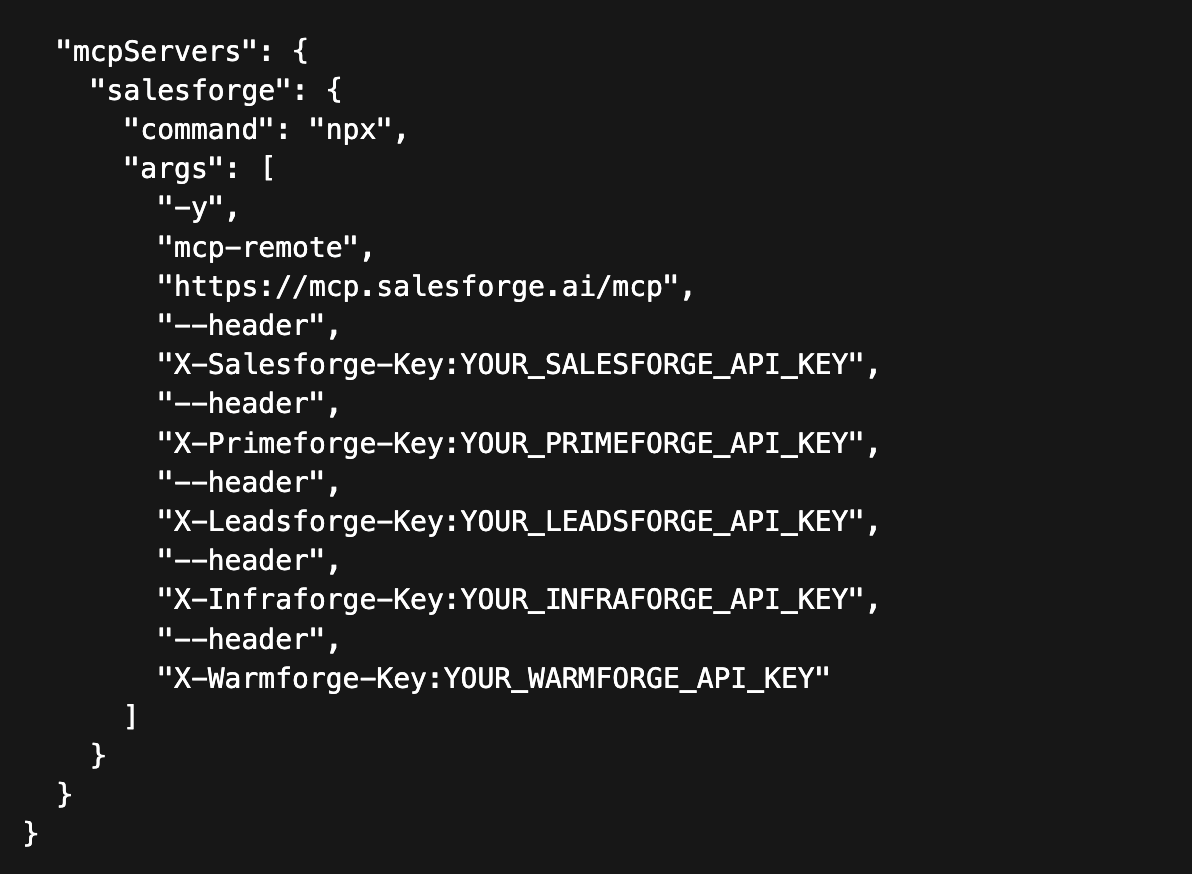
Salesforge MCP Server is built differently. Everything lives in one place: multi-channel outreach, inbox management, lead sourcing, warmup, and deliverability monitoring.
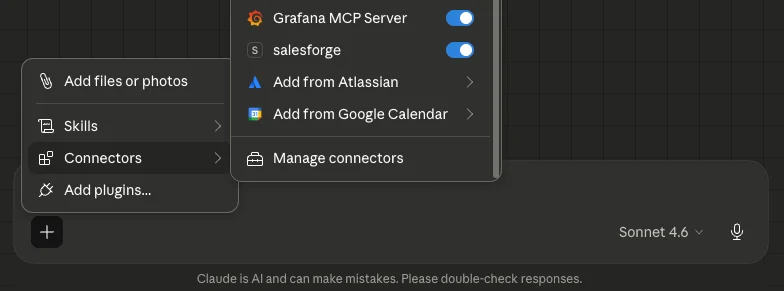
You're not stitching tools together; you're running outbound from a single platform that was built for it.
The difference shows up in practice:
Instantly is email-only. Salesforge runs email and LinkedIn sequences together from the same campaign.
If your outbound motion touches both channels, and most effective ones do, instantly, the MCP Server won't change that limitation, no matter how well it's configured.
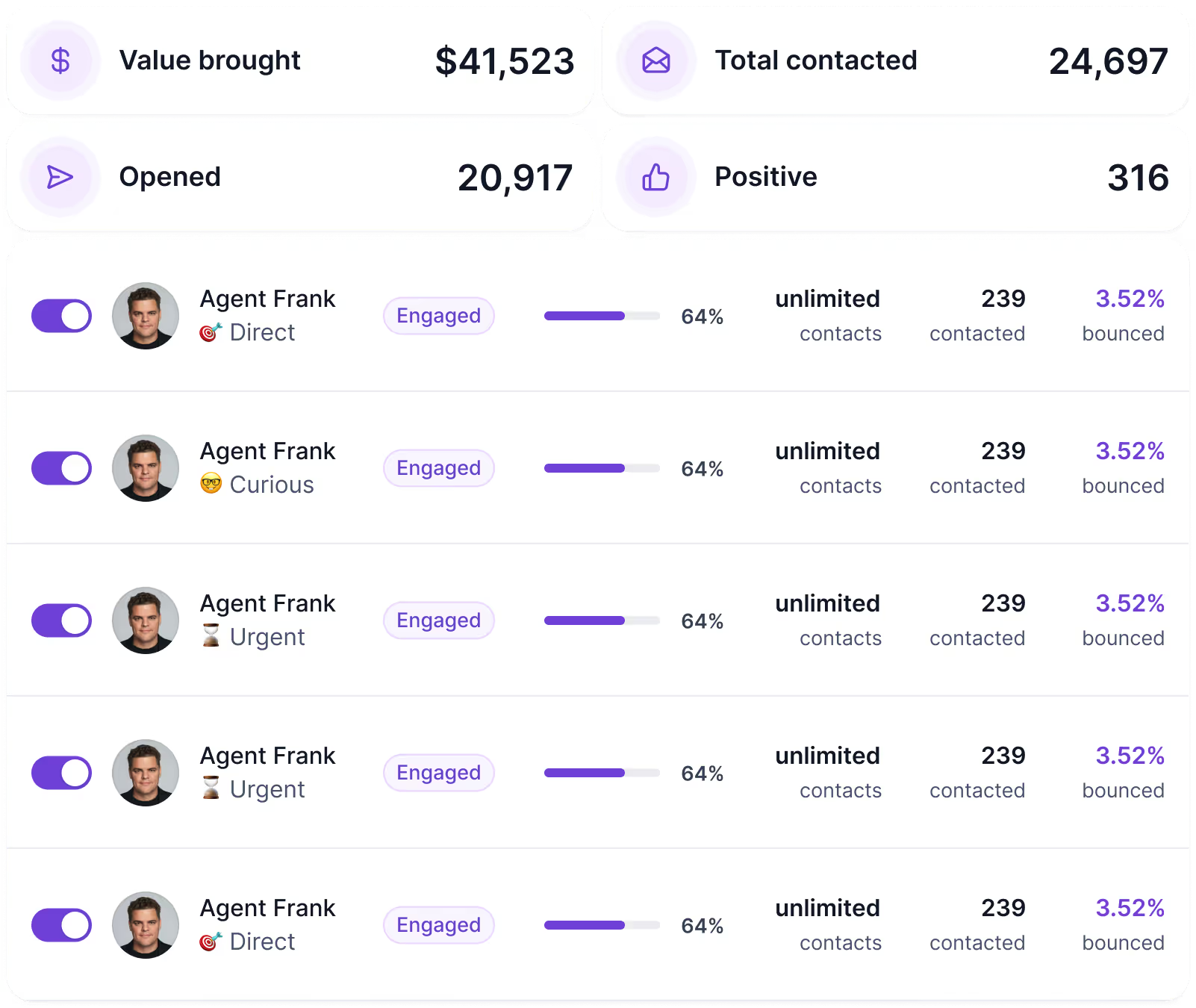
Instead of prompting an AI to pull stats and make changes through an API connection, Agent Frank works alongside your side as an autonomous AI SDR inside Salesforge.
He prospects, writes, sends, follows up, and books meetings on Auto-Pilot or Co-Pilot mode, depending on how much control you want.
No GitHub repo to clone, no Python version to check, and no JSON config file to edit.
One of the biggest operational headaches at agency scale is managing replies across dozens of inboxes. Primebox pulls every reply email and LinkedIn into a single unified inbox.
You're not jumping between accounts or missing responses because a sending account wasn't checked.
Salesforge connects natively with Warmforge for mailbox warmup, Mailforge or Infraforge for email infrastructure, and Leadsforge for lead sourcing.
If you're running Instantly MCP Server, you're still managing all of that separately. With Salesforge, the stack is connected by design.
Instantly MCP Server makes sense if you're already on Instantly and want to add an AI layer.
But if you're building or rebuilding your outbound stack, starting with Salesforge requires zero technical overhead to maintain a community-built MCP connector on top of a platform that wasn't designed for this kind of integration.
If your goal is to run more outbound with less manual work without debugging API connections or managing five separate tools, Salesforge is worth a serious look.
Enter your email to get a custom plan & stack recommendation for your business
Please check your mailbox in 5 minutes

Instantly MCP Server genuinely cuts out the manual clicking, the CSV exports, and the copy-pasting into spreadsheets that eat your Monday mornings.
But here is what you are actually signing up for:
For a solo operator running one or two accounts, that trade-off might work.
But if you run multi-channel sequences, agencies scaling across dozens of clients, and founders who need leads and outreach in one place, the gaps add up fast.
Salesforge gives you email and LinkedIn outreach, Agent Frank handles autonomous prospecting around the clock, and Primebox manages all replies in one inbox. No Python. No config files.
Try Salesforge MCP and see what your outbound stack looks like when it actually works together.



.jpg)